- HomeElectronicsAccessories & SuppliesAudio & Video AccessoriesCables & InterconnectsVideo CablesHDMI Cables
Description
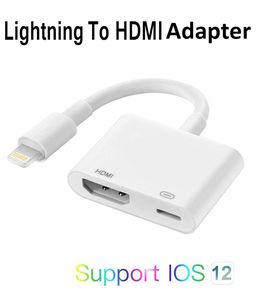
ASKJ US HDMI connector cable Support 1080P for HDTV Projector Monitor compatible with iOS 8.0-12.4 and Later
1. Small Screen into Big Screen
Allows your iPhone/iPads' audio/Video transfer to display/projector/TV with HDMI port. Show videos or pictures from your device, present slideshows or browse the web on a larger screen.
2. Full 1080P HD Output
It delivers full 1080P HD Output. Providing ultra-clear overspeed visual experience in daily life and work. Please note that your original video must be 1080P HD or you will not be able to achieve 1080P HD video quality.
3.Widely Compatibility
Compatible with iPhone XR / XS / XS Max / X / 8 / 8Plus / 7 / 7 Plus / 6S / 6S Plus / 6 / 6Plus / 5S / 5C / 5SE / 5 / iPod / iPad Mini 2 4 / iPad Air 2 and more.
4. Widely Support: The HDMI Dongle compatible with YouTube, IDMB, Quickflix, Family On TV, ABC, NBC, FOX, Microsoft Office and more. ★ But NOT Compatible with Netflix, Amazon video, HBO go, HULU, SKY Q and Honda motor. Paid Video Apps May Not be Supported. Because these Paid Video Apps are encrypted and not authorized for third-party software sharing.
5. How to Connect correctly
Step ①.Plug the HDMI cable (Sold separately) connect to the HDMI adapter and TV/Projector/Monitor HDMI port.
Step ②. Use your original iPhone charging cable (Sold separately) and charge adapter ( 5V/1A for iPhone, 5V/2A for iPad) to supply power for the HDMI adapter.
Step ③. Switch the TV/projector's output to corresponding HDMI mode.
Step ④.wait 8-10s the phones' screen will pop out a tips "Trust or Not Trust", just click"Trust" Button then wait it to connect automatically.
❤Noted: The HDMI adapter must be connected to power source! if not , it won't work.
1. Small Screen into Big Screen
Allows your iPhone/iPads' audio/Video transfer to display/projector/TV with HDMI port. Show videos or pictures from your device, present slideshows or browse the web on a larger screen.
2. Full 1080P HD Output
It delivers full 1080P HD Output. Providing ultra-clear overspeed visual experience in daily life and work. Please note that your original video must be 1080P HD or you will not be able to achieve 1080P HD video quality.
3.Widely Compatibility
Compatible with iPhone XR / XS / XS Max / X / 8 / 8Plus / 7 / 7 Plus / 6S / 6S Plus / 6 / 6Plus / 5S / 5C / 5SE / 5 / iPod / iPad Mini 2 4 / iPad Air 2 and more.
4. Widely Support: The HDMI Dongle compatible with YouTube, IDMB, Quickflix, Family On TV, ABC, NBC, FOX, Microsoft Office and more. ★ But NOT Compatible with Netflix, Amazon video, HBO go, HULU, SKY Q and Honda motor. Paid Video Apps May Not be Supported. Because these Paid Video Apps are encrypted and not authorized for third-party software sharing.
5. How to Connect correctly
Step ①.Plug the HDMI cable (Sold separately) connect to the HDMI adapter and TV/Projector/Monitor HDMI port.
Step ②. Use your original iPhone charging cable (Sold separately) and charge adapter ( 5V/1A for iPhone, 5V/2A for iPad) to supply power for the HDMI adapter.
Step ③. Switch the TV/projector's output to corresponding HDMI mode.
Step ④.wait 8-10s the phones' screen will pop out a tips "Trust or Not Trust", just click"Trust" Button then wait it to connect automatically.
❤Noted: The HDMI adapter must be connected to power source! if not , it won't work.
1080P HD Digital AV Adapter Compatible with iPhone iPad to HDMI Adapter Cable, HDMI Converter Compatible with iPhone Xs MAX XR X 8 7 6 Plus iPad to HDTV Projector Support 8.0-12.4 and Later (White)
Price is below average
Current Price
$12.99
Average
$14.19
Min Price
$11.99
Max Price
$19.99
Price dynamics
8%
Description
ASKJ US HDMI connector cable Support 1080P for HDTV Projector Monitor compatible with iOS 8.0-12.4 and Later
1. Small Screen into Big Screen
Allows your iPhone/iPads' audio/Video transfer to display/projector/TV with HDMI port. Show videos or pictures from your device, present slideshows or browse the web on a larger screen.
2. Full 1080P HD Output
It delivers full 1080P HD Output. Providing ultra-clear overspeed visual experience in daily life and work. Please note that your original video must be 1080P HD or you will not be able to achieve 1080P HD video quality.
3.Widely Compatibility
Compatible with iPhone XR / XS / XS Max / X / 8 / 8Plus / 7 / 7 Plus / 6S / 6S Plus / 6 / 6Plus / 5S / 5C / 5SE / 5 / iPod / iPad Mini 2 4 / iPad Air 2 and more.
4. Widely Support: The HDMI Dongle compatible with YouTube, IDMB, Quickflix, Family On TV, ABC, NBC, FOX, Microsoft Office and more. ★ But NOT Compatible with Netflix, Amazon video, HBO go, HULU, SKY Q and Honda motor. Paid Video Apps May Not be Supported. Because these Paid Video Apps are encrypted and not authorized for third-party software sharing.
5. How to Connect correctly
Step ①.Plug the HDMI cable (Sold separately) connect to the HDMI adapter and TV/Projector/Monitor HDMI port.
Step ②. Use your original iPhone charging cable (Sold separately) and charge adapter ( 5V/1A for iPhone, 5V/2A for iPad) to supply power for the HDMI adapter.
Step ③. Switch the TV/projector's output to corresponding HDMI mode.
Step ④.wait 8-10s the phones' screen will pop out a tips "Trust or Not Trust", just click"Trust" Button then wait it to connect automatically.
❤Noted: The HDMI adapter must be connected to power source! if not , it won't work.
1. Small Screen into Big Screen
Allows your iPhone/iPads' audio/Video transfer to display/projector/TV with HDMI port. Show videos or pictures from your device, present slideshows or browse the web on a larger screen.
2. Full 1080P HD Output
It delivers full 1080P HD Output. Providing ultra-clear overspeed visual experience in daily life and work. Please note that your original video must be 1080P HD or you will not be able to achieve 1080P HD video quality.
3.Widely Compatibility
Compatible with iPhone XR / XS / XS Max / X / 8 / 8Plus / 7 / 7 Plus / 6S / 6S Plus / 6 / 6Plus / 5S / 5C / 5SE / 5 / iPod / iPad Mini 2 4 / iPad Air 2 and more.
4. Widely Support: The HDMI Dongle compatible with YouTube, IDMB, Quickflix, Family On TV, ABC, NBC, FOX, Microsoft Office and more. ★ But NOT Compatible with Netflix, Amazon video, HBO go, HULU, SKY Q and Honda motor. Paid Video Apps May Not be Supported. Because these Paid Video Apps are encrypted and not authorized for third-party software sharing.
5. How to Connect correctly
Step ①.Plug the HDMI cable (Sold separately) connect to the HDMI adapter and TV/Projector/Monitor HDMI port.
Step ②. Use your original iPhone charging cable (Sold separately) and charge adapter ( 5V/1A for iPhone, 5V/2A for iPad) to supply power for the HDMI adapter.
Step ③. Switch the TV/projector's output to corresponding HDMI mode.
Step ④.wait 8-10s the phones' screen will pop out a tips "Trust or Not Trust", just click"Trust" Button then wait it to connect automatically.
❤Noted: The HDMI adapter must be connected to power source! if not , it won't work.
Price will be lower
in next 2 weeks
in next 2 weeks
According to the data, price will be lower in next two weeks, so not waste your money and track better price!
Product review & video
so you can see that in real time that's our camera hey everyone Digital David here today in this video I'm gonna be unboxing and reviewing the Apple lightning 2 digital AV Adapter I did purchase this product myself and any opinion expressed in this video is strictly my own that being said if you're interested in this product the link to it will be in my video description below so please go ahead and check it out there you can see the nice Apple retail box and packaging right here very simple product guys it's just an HDMI dongle so it plugs into the Lightning port on your phone and it provides you with an HDMI port and a Lightning port so you can connect this to your TV monitor or projector now let's go ahead let's open it up and look at the package contents here oh the package contents first up we have your compliance information and your warranty info then we have the dongle itself gu



Similar products






































