Description
Please note: this camera can not record voice and sound. The camera complys with US laws and regulations. It is only a video camera that doeFeature:
Loop Recording Mode
When the mode set to "L", It will working continuously, automatically overwrites oldest files when the memory fills up by saving a video files per 3 minutes. You only can view the newest memory
Motion Detection Mode
When the mode set to "M", you will never waste precious memory card space recording nothing.This hidden camera does not start recording until it detects motion (Highly Recommend)
How to change Recording Mode??
1.Open the front the cover.
2.Switch the button to the recording mode you like.("L" or "M")
3.Plug it into outlet and the device will recording in new Mode you set.
How to adjust the date and time
1. Turn on the camera firstly(Just plug it into outlet), and then the recorder will set up a TXT files in your Micro SD card automatically. Then turn off.
2.Connect the camera with your computer (or read the SD card), then it will go into U-disc mode. You will find a txt file which name is "time.txt".
3.Open the TXT file, change the time as you like (Year/Month/Date/Hour/Minute/Second)
For example:
Original Time :2017-01-01 23:59:59
Change to :2018-08-08 17:30:00
Related parameters:
Video format:AVI
Video Code: M-JPEG
Video Resolution:1920*1080
Frame Frequency: 30FPS
Motion Detection: support
Import Voltage: DC-5V
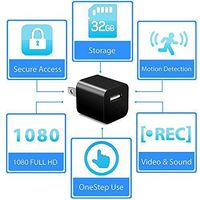
Storage support:Max up to 32GB
Support System: Windows, Mac Os, me/2000/XP/2003/Vista
Playing Software:System or other the mainstream video playing software
More detail please check in Instruction Book, or contact us by amazon message
Please note: This camera do not record voice. Does not have audio function.
Package Includes:
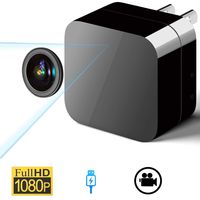
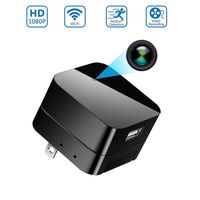
1 x Hidden Camera Charger
1 x USB cable
1 x SD card reader
1 x Instruction Manual
Loop Recording Mode
When the mode set to "L", It will working continuously, automatically overwrites oldest files when the memory fills up by saving a video files per 3 minutes. You only can view the newest memory
Motion Detection Mode
When the mode set to "M", you will never waste precious memory card space recording nothing.This hidden camera does not start recording until it detects motion (Highly Recommend)
How to change Recording Mode??
1.Open the front the cover.
2.Switch the button to the recording mode you like.("L" or "M")
3.Plug it into outlet and the device will recording in new Mode you set.
How to adjust the date and time
1. Turn on the camera firstly(Just plug it into outlet), and then the recorder will set up a TXT files in your Micro SD card automatically. Then turn off.
2.Connect the camera with your computer (or read the SD card), then it will go into U-disc mode. You will find a txt file which name is "time.txt".
3.Open the TXT file, change the time as you like (Year/Month/Date/Hour/Minute/Second)
For example:
Original Time :2017-01-01 23:59:59
Change to :2018-08-08 17:30:00
Related parameters:
Video format:AVI
Video Code: M-JPEG
Video Resolution:1920*1080
Frame Frequency: 30FPS
Motion Detection: support
Import Voltage: DC-5V
Storage support:Max up to 32GB
Support System: Windows, Mac Os, me/2000/XP/2003/Vista
Playing Software:System or other the mainstream video playing software
More detail please check in Instruction Book, or contact us by amazon message
Please note: This camera do not record voice. Does not have audio function.
Package Includes:
1 x Hidden Camera Charger
1 x USB cable
1 x SD card reader
1 x Instruction Manual
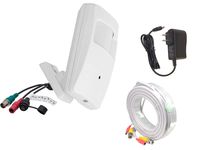
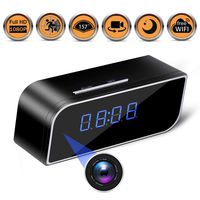
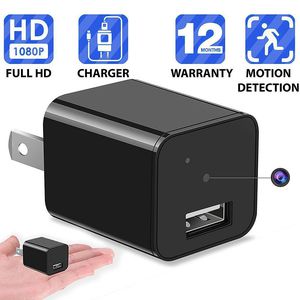
1080P Motion Detection USB Wall Charger Camera Plug Spy Cam Adapter Camera Loop Recording Nanny Cam Support to 32GB Storage
Current Price
$18.99
Average
$18.68
Min Price
$11.48
Max Price
$39.99
Price dynamics
2%
Description
Please note: this camera can not record voice and sound. The camera complys with US laws and regulations. It is only a video camera that doeFeature:
Loop Recording Mode
When the mode set to "L", It will working continuously, automatically overwrites oldest files when the memory fills up by saving a video files per 3 minutes. You only can view the newest memory
Motion Detection Mode
When the mode set to "M", you will never waste precious memory card space recording nothing.This hidden camera does not start recording until it detects motion (Highly Recommend)
How to change Recording Mode??
1.Open the front the cover.
2.Switch the button to the recording mode you like.("L" or "M")
3.Plug it into outlet and the device will recording in new Mode you set.
How to adjust the date and time
1. Turn on the camera firstly(Just plug it into outlet), and then the recorder will set up a TXT files in your Micro SD card automatically. Then turn off.
2.Connect the camera with your computer (or read the SD card), then it will go into U-disc mode. You will find a txt file which name is "time.txt".
3.Open the TXT file, change the time as you like (Year/Month/Date/Hour/Minute/Second)
For example:
Original Time :2017-01-01 23:59:59
Change to :2018-08-08 17:30:00
Related parameters:
Video format:AVI
Video Code: M-JPEG
Video Resolution:1920*1080
Frame Frequency: 30FPS
Motion Detection: support
Import Voltage: DC-5V
Storage support:Max up to 32GB
Support System: Windows, Mac Os, me/2000/XP/2003/Vista
Playing Software:System or other the mainstream video playing software
More detail please check in Instruction Book, or contact us by amazon message
Please note: This camera do not record voice. Does not have audio function.
Package Includes:
1 x Hidden Camera Charger
1 x USB cable
1 x SD card reader
1 x Instruction Manual
Loop Recording Mode
When the mode set to "L", It will working continuously, automatically overwrites oldest files when the memory fills up by saving a video files per 3 minutes. You only can view the newest memory
Motion Detection Mode
When the mode set to "M", you will never waste precious memory card space recording nothing.This hidden camera does not start recording until it detects motion (Highly Recommend)
How to change Recording Mode??
1.Open the front the cover.
2.Switch the button to the recording mode you like.("L" or "M")
3.Plug it into outlet and the device will recording in new Mode you set.
How to adjust the date and time
1. Turn on the camera firstly(Just plug it into outlet), and then the recorder will set up a TXT files in your Micro SD card automatically. Then turn off.
2.Connect the camera with your computer (or read the SD card), then it will go into U-disc mode. You will find a txt file which name is "time.txt".
3.Open the TXT file, change the time as you like (Year/Month/Date/Hour/Minute/Second)
For example:
Original Time :2017-01-01 23:59:59
Change to :2018-08-08 17:30:00
Related parameters:
Video format:AVI
Video Code: M-JPEG
Video Resolution:1920*1080
Frame Frequency: 30FPS
Motion Detection: support
Import Voltage: DC-5V
Storage support:Max up to 32GB
Support System: Windows, Mac Os, me/2000/XP/2003/Vista
Playing Software:System or other the mainstream video playing software
More detail please check in Instruction Book, or contact us by amazon message
Please note: This camera do not record voice. Does not have audio function.
Package Includes:
1 x Hidden Camera Charger
1 x USB cable
1 x SD card reader
1 x Instruction Manual
Price will be lower
in next 2 weeks
in next 2 weeks
According to the data, price will be lower in next two weeks, so not waste your money and track better price!
Similar products