Description
Specifications:
Condition: 100% Brand New
Material: Plastic
Color: Blue, White (Optional)
Battery powered: 2 * AAA battery (Battery not included)
Weight: Approx. 166g / 5.9oz
Size: approx. 20.5*2.7*14cm / 8.1*1.1*5.5in
Package list:
1 * Medicine Box (Battery not included)
1 * Instruction Manual
Product instructions:
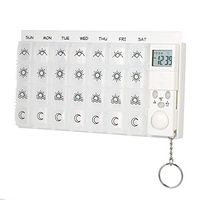
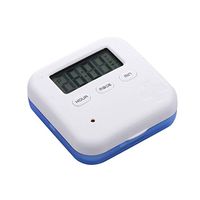
1. Open (shutdown), load 2 7-cell batteries, long press SET button for 3 seconds to open, long press three button to turn off the power, i recognize 12-hour system, press HR+MIN/LT button simultaneously in the clock state, Switchable 12/24 hour system.
2. Set the time for the kit
In the modeless state, press the SET button five times, the clock symbol flashes, the HR button is set to the hour, press the MlN button to set the minute, and finally the SET button is pressed to confirm.
3. Set up four groups of alarms
In the modeless state, press the SET button once, the ''1'' word on the alarm group will flash, press HR to set the minute, and finally press the SET button to confirm. The alarm group number shows a small point, that is, the setting is successful.
4. Set up four groups of ringing bells
Similarly, in the modeless state, 2 times, 3 times, 4 times SET6 button, the second, third, and fourth group alarms can be set separately.
5. Cancel the alarm
Press the SET button to select the alarm to be cancelled. The corresponding number (1, 2, 3, 4) on the display will flash, then press the HR button and the MIN button simultaneously until the alarm time shows 00:00 and the number of alarms. The small dot disappears, that is, the cancellation is successful.
Note:
1.Please allow 0-1 inch error due to manual measurement. Thanks for your understanding.
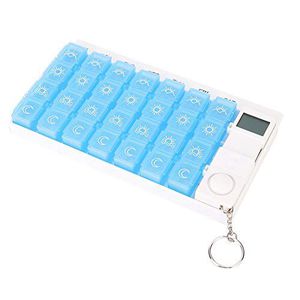
Condition: 100% Brand New
Material: Plastic
Color: Blue, White (Optional)
Battery powered: 2 * AAA battery (Battery not included)
Weight: Approx. 166g / 5.9oz
Size: approx. 20.5*2.7*14cm / 8.1*1.1*5.5in
Package list:
1 * Medicine Box (Battery not included)
1 * Instruction Manual
Product instructions:
1. Open (shutdown), load 2 7-cell batteries, long press SET button for 3 seconds to open, long press three button to turn off the power, i recognize 12-hour system, press HR+MIN/LT button simultaneously in the clock state, Switchable 12/24 hour system.
2. Set the time for the kit
In the modeless state, press the SET button five times, the clock symbol flashes, the HR button is set to the hour, press the MlN button to set the minute, and finally the SET button is pressed to confirm.
3. Set up four groups of alarms
In the modeless state, press the SET button once, the ''1'' word on the alarm group will flash, press HR to set the minute, and finally press the SET button to confirm. The alarm group number shows a small point, that is, the setting is successful.
4. Set up four groups of ringing bells
Similarly, in the modeless state, 2 times, 3 times, 4 times SET6 button, the second, third, and fourth group alarms can be set separately.
5. Cancel the alarm
Press the SET button to select the alarm to be cancelled. The corresponding number (1, 2, 3, 4) on the display will flash, then press the HR button and the MIN button simultaneously until the alarm time shows 00:00 and the number of alarms. The small dot disappears, that is, the cancellation is successful.
Note:
1.Please allow 0-1 inch error due to manual measurement. Thanks for your understanding.
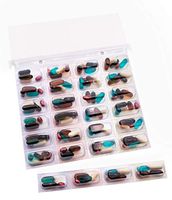
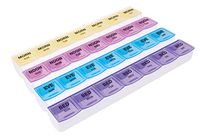
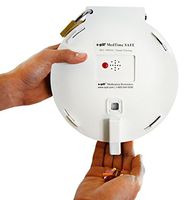
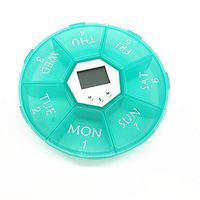
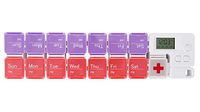
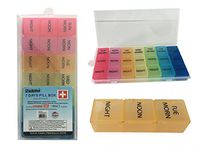
28-Segment Portable Travel Medicine Storage Box, Pill Box Reminder, Electronic Timing Kit, Storage for Vitamins, Supplements and Drugs(Blue)
Current Price
$13.29
Average
$9.29
Min Price
$6.19
Max Price
$13.29
Price dynamics
30%
Description
Specifications:
Condition: 100% Brand New
Material: Plastic
Color: Blue, White (Optional)
Battery powered: 2 * AAA battery (Battery not included)
Weight: Approx. 166g / 5.9oz
Size: approx. 20.5*2.7*14cm / 8.1*1.1*5.5in
Package list:
1 * Medicine Box (Battery not included)
1 * Instruction Manual
Product instructions:
1. Open (shutdown), load 2 7-cell batteries, long press SET button for 3 seconds to open, long press three button to turn off the power, i recognize 12-hour system, press HR+MIN/LT button simultaneously in the clock state, Switchable 12/24 hour system.
2. Set the time for the kit
In the modeless state, press the SET button five times, the clock symbol flashes, the HR button is set to the hour, press the MlN button to set the minute, and finally the SET button is pressed to confirm.
3. Set up four groups of alarms
In the modeless state, press the SET button once, the ''1'' word on the alarm group will flash, press HR to set the minute, and finally press the SET button to confirm. The alarm group number shows a small point, that is, the setting is successful.
4. Set up four groups of ringing bells
Similarly, in the modeless state, 2 times, 3 times, 4 times SET6 button, the second, third, and fourth group alarms can be set separately.
5. Cancel the alarm
Press the SET button to select the alarm to be cancelled. The corresponding number (1, 2, 3, 4) on the display will flash, then press the HR button and the MIN button simultaneously until the alarm time shows 00:00 and the number of alarms. The small dot disappears, that is, the cancellation is successful.
Note:
1.Please allow 0-1 inch error due to manual measurement. Thanks for your understanding.
Condition: 100% Brand New
Material: Plastic
Color: Blue, White (Optional)
Battery powered: 2 * AAA battery (Battery not included)
Weight: Approx. 166g / 5.9oz
Size: approx. 20.5*2.7*14cm / 8.1*1.1*5.5in
Package list:
1 * Medicine Box (Battery not included)
1 * Instruction Manual
Product instructions:
1. Open (shutdown), load 2 7-cell batteries, long press SET button for 3 seconds to open, long press three button to turn off the power, i recognize 12-hour system, press HR+MIN/LT button simultaneously in the clock state, Switchable 12/24 hour system.
2. Set the time for the kit
In the modeless state, press the SET button five times, the clock symbol flashes, the HR button is set to the hour, press the MlN button to set the minute, and finally the SET button is pressed to confirm.
3. Set up four groups of alarms
In the modeless state, press the SET button once, the ''1'' word on the alarm group will flash, press HR to set the minute, and finally press the SET button to confirm. The alarm group number shows a small point, that is, the setting is successful.
4. Set up four groups of ringing bells
Similarly, in the modeless state, 2 times, 3 times, 4 times SET6 button, the second, third, and fourth group alarms can be set separately.
5. Cancel the alarm
Press the SET button to select the alarm to be cancelled. The corresponding number (1, 2, 3, 4) on the display will flash, then press the HR button and the MIN button simultaneously until the alarm time shows 00:00 and the number of alarms. The small dot disappears, that is, the cancellation is successful.
Note:
1.Please allow 0-1 inch error due to manual measurement. Thanks for your understanding.

Price will be lower
in next 2 weeks
in next 2 weeks
According to the data, price will be lower in next two weeks, so not waste your money and track better price!
Similar products