- HomeElectronicsAccessories & SuppliesAudio & Video AccessoriesCables & InterconnectsVideo CablesHDMI Cables
Description
Warm Tips :
1.please turn on the USB debugging function in the setting if you use Android phones !
2.Plug and play for iphones and ipads ! It can share your videos and photos with your family and friends on the big screen, it works with all the HDMI equipped TV, display, projector or other compatible displays. Support HDMI 1080P full HD output, let you enjoy pictures, videos, online movies, games, web browsing, online shopping, document etc on big screen.
Q: How to connect for IOS/Android system? A:Plug and Play
1.Connect HDMI end to TV/Projector/Monitor's HDMI port, and connect lighting/micro USB/type C port to your phone;
2.Connect an external 5V/1A(ipad: 5V/2A) adapter with USB end to power up this cable, note that power bank is not enough to make it works;
3.For IOS: connect the phone and click "Trust" can be used directly; For android: please turn on USB debugging firstly;
4.Click the "SOURCE" key on your remote control, then choose "HDMI" signal source;
5.Waiting for 5 to10 seconds, phone can be mirrored to TV/projector/monitor.
Compatible with: iPhone support models: iPhoneX, iPhone8/8P, iPhone7/7P, iPhone6s/6P, iPhone SE, iPhone5S, iPhone5C.
.. Huawei support models: Mate10/pro, P20/Pro, P10/9/8...
Samsung supports models: S8, S8+, S9, S9+, Note8.......
Warm Tips: 1.This hdmi cable isn't designed for charging purposes. It is mainly charge for the devices to make it work.
2.Due to copyright protection measures, you may not use multi-screen mirroring with some paid contents including Netflix, HULU, Prime videos, DIRECTV and other paid videos, please refer to the terms and conditions of those apps.
Specification: 1.Support all formats of audio, video and picture
2.Resolution: 480p, 720p, 1080p
3.HDMI Cable: 2m/6.6ft
4.USB Power Supply Cable: 0.8m/2.6ft
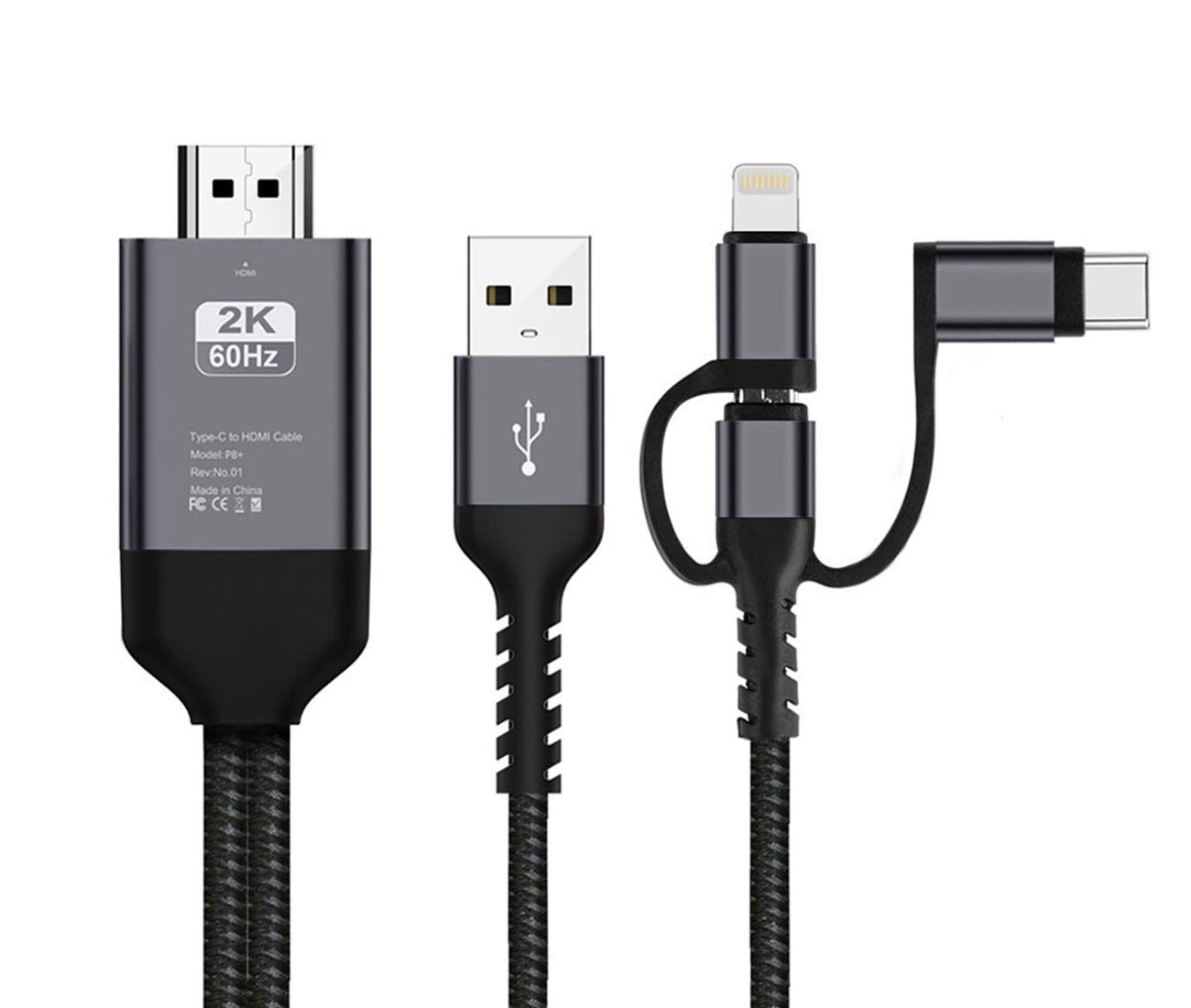
Package Contents: 1 X 3 in 1 Lighting/Micro USB/Type-C to HDMI Cable
1 X User Manual
1.please turn on the USB debugging function in the setting if you use Android phones !
2.Plug and play for iphones and ipads ! It can share your videos and photos with your family and friends on the big screen, it works with all the HDMI equipped TV, display, projector or other compatible displays. Support HDMI 1080P full HD output, let you enjoy pictures, videos, online movies, games, web browsing, online shopping, document etc on big screen.
Q: How to connect for IOS/Android system? A:Plug and Play
1.Connect HDMI end to TV/Projector/Monitor's HDMI port, and connect lighting/micro USB/type C port to your phone;
2.Connect an external 5V/1A(ipad: 5V/2A) adapter with USB end to power up this cable, note that power bank is not enough to make it works;
3.For IOS: connect the phone and click "Trust" can be used directly; For android: please turn on USB debugging firstly;
4.Click the "SOURCE" key on your remote control, then choose "HDMI" signal source;
5.Waiting for 5 to10 seconds, phone can be mirrored to TV/projector/monitor.
Compatible with: iPhone support models: iPhoneX, iPhone8/8P, iPhone7/7P, iPhone6s/6P, iPhone SE, iPhone5S, iPhone5C.
.. Huawei support models: Mate10/pro, P20/Pro, P10/9/8...
Samsung supports models: S8, S8+, S9, S9+, Note8.......
Warm Tips: 1.This hdmi cable isn't designed for charging purposes. It is mainly charge for the devices to make it work.
2.Due to copyright protection measures, you may not use multi-screen mirroring with some paid contents including Netflix, HULU, Prime videos, DIRECTV and other paid videos, please refer to the terms and conditions of those apps.
Specification: 1.Support all formats of audio, video and picture
2.Resolution: 480p, 720p, 1080p
3.HDMI Cable: 2m/6.6ft
4.USB Power Supply Cable: 0.8m/2.6ft
Package Contents: 1 X 3 in 1 Lighting/Micro USB/Type-C to HDMI Cable
1 X User Manual
3 in 1 HDMI Adapter Cable, Lighting/Type-C/Micro USB to HDMI Cable Digital Audio Mirror Mobile Phone Screen to TV Projector Monitor 1080P HDTV Adapter for iOS and Android Devices 2.0m/6.5FT (Gray)
Current Price
$20.99
Average
$20.99
Min Price
$19.99
Max Price
$22.99
Price dynamics
0%
Description
Warm Tips :
1.please turn on the USB debugging function in the setting if you use Android phones !
2.Plug and play for iphones and ipads ! It can share your videos and photos with your family and friends on the big screen, it works with all the HDMI equipped TV, display, projector or other compatible displays. Support HDMI 1080P full HD output, let you enjoy pictures, videos, online movies, games, web browsing, online shopping, document etc on big screen.
Q: How to connect for IOS/Android system? A:Plug and Play
1.Connect HDMI end to TV/Projector/Monitor's HDMI port, and connect lighting/micro USB/type C port to your phone;
2.Connect an external 5V/1A(ipad: 5V/2A) adapter with USB end to power up this cable, note that power bank is not enough to make it works;
3.For IOS: connect the phone and click "Trust" can be used directly; For android: please turn on USB debugging firstly;
4.Click the "SOURCE" key on your remote control, then choose "HDMI" signal source;
5.Waiting for 5 to10 seconds, phone can be mirrored to TV/projector/monitor.
Compatible with: iPhone support models: iPhoneX, iPhone8/8P, iPhone7/7P, iPhone6s/6P, iPhone SE, iPhone5S, iPhone5C.
.. Huawei support models: Mate10/pro, P20/Pro, P10/9/8...
Samsung supports models: S8, S8+, S9, S9+, Note8.......
Warm Tips: 1.This hdmi cable isn't designed for charging purposes. It is mainly charge for the devices to make it work.
2.Due to copyright protection measures, you may not use multi-screen mirroring with some paid contents including Netflix, HULU, Prime videos, DIRECTV and other paid videos, please refer to the terms and conditions of those apps.
Specification: 1.Support all formats of audio, video and picture
2.Resolution: 480p, 720p, 1080p
3.HDMI Cable: 2m/6.6ft
4.USB Power Supply Cable: 0.8m/2.6ft
Package Contents: 1 X 3 in 1 Lighting/Micro USB/Type-C to HDMI Cable
1 X User Manual
1.please turn on the USB debugging function in the setting if you use Android phones !
2.Plug and play for iphones and ipads ! It can share your videos and photos with your family and friends on the big screen, it works with all the HDMI equipped TV, display, projector or other compatible displays. Support HDMI 1080P full HD output, let you enjoy pictures, videos, online movies, games, web browsing, online shopping, document etc on big screen.
Q: How to connect for IOS/Android system? A:Plug and Play
1.Connect HDMI end to TV/Projector/Monitor's HDMI port, and connect lighting/micro USB/type C port to your phone;
2.Connect an external 5V/1A(ipad: 5V/2A) adapter with USB end to power up this cable, note that power bank is not enough to make it works;
3.For IOS: connect the phone and click "Trust" can be used directly; For android: please turn on USB debugging firstly;
4.Click the "SOURCE" key on your remote control, then choose "HDMI" signal source;
5.Waiting for 5 to10 seconds, phone can be mirrored to TV/projector/monitor.
Compatible with: iPhone support models: iPhoneX, iPhone8/8P, iPhone7/7P, iPhone6s/6P, iPhone SE, iPhone5S, iPhone5C.
.. Huawei support models: Mate10/pro, P20/Pro, P10/9/8...
Samsung supports models: S8, S8+, S9, S9+, Note8.......
Warm Tips: 1.This hdmi cable isn't designed for charging purposes. It is mainly charge for the devices to make it work.
2.Due to copyright protection measures, you may not use multi-screen mirroring with some paid contents including Netflix, HULU, Prime videos, DIRECTV and other paid videos, please refer to the terms and conditions of those apps.
Specification: 1.Support all formats of audio, video and picture
2.Resolution: 480p, 720p, 1080p
3.HDMI Cable: 2m/6.6ft
4.USB Power Supply Cable: 0.8m/2.6ft
Package Contents: 1 X 3 in 1 Lighting/Micro USB/Type-C to HDMI Cable
1 X User Manual
Price will be lower
in next 2 weeks
in next 2 weeks
According to the data, price will be lower in next two weeks, so not waste your money and track better price!
Product review & video
hey what's going on guys this eta prime back here again today we're going to be taking a look at this adapter that claims it can add hdmi to any android device now i'm really interested in this because that's one of the main things that i look for when i'm buying a high-end phone with these cheaper phones that we're going to be testing out in this video here the samsung a01 the moto g fast the poco m3 and the all do cube i play 40 tablet do not have hdmi from the factory but if you pick up a higher end phone from let's say lg oneplus or even samsung chances are it will have hdmi capabilities over usb type-c but all of the devices we're going to be testing out in this video don't support hdmi and that's where this adapter comes in they claim that this can add hdmi to any android device as long as it's running android 4.4 or higher now i've done a little bit of research on these devices a



Similar products