Description
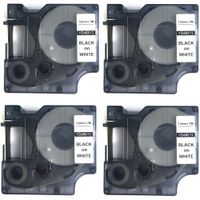
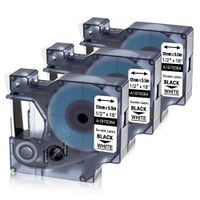
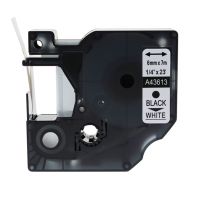
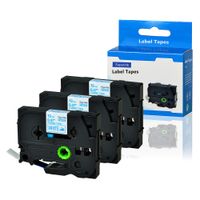
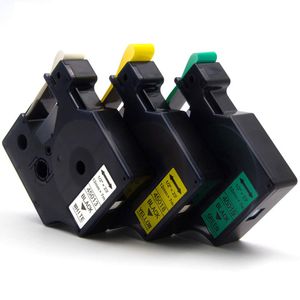
Repalcement DYMO D1 label tape 12mm ( 1/2 Inch x 23 Feet, 12mm x 7m )
Type & Color :
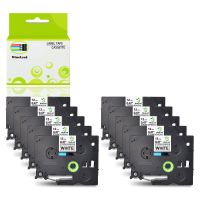
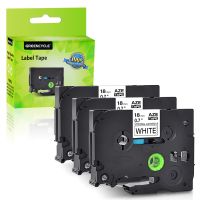
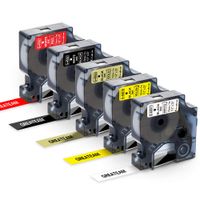
1-Pack equivalent DYMO D1 label tape 45013 (S0720530), Black Print on White
1-Pack equivalent DYMO D1 label tape 45018 (S0720580), Black Print on Yellow
1-Pack equivalent DYMO D1 label tape 45019 (S0720590), Black Print on Green
Compatible with the following DYMO label makers:
【1】 DYMO LabelManager 160, DYMO LabelManager 280, DYMO LabelManager 210D
【2】 DYMO LabelManager 360D DYMO LabelManager 200, DYMO LabelManager 120P
【3】 DYMO LabelManager 100, DYMO LabelManager 300, DYMO LabelManager 350, DYMO LabelManager 350D
【4】 DYMO LabelManager 150, DYMO LabelManager 400, DYMO LabelManager 420P, DYMO LabelManager 450
【5】 DYMO LabelManager 450D, DYMO LabelManager 500TS Touchscreen, DYMO LabelManager 260P
【6】 DYMO LabelManager PnP, DYMO LabelManager Wireless PnP (DYMO LabelManager WirelessPlug N Play)
【7】 DYMO LabelManager PnP, DYMO MobileLabeler COLORPOP Label Maker
【8】 DYMO LabelManager PC, DYMO LabelManagerPC II, DYMO LabelManager 220P
【9】DYMO 3MPL100, DYMO 3M PL150, DYMO 3M PL200, DYMO 3M PL300
【10】 DYMO LabelPoint 100, DYMO LabelPoint 150, DYMO LabelPoint 200, DYMO LabelPoint 250, DYMO LabelPoint 300
Tips for using the label tape:
1.Turn the gear in the direction (counterclockwise) to tighten the ribbon to avoid breakage or jamming .
2.Please extend part of the label through the outlet of the label .
3.DO NOT pull the label paper or touch the label machine until the label ribbon is complete without printing.
4.Before the end of printing, please do not touch the cutter of label maker to avoid any error.
Type & Color :
1-Pack equivalent DYMO D1 label tape 45013 (S0720530), Black Print on White
1-Pack equivalent DYMO D1 label tape 45018 (S0720580), Black Print on Yellow
1-Pack equivalent DYMO D1 label tape 45019 (S0720590), Black Print on Green
Compatible with the following DYMO label makers:
【1】 DYMO LabelManager 160, DYMO LabelManager 280, DYMO LabelManager 210D
【2】 DYMO LabelManager 360D DYMO LabelManager 200, DYMO LabelManager 120P
【3】 DYMO LabelManager 100, DYMO LabelManager 300, DYMO LabelManager 350, DYMO LabelManager 350D
【4】 DYMO LabelManager 150, DYMO LabelManager 400, DYMO LabelManager 420P, DYMO LabelManager 450
【5】 DYMO LabelManager 450D, DYMO LabelManager 500TS Touchscreen, DYMO LabelManager 260P
【6】 DYMO LabelManager PnP, DYMO LabelManager Wireless PnP (DYMO LabelManager WirelessPlug N Play)
【7】 DYMO LabelManager PnP, DYMO MobileLabeler COLORPOP Label Maker
【8】 DYMO LabelManager PC, DYMO LabelManagerPC II, DYMO LabelManager 220P
【9】DYMO 3MPL100, DYMO 3M PL150, DYMO 3M PL200, DYMO 3M PL300
【10】 DYMO LabelPoint 100, DYMO LabelPoint 150, DYMO LabelPoint 200, DYMO LabelPoint 250, DYMO LabelPoint 300
Tips for using the label tape:
1.Turn the gear in the direction (counterclockwise) to tighten the ribbon to avoid breakage or jamming .
2.Please extend part of the label through the outlet of the label .
3.DO NOT pull the label paper or touch the label machine until the label ribbon is complete without printing.
4.Before the end of printing, please do not touch the cutter of label maker to avoid any error.
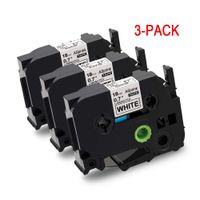
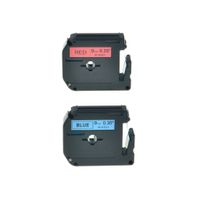
3 Pack 1/2 Inch Replace for Dymo D1 Labels Tape Color Combo Set Refill Tape 45013 45018 45019, Compatible for Dymo Label Makers LabelManager 160 210D 280, LabelPoint 100, 150, 200, 250, 300
Current Price
$6.99
Average
$6.99
Min Price
$6.99
Max Price
$6.99
Description
Repalcement DYMO D1 label tape 12mm ( 1/2 Inch x 23 Feet, 12mm x 7m )
Type & Color :
1-Pack equivalent DYMO D1 label tape 45013 (S0720530), Black Print on White
1-Pack equivalent DYMO D1 label tape 45018 (S0720580), Black Print on Yellow
1-Pack equivalent DYMO D1 label tape 45019 (S0720590), Black Print on Green
Compatible with the following DYMO label makers:
【1】 DYMO LabelManager 160, DYMO LabelManager 280, DYMO LabelManager 210D
【2】 DYMO LabelManager 360D DYMO LabelManager 200, DYMO LabelManager 120P
【3】 DYMO LabelManager 100, DYMO LabelManager 300, DYMO LabelManager 350, DYMO LabelManager 350D
【4】 DYMO LabelManager 150, DYMO LabelManager 400, DYMO LabelManager 420P, DYMO LabelManager 450
【5】 DYMO LabelManager 450D, DYMO LabelManager 500TS Touchscreen, DYMO LabelManager 260P
【6】 DYMO LabelManager PnP, DYMO LabelManager Wireless PnP (DYMO LabelManager WirelessPlug N Play)
【7】 DYMO LabelManager PnP, DYMO MobileLabeler COLORPOP Label Maker
【8】 DYMO LabelManager PC, DYMO LabelManagerPC II, DYMO LabelManager 220P
【9】DYMO 3MPL100, DYMO 3M PL150, DYMO 3M PL200, DYMO 3M PL300
【10】 DYMO LabelPoint 100, DYMO LabelPoint 150, DYMO LabelPoint 200, DYMO LabelPoint 250, DYMO LabelPoint 300
Tips for using the label tape:
1.Turn the gear in the direction (counterclockwise) to tighten the ribbon to avoid breakage or jamming .
2.Please extend part of the label through the outlet of the label .
3.DO NOT pull the label paper or touch the label machine until the label ribbon is complete without printing.
4.Before the end of printing, please do not touch the cutter of label maker to avoid any error.
Type & Color :
1-Pack equivalent DYMO D1 label tape 45013 (S0720530), Black Print on White
1-Pack equivalent DYMO D1 label tape 45018 (S0720580), Black Print on Yellow
1-Pack equivalent DYMO D1 label tape 45019 (S0720590), Black Print on Green
Compatible with the following DYMO label makers:
【1】 DYMO LabelManager 160, DYMO LabelManager 280, DYMO LabelManager 210D
【2】 DYMO LabelManager 360D DYMO LabelManager 200, DYMO LabelManager 120P
【3】 DYMO LabelManager 100, DYMO LabelManager 300, DYMO LabelManager 350, DYMO LabelManager 350D
【4】 DYMO LabelManager 150, DYMO LabelManager 400, DYMO LabelManager 420P, DYMO LabelManager 450
【5】 DYMO LabelManager 450D, DYMO LabelManager 500TS Touchscreen, DYMO LabelManager 260P
【6】 DYMO LabelManager PnP, DYMO LabelManager Wireless PnP (DYMO LabelManager WirelessPlug N Play)
【7】 DYMO LabelManager PnP, DYMO MobileLabeler COLORPOP Label Maker
【8】 DYMO LabelManager PC, DYMO LabelManagerPC II, DYMO LabelManager 220P
【9】DYMO 3MPL100, DYMO 3M PL150, DYMO 3M PL200, DYMO 3M PL300
【10】 DYMO LabelPoint 100, DYMO LabelPoint 150, DYMO LabelPoint 200, DYMO LabelPoint 250, DYMO LabelPoint 300
Tips for using the label tape:
1.Turn the gear in the direction (counterclockwise) to tighten the ribbon to avoid breakage or jamming .
2.Please extend part of the label through the outlet of the label .
3.DO NOT pull the label paper or touch the label machine until the label ribbon is complete without printing.
4.Before the end of printing, please do not touch the cutter of label maker to avoid any error.
Price will be lower
in next 2 weeks
in next 2 weeks
According to the data, price will be lower in next two weeks, so not waste your money and track better price!
Product review & video
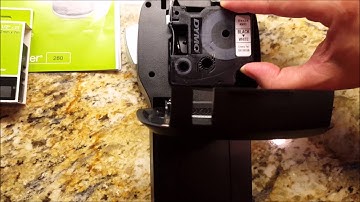
okay this is a companion video to my video review of the Dymo label maker which they call the die mold label manager this is the unit that takes the d1 replacement cartridges this is going to show you how to open the back of the unit to replace the cartridge it's super simple there's a little tab here at the top your fingers under it comes right open this cartridge is still active so I'm not going to put in a new one but I'll show you just lift it super easy they come like this you can see the edge of the tape on there for the labels all you do is line it up right here push it down that's it okay it'll feed itself through here when you make a label I have had it jammed two or three times usually after my five-year-old has made a label yes my five-year-old can make labels on it it's that easy to use so all you do if it jams you'll see it get caught up in here what I do is I just lift it