Description
Please use CTRL+F to find your model/part number printed on your Notebook, Laptopbottom or original battery
Compatiable battery model list:
Acer Aspire ES15
Acer Aspire ES1-572
Acer Aspire ES1-572-31LD
Acer Aspire ES1-572-56BP
Acer Aspire R3
Acer Aspire R3-131T
Acer Aspire R3-131T-P4QQ
Acer Aspire R5
Acer Aspire R5-571T
Acer Aspire R5-71TG
Acer ES1-572-31BD
Replacement battery Part Number list:
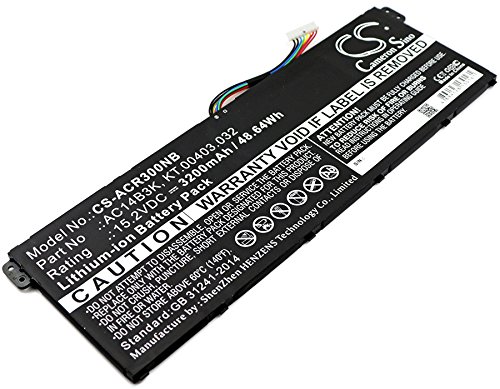
AC14B3K, KT.00403.032
Parameters:
Capacity: 3200mAh / 48.64Wh
Volts: 15.2V
Type: Li-ion
Compatiable battery model list:
Acer Aspire ES15
Acer Aspire ES1-572
Acer Aspire ES1-572-31LD
Acer Aspire ES1-572-56BP
Acer Aspire R3
Acer Aspire R3-131T
Acer Aspire R3-131T-P4QQ
Acer Aspire R5
Acer Aspire R5-571T
Acer Aspire R5-71TG
Acer ES1-572-31BD
Replacement battery Part Number list:
AC14B3K, KT.00403.032
Parameters:
Capacity: 3200mAh / 48.64Wh
Volts: 15.2V
Type: Li-ion
3200mAh Battery Replacement for AcerAspire ES15, Aspire ES1-572, Aspire ES1-572-31LD, Aspire ES1-572-56BP, Aspire R3, P/N AC14B3K, KT.00403.032
Current Price
$55.14
Average
$55.14
Min Price
$55.14
Max Price
$55.14
Price dynamics
0%
Description
Please use CTRL+F to find your model/part number printed on your Notebook, Laptopbottom or original battery
Compatiable battery model list:
Acer Aspire ES15
Acer Aspire ES1-572
Acer Aspire ES1-572-31LD
Acer Aspire ES1-572-56BP
Acer Aspire R3
Acer Aspire R3-131T
Acer Aspire R3-131T-P4QQ
Acer Aspire R5
Acer Aspire R5-571T
Acer Aspire R5-71TG
Acer ES1-572-31BD
Replacement battery Part Number list:
AC14B3K, KT.00403.032
Parameters:
Capacity: 3200mAh / 48.64Wh
Volts: 15.2V
Type: Li-ion
Compatiable battery model list:
Acer Aspire ES15
Acer Aspire ES1-572
Acer Aspire ES1-572-31LD
Acer Aspire ES1-572-56BP
Acer Aspire R3
Acer Aspire R3-131T
Acer Aspire R3-131T-P4QQ
Acer Aspire R5
Acer Aspire R5-571T
Acer Aspire R5-71TG
Acer ES1-572-31BD
Replacement battery Part Number list:
AC14B3K, KT.00403.032
Parameters:
Capacity: 3200mAh / 48.64Wh
Volts: 15.2V
Type: Li-ion
Price will be lower
in next 2 weeks
in next 2 weeks
According to the data, price will be lower in next two weeks, so not waste your money and track better price!
Product review & video
remove screws marked by red circles and then pry up and remove backdoor remove screws that hold hard drive and remove it remove the rest of screws on the bottom case using plastic tool line up top case now you need to remove keyboard and touchpad SFC cable keyboard cable plastic lock you need to push back and the CH pad cable lock you need to move out and removing top case unplugging battery cable the first thing you must do is unplug and USB board applicable now you need to unlock the plastic launches that holds battery in the case and now battery can be removed here you can see its specification



Similar products