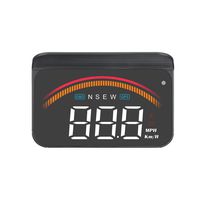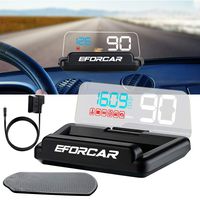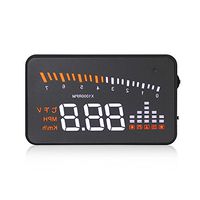
Description
Specifications:
How to switch KPH to MPH?
When the car start and the interface display normally, you can dial the button to left for 5 seconds, and you will see the "functional zone 1" is flashing.
Then you can dial left or right to choose what you want to display. To press the button you can enter into the "functional zone 2" by repeating the same steps. Similarly, the "functional zone 3".
Finally you can exit by pressing the button for 5 seconds
Output Frequency:Obdii interface car hud
Wire or Wireless:Wired
Rated Power:Obdii port car head up display
Material Type: Plastic
Display Size: 5.5 inch screen
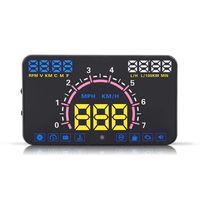
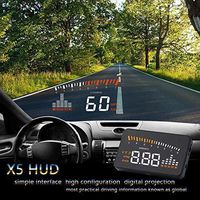
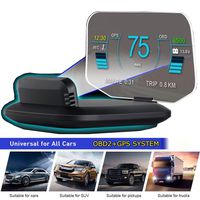
HUD: Car OBDII HUD Head UP 5.5 LCD Display
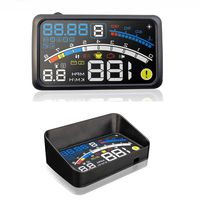
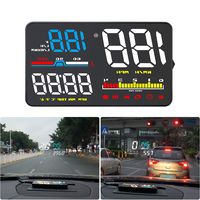
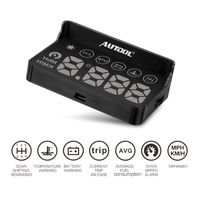
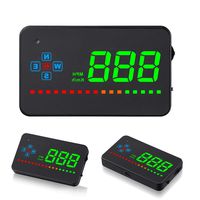
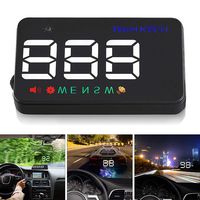
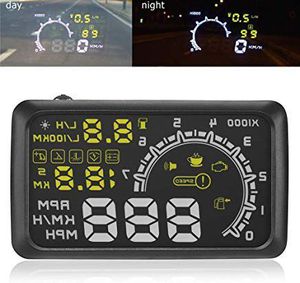
Display Information: Speed, engine speed, instantaneous fuel consumption, 100 km average fuel consumption, real-time voltage, real-time water temperature, manual / automatic brightness adjustment, public miles switching, throttle data, ignition advance angle display, 100 km acceleration time display, And reminders, single / multi-segment alarm, display mode selection
Alarm: Speed alarm, shift reminders, water temperature alarm, voltage alarm
Work Temperature: -400 ~ +800 Celsius Degree
Barometric Press: 86 ~ 106 KPa
Relative Humidity: 10% ~ 95%
Environment Voice: < = 60 dB' (A)
Alarm of Sound Level: > = 30 dB' (A)
Work Voltage: 9V ~ 16V dc (12V dc / 400mA)
Note:
Asian models can't be used before 2008. European and American models can't be used before 2004.
Package Weight : 278.0 G / 9.81 Ounces
Package Dimensions (L*W*H) : 170*130*45 MM / 6.69*5.12*1.77 Inches
Package Include:
1 x Host
1 x Car Charger
1 x Anti-skid Pad
1 x Reflective Film
1 x Manual
How to switch KPH to MPH?
When the car start and the interface display normally, you can dial the button to left for 5 seconds, and you will see the "functional zone 1" is flashing.
Then you can dial left or right to choose what you want to display. To press the button you can enter into the "functional zone 2" by repeating the same steps. Similarly, the "functional zone 3".
Finally you can exit by pressing the button for 5 seconds
Output Frequency:Obdii interface car hud
Wire or Wireless:Wired
Rated Power:Obdii port car head up display
Material Type: Plastic
Display Size: 5.5 inch screen
HUD: Car OBDII HUD Head UP 5.5 LCD Display
Display Information: Speed, engine speed, instantaneous fuel consumption, 100 km average fuel consumption, real-time voltage, real-time water temperature, manual / automatic brightness adjustment, public miles switching, throttle data, ignition advance angle display, 100 km acceleration time display, And reminders, single / multi-segment alarm, display mode selection
Alarm: Speed alarm, shift reminders, water temperature alarm, voltage alarm
Work Temperature: -400 ~ +800 Celsius Degree
Barometric Press: 86 ~ 106 KPa
Relative Humidity: 10% ~ 95%
Environment Voice: < = 60 dB' (A)
Alarm of Sound Level: > = 30 dB' (A)
Work Voltage: 9V ~ 16V dc (12V dc / 400mA)
Note:
Asian models can't be used before 2008. European and American models can't be used before 2004.
Package Weight : 278.0 G / 9.81 Ounces
Package Dimensions (L*W*H) : 170*130*45 MM / 6.69*5.12*1.77 Inches
Package Include:
1 x Host
1 x Car Charger
1 x Anti-skid Pad
1 x Reflective Film
1 x Manual
5.5 Inch Auto OBDII OBD2 Port Car Hud Head Up Display KM/h MPH Overspeed Warning Windshield Projector Alarm System
Current Price
$29.99
Average
$29.99
Min Price
$29.99
Max Price
$29.99
Price dynamics
0%
Description
Specifications:
How to switch KPH to MPH?
When the car start and the interface display normally, you can dial the button to left for 5 seconds, and you will see the "functional zone 1" is flashing.
Then you can dial left or right to choose what you want to display. To press the button you can enter into the "functional zone 2" by repeating the same steps. Similarly, the "functional zone 3".
Finally you can exit by pressing the button for 5 seconds
Output Frequency:Obdii interface car hud
Wire or Wireless:Wired
Rated Power:Obdii port car head up display
Material Type: Plastic
Display Size: 5.5 inch screen
HUD: Car OBDII HUD Head UP 5.5 LCD Display
Display Information: Speed, engine speed, instantaneous fuel consumption, 100 km average fuel consumption, real-time voltage, real-time water temperature, manual / automatic brightness adjustment, public miles switching, throttle data, ignition advance angle display, 100 km acceleration time display, And reminders, single / multi-segment alarm, display mode selection
Alarm: Speed alarm, shift reminders, water temperature alarm, voltage alarm
Work Temperature: -400 ~ +800 Celsius Degree
Barometric Press: 86 ~ 106 KPa
Relative Humidity: 10% ~ 95%
Environment Voice: < = 60 dB' (A)
Alarm of Sound Level: > = 30 dB' (A)
Work Voltage: 9V ~ 16V dc (12V dc / 400mA)
Note:
Asian models can't be used before 2008. European and American models can't be used before 2004.
Package Weight : 278.0 G / 9.81 Ounces
Package Dimensions (L*W*H) : 170*130*45 MM / 6.69*5.12*1.77 Inches
Package Include:
1 x Host
1 x Car Charger
1 x Anti-skid Pad
1 x Reflective Film
1 x Manual
How to switch KPH to MPH?
When the car start and the interface display normally, you can dial the button to left for 5 seconds, and you will see the "functional zone 1" is flashing.
Then you can dial left or right to choose what you want to display. To press the button you can enter into the "functional zone 2" by repeating the same steps. Similarly, the "functional zone 3".
Finally you can exit by pressing the button for 5 seconds
Output Frequency:Obdii interface car hud
Wire or Wireless:Wired
Rated Power:Obdii port car head up display
Material Type: Plastic
Display Size: 5.5 inch screen
HUD: Car OBDII HUD Head UP 5.5 LCD Display
Display Information: Speed, engine speed, instantaneous fuel consumption, 100 km average fuel consumption, real-time voltage, real-time water temperature, manual / automatic brightness adjustment, public miles switching, throttle data, ignition advance angle display, 100 km acceleration time display, And reminders, single / multi-segment alarm, display mode selection
Alarm: Speed alarm, shift reminders, water temperature alarm, voltage alarm
Work Temperature: -400 ~ +800 Celsius Degree
Barometric Press: 86 ~ 106 KPa
Relative Humidity: 10% ~ 95%
Environment Voice: < = 60 dB' (A)
Alarm of Sound Level: > = 30 dB' (A)
Work Voltage: 9V ~ 16V dc (12V dc / 400mA)
Note:
Asian models can't be used before 2008. European and American models can't be used before 2004.
Package Weight : 278.0 G / 9.81 Ounces
Package Dimensions (L*W*H) : 170*130*45 MM / 6.69*5.12*1.77 Inches
Package Include:
1 x Host
1 x Car Charger
1 x Anti-skid Pad
1 x Reflective Film
1 x Manual
Price will be lower
in next 2 weeks
in next 2 weeks
According to the data, price will be lower in next two weeks, so not waste your money and track better price!
Product review & video
hi this dr. class here and in this video I'll be unboxing and installing this head-up display unit that I got off a website called gearbest.com it cost just under fifty dollars and this unit what it does is that it will project the data it collects from the obd2 diagnostic port onto your windshield let me open this up and show you what's inside here we have the 5.5 inch LED display unit it's very low profile here's the back here is the obd2 cable that connects the obd2 port on your vehicle to the display unit here is the user manual here we have an anti-slip pad for the display unit sit on the back here is the reflective windshield screen let's not very closer look at the unit now the model number on this head-up display unit is simply called the 88 and I will put the product link in the description below now this unit does have an auto illumination so what that means is that during the


Similar products