Description
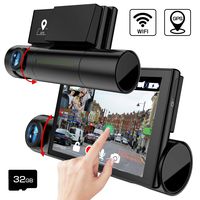
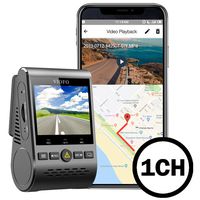
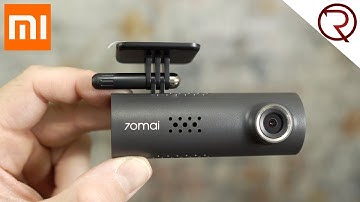
Features Voice Control: 6 kinds of oral instructions are available: Take Picture, Record Video, Record Without Sound, Record With Sound, Turn On Wi-Fi, Turn Off Wi-Fi. Notice*: Voice command is only available when app is disconnected. Emergency Recording: When built-in G-Sensor detects a collision, 70mai dash cam will automatically lock this video to Emergency File to prevent the video from overwritten. Wi-Fi connection and 70mai APP: allow you to operate dash camera on the phone – watching live streaming view, playback and download useful and meaningful recording files. 70mai APP is available for devices running Android and IOS. For App Download you can find it in App Store or scan a QR code on the manual book to download. Supports Android and IOS systems. Activate the dash cam when first time use Power on the dash cam When the dash cam boots up at first time, you will hear a piece of voice prompt "70mai boots up, please activate the device by connecting to your cell phone. " At that moment, the indicator is in blue breathing state. (If the indicator displays blue but always light on, please press the power key to open Wi-Fi hotspot of the dash cam. )Use app to connect the dash cam1. Open 70mai dash cam app, sign up with email or phone. 2. At the homepage of app, click "Add new dash cam" and follow the guide to build connection to your dash cam. The default password of the dash cam is 12345678. 3. When you hear the voice prompt "Please click the power key to authorize", press the power key to accept the connection request from your cellphone. 4. You will see new user guide after the first connection. Please read it carefully to learn the basic skills of using the functions of dash cam, and adjust the angle of your dash cam as well. 5. Please be noted that the built-in battery is designed to record emergency. Normally the smart dash cam needs to connect to external power.
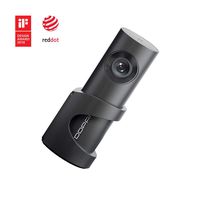
70mai Dash Camera for Cars, 1080P, 130° Wide Angle, Built-in WiFi Dash Cam, Emergency Recording, APP Control Dashboard, Car Camera Recorder with Night Vision, G-Sensor, Car DVR
Price is below average
Current Price
$42.99
Average
$43.05
Min Price
$32.99
Max Price
$65
Price dynamics
0%
Description
Features Voice Control: 6 kinds of oral instructions are available: Take Picture, Record Video, Record Without Sound, Record With Sound, Turn On Wi-Fi, Turn Off Wi-Fi. Notice*: Voice command is only available when app is disconnected. Emergency Recording: When built-in G-Sensor detects a collision, 70mai dash cam will automatically lock this video to Emergency File to prevent the video from overwritten. Wi-Fi connection and 70mai APP: allow you to operate dash camera on the phone – watching live streaming view, playback and download useful and meaningful recording files. 70mai APP is available for devices running Android and IOS. For App Download you can find it in App Store or scan a QR code on the manual book to download. Supports Android and IOS systems. Activate the dash cam when first time use Power on the dash cam When the dash cam boots up at first time, you will hear a piece of voice prompt "70mai boots up, please activate the device by connecting to your cell phone. " At that moment, the indicator is in blue breathing state. (If the indicator displays blue but always light on, please press the power key to open Wi-Fi hotspot of the dash cam. )Use app to connect the dash cam1. Open 70mai dash cam app, sign up with email or phone. 2. At the homepage of app, click "Add new dash cam" and follow the guide to build connection to your dash cam. The default password of the dash cam is 12345678. 3. When you hear the voice prompt "Please click the power key to authorize", press the power key to accept the connection request from your cellphone. 4. You will see new user guide after the first connection. Please read it carefully to learn the basic skills of using the functions of dash cam, and adjust the angle of your dash cam as well. 5. Please be noted that the built-in battery is designed to record emergency. Normally the smart dash cam needs to connect to external power.
Price will be lower
in next 2 weeks
in next 2 weeks
According to the data, price will be lower in next two weeks, so not waste your money and track better price!
Product review & video
[Music] what's happening everyone my name is Alex and welcome back to when you review for today I have a very affordable dashcam called the seventh email now this company is also owned by Xiaomi so depending where you're buying the camera you may see this listed as the Cheramie 70 ma but this is the exact same product so you can find this camera for about $40 and for $40 to get a camera that can record in 1080p at 30 frames per second a camera that can be controlled over Wi-Fi from your smartphone or tablet and a camera that can take voice commands I know that dash cams aren't that exciting for everyone but if you're a driver like myself you know that there is a lot of crazy stuff happening on the road every single day having one of these dash cams could save you a lot of money in case of an accident where you're not at fault so for example last night I was peacefully driving and this g

Similar products