Description
NOTICE!
When opening the ipad, do not damage the lcd, the touch glass and the cable inside, a very important step.
Before reseal your iPad, test the battery with the original data cable and charger (surpport 5V, 2.1A).
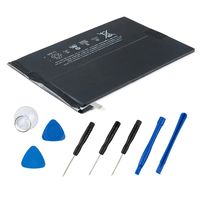
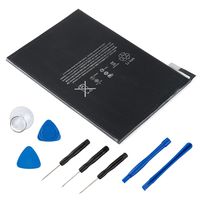
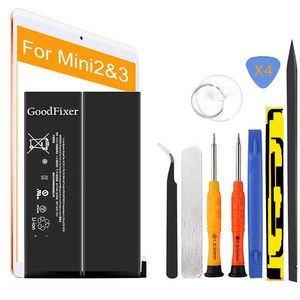
Packing List
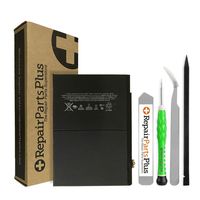
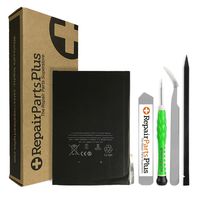
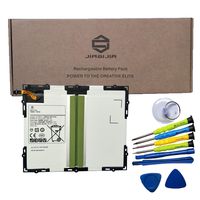
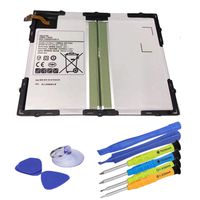
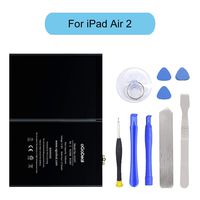
-1 iPad Mini 2nd generation battery / iPad Mini 3 Battery
-1 Pentalobe Screwdriver
-1 Philips Size Screwdriver
-4 Triangle Opening Tool
-1 Pry Opening Spudger
-1 Suction Cup
-1 Set of Adhesive
-1 Spudger
-1 Metal Spatula/Scraper
-1 Tweezer
-Kindly Note:
After the battery installed inside iPad,we suggest you full charge 100% and use the power to about 2% 3 times, then the battery will became more excellent.
If your iPad Mini 2 / iPad Mini 3 Touch Screen Glass Digitizer is broken, you can replace them at the same time. ^ v ^
This battery only for Apple iPad Mini 2/3.
Q: iPad can't start?
A: Check the LCD cable and battery cable, connect the original data cable; check whether the iPad is charging,if charging,reseal iPad.
Q: The iPad can be power on, but no charging; when using it for a few hours, the electricity number is not reduced?
A: Restart the iPad, or use the iPad power to 1% and try charging again.
Q: No charging, but showing"charging icon"?
A: Please use a charger that supports 5V 2.1A, and the original data cable.
GoodFixer Customer Service Guarantee:
24-Hour Reply
365 DAYS Warranty
When opening the ipad, do not damage the lcd, the touch glass and the cable inside, a very important step.
Before reseal your iPad, test the battery with the original data cable and charger (surpport 5V, 2.1A).
Packing List
-1 iPad Mini 2nd generation battery / iPad Mini 3 Battery
-1 Pentalobe Screwdriver
-1 Philips Size Screwdriver
-4 Triangle Opening Tool
-1 Pry Opening Spudger
-1 Suction Cup
-1 Set of Adhesive
-1 Spudger
-1 Metal Spatula/Scraper
-1 Tweezer
-Kindly Note:
After the battery installed inside iPad,we suggest you full charge 100% and use the power to about 2% 3 times, then the battery will became more excellent.
If your iPad Mini 2 / iPad Mini 3 Touch Screen Glass Digitizer is broken, you can replace them at the same time. ^ v ^
This battery only for Apple iPad Mini 2/3.
Q: iPad can't start?
A: Check the LCD cable and battery cable, connect the original data cable; check whether the iPad is charging,if charging,reseal iPad.
Q: The iPad can be power on, but no charging; when using it for a few hours, the electricity number is not reduced?
A: Restart the iPad, or use the iPad power to 1% and try charging again.
Q: No charging, but showing"charging icon"?
A: Please use a charger that supports 5V 2.1A, and the original data cable.
GoodFixer Customer Service Guarantee:
24-Hour Reply
365 DAYS Warranty
GoodFixer Replacement Battery Compatible with Apple iPad Mini 2/Mini 3, Complete Repair Tools Kit, Adhesive Strip, 0 Cycle 6471mAh Li-ion Replacement Battery [365 Days Warranty]
Price is below average
Current Price
$27.99
Average
$30.63
Min Price
$27.99
Max Price
$33.99
Price dynamics
9%
Description
NOTICE!
When opening the ipad, do not damage the lcd, the touch glass and the cable inside, a very important step.
Before reseal your iPad, test the battery with the original data cable and charger (surpport 5V, 2.1A).
Packing List
-1 iPad Mini 2nd generation battery / iPad Mini 3 Battery
-1 Pentalobe Screwdriver
-1 Philips Size Screwdriver
-4 Triangle Opening Tool
-1 Pry Opening Spudger
-1 Suction Cup
-1 Set of Adhesive
-1 Spudger
-1 Metal Spatula/Scraper
-1 Tweezer
-Kindly Note:
After the battery installed inside iPad,we suggest you full charge 100% and use the power to about 2% 3 times, then the battery will became more excellent.
If your iPad Mini 2 / iPad Mini 3 Touch Screen Glass Digitizer is broken, you can replace them at the same time. ^ v ^
This battery only for Apple iPad Mini 2/3.
Q: iPad can't start?
A: Check the LCD cable and battery cable, connect the original data cable; check whether the iPad is charging,if charging,reseal iPad.
Q: The iPad can be power on, but no charging; when using it for a few hours, the electricity number is not reduced?
A: Restart the iPad, or use the iPad power to 1% and try charging again.
Q: No charging, but showing"charging icon"?
A: Please use a charger that supports 5V 2.1A, and the original data cable.
GoodFixer Customer Service Guarantee:
24-Hour Reply
365 DAYS Warranty
When opening the ipad, do not damage the lcd, the touch glass and the cable inside, a very important step.
Before reseal your iPad, test the battery with the original data cable and charger (surpport 5V, 2.1A).
Packing List
-1 iPad Mini 2nd generation battery / iPad Mini 3 Battery
-1 Pentalobe Screwdriver
-1 Philips Size Screwdriver
-4 Triangle Opening Tool
-1 Pry Opening Spudger
-1 Suction Cup
-1 Set of Adhesive
-1 Spudger
-1 Metal Spatula/Scraper
-1 Tweezer
-Kindly Note:
After the battery installed inside iPad,we suggest you full charge 100% and use the power to about 2% 3 times, then the battery will became more excellent.
If your iPad Mini 2 / iPad Mini 3 Touch Screen Glass Digitizer is broken, you can replace them at the same time. ^ v ^
This battery only for Apple iPad Mini 2/3.
Q: iPad can't start?
A: Check the LCD cable and battery cable, connect the original data cable; check whether the iPad is charging,if charging,reseal iPad.
Q: The iPad can be power on, but no charging; when using it for a few hours, the electricity number is not reduced?
A: Restart the iPad, or use the iPad power to 1% and try charging again.
Q: No charging, but showing"charging icon"?
A: Please use a charger that supports 5V 2.1A, and the original data cable.
GoodFixer Customer Service Guarantee:
24-Hour Reply
365 DAYS Warranty
Price will be lower
in next 2 weeks
in next 2 weeks
According to the data, price will be lower in next two weeks, so not waste your money and track better price!
Product review & video
the ipad mini 2 was released in 2013 and was a massive upgrade over the first one thanks to the fantastic a7 chipset and retina display it got full ios updates all the way until late 2019 matching the iphone 5s and making it among the longest supported tablets of all time hey how's it going i'm josh from 91 tech and today we're taking a look at the second generation ipad mini how does it hold up seven years later there's no question that the ipad mini was a very good move on apple's part the first one from 2012 sold very well which in hindsight is kind of unfortunate because the a5 chipset inside of it confirmed it would be a mess nowadays it absolutely struggles on ios 9 making it very annoying to use to the point that i'd argue it's basically completely obsolete despite only being a year newer this definitely isn't the case for the second generation ipad mini it certainly isn't fast o

Similar products