Description
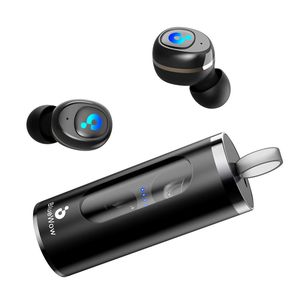
- BlueWow A5 - True Wireless Stereo Earbuds with Bluetooth 5.0 - Black
- Clarity Sound quality and bring the pure sound quality to you
Please Kindly Note:
- Before use it please remove the protection film on the bottom of the earphones, then you it can start to charge it.
- The charging dock is with magnetic inductive function. To save the power, if you slide it out and forget to turn it back, it will in standby mode after 30s. Then when you put the earphones on it, it will not charging, in this case, please just push it back and it will be active and charge the earphones again.
- When the earphones are in charging, the white LED up, when it is full charged, Blue LED light up and will turn off after 30s.
- Under stereo mode, Left earbuds will be main headset for call talking/hearing, Right earbuds will mute. Music will still stay under stereo mode. Please keep the wireless earphones away from small children to avoid choking hazard.
How To Pair Into Stereo Mode:
- Slide out the charging dock, take out the BlueWow A5 Earbuds form the case. Both earphones power on and pear each other automatically ( With voice prompt "Power on")
- After R and L earbuds paired. L earbuds will flash Blue and White alternately, R earbuds blinks Blue ( With Voice Prompt " Connected, Left Channel, Right Channel " ).
- Now go back to your mobile phone, turn on bluetooth, search and select " BlueWow A5 L ", click it and paired ( With Voice Prompt "Pairing successful, Second device connected" ).
Specifications:
- Bluetooth: 5.0
- Comptabile with iOS and most Android smart mobile phones
- Support: A2DP/AVRCP/HFP/HSP/CVC
- Talk time: 2H
- Play time: 3.5 - 4.0H
- Bluetooth range: 10m/33feet
- Earphone battery: Built-in 50m
True Wireless Earbuds, Update Bluetooth Sport Earphone with Charging Case, Auto Power on & Pairing, Stereo Headphone, IPX4 Waterproof, iOS & Android Support, BlueWow A5 - Black
Price is below average
Current Price
$45.99
Average
$48.49
Min Price
$45.99
Max Price
$49.99
Price dynamics
5%
Description
- BlueWow A5 - True Wireless Stereo Earbuds with Bluetooth 5.0 - Black
- Clarity Sound quality and bring the pure sound quality to you
Please Kindly Note:
- Before use it please remove the protection film on the bottom of the earphones, then you it can start to charge it.
- The charging dock is with magnetic inductive function. To save the power, if you slide it out and forget to turn it back, it will in standby mode after 30s. Then when you put the earphones on it, it will not charging, in this case, please just push it back and it will be active and charge the earphones again.
- When the earphones are in charging, the white LED up, when it is full charged, Blue LED light up and will turn off after 30s.
- Under stereo mode, Left earbuds will be main headset for call talking/hearing, Right earbuds will mute. Music will still stay under stereo mode. Please keep the wireless earphones away from small children to avoid choking hazard.
How To Pair Into Stereo Mode:
- Slide out the charging dock, take out the BlueWow A5 Earbuds form the case. Both earphones power on and pear each other automatically ( With voice prompt "Power on")
- After R and L earbuds paired. L earbuds will flash Blue and White alternately, R earbuds blinks Blue ( With Voice Prompt " Connected, Left Channel, Right Channel " ).
- Now go back to your mobile phone, turn on bluetooth, search and select " BlueWow A5 L ", click it and paired ( With Voice Prompt "Pairing successful, Second device connected" ).
Specifications:
- Bluetooth: 5.0
- Comptabile with iOS and most Android smart mobile phones
- Support: A2DP/AVRCP/HFP/HSP/CVC
- Talk time: 2H
- Play time: 3.5 - 4.0H
- Bluetooth range: 10m/33feet
- Earphone battery: Built-in 50m
Price will be lower
in next 2 weeks
in next 2 weeks
According to the data, price will be lower in next two weeks, so not waste your money and track better price!
Product review & video
love everyone today we're gonna be connecting the Bluetooth headphones shown right here i 7s tws a very simple process I picked up mine on amazing for last calm I got a wide variety of colors check them out only $11.99 pretty good quality my free shipping on everything as well so we begin very simple go ahead and turn off the Bluetooth on your cellular device I want to do so you can turn the charging case on with this little button posted at the bottom and you can see that there's both charging and they got a red light once you see they're both charging go ahead and pull them out of the case you can see two power buttons on each headphone I simply hold those down at the same time you see a light begin to flash on each when the lights are flashing I simply double tap or triple tap one of the headphones to connect them together via bluetooth it might take a little second there as you can



Similar products



































