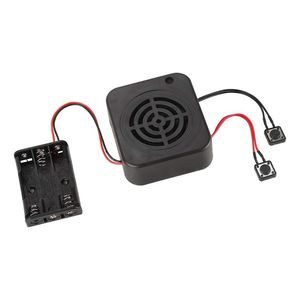
Description
Specification:
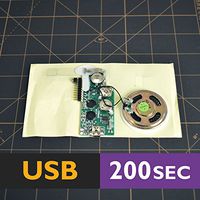
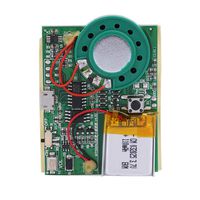
Type: DIY Recording Box
Recording playback time: 2 minutes / 4 minutes (Optional)
Battery pack: 3 * 1.5V AAA batteries (NOT Included)
Play button: Press the button to start playing the recorded sound (black with button line)
Record button: red with button line
Power cable length: Approx. 130MM
Recording box size: Approx. 68 * 61 * 29MM
Package list:
1 * Recording Box
Note:
1. Please note that there is NO battery in the package.
2. Please allow slight error due to manual measurement.
3. Different monitor colors may be different. Thanks for your kind understanding.
Instructions:
Q1. How to record?
A: Recording and playback operations:
Press the recording button, hear the "DI" sound to release the recording button, then speak to the microphone within 5-10 cm to start recording, press the recording button again, hear the "DIDI" sound then release the recording button, indicating the recording is completed. Then press the play button again to play the currently recorded sound. During the playback process, press the play button again to stop playing the sound.
Q2. If we recorded the wrong voice, can we re-record it?
A: Yes, you can press the record button to re-record.
Q3. How to delete the recording?
A: Press and hold the record button, do not record, when you hear the "DI" sound, release your hand. Then press the record button to re-record.
4. The button with the red wire is the recording button, and the button with the black wire is the playback button.
Type: DIY Recording Box
Recording playback time: 2 minutes / 4 minutes (Optional)
Battery pack: 3 * 1.5V AAA batteries (NOT Included)
Play button: Press the button to start playing the recorded sound (black with button line)
Record button: red with button line
Power cable length: Approx. 130MM
Recording box size: Approx. 68 * 61 * 29MM
Package list:
1 * Recording Box
Note:
1. Please note that there is NO battery in the package.
2. Please allow slight error due to manual measurement.
3. Different monitor colors may be different. Thanks for your kind understanding.
Instructions:
Q1. How to record?
A: Recording and playback operations:
Press the recording button, hear the "DI" sound to release the recording button, then speak to the microphone within 5-10 cm to start recording, press the recording button again, hear the "DIDI" sound then release the recording button, indicating the recording is completed. Then press the play button again to play the currently recorded sound. During the playback process, press the play button again to stop playing the sound.
Q2. If we recorded the wrong voice, can we re-record it?
A: Yes, you can press the record button to re-record.
Q3. How to delete the recording?
A: Press and hold the record button, do not record, when you hear the "DI" sound, release your hand. Then press the record button to re-record.
4. The button with the red wire is the recording button, and the button with the black wire is the playback button.
Wendry Voice Recording Box, DIY Voice Message Box, Sound Recorder Module for DIY Audio Cards Gift Box Support Ultra-Long Recording, up to 2/4 Minutes(2min)
Current Price
$9.49
Average
$9.24
Min Price
$8.99
Max Price
$9.49
Price dynamics
3%
Description
Specification:
Type: DIY Recording Box
Recording playback time: 2 minutes / 4 minutes (Optional)
Battery pack: 3 * 1.5V AAA batteries (NOT Included)
Play button: Press the button to start playing the recorded sound (black with button line)
Record button: red with button line
Power cable length: Approx. 130MM
Recording box size: Approx. 68 * 61 * 29MM
Package list:
1 * Recording Box
Note:
1. Please note that there is NO battery in the package.
2. Please allow slight error due to manual measurement.
3. Different monitor colors may be different. Thanks for your kind understanding.
Instructions:
Q1. How to record?
A: Recording and playback operations:
Press the recording button, hear the "DI" sound to release the recording button, then speak to the microphone within 5-10 cm to start recording, press the recording button again, hear the "DIDI" sound then release the recording button, indicating the recording is completed. Then press the play button again to play the currently recorded sound. During the playback process, press the play button again to stop playing the sound.
Q2. If we recorded the wrong voice, can we re-record it?
A: Yes, you can press the record button to re-record.
Q3. How to delete the recording?
A: Press and hold the record button, do not record, when you hear the "DI" sound, release your hand. Then press the record button to re-record.
4. The button with the red wire is the recording button, and the button with the black wire is the playback button.
Type: DIY Recording Box
Recording playback time: 2 minutes / 4 minutes (Optional)
Battery pack: 3 * 1.5V AAA batteries (NOT Included)
Play button: Press the button to start playing the recorded sound (black with button line)
Record button: red with button line
Power cable length: Approx. 130MM
Recording box size: Approx. 68 * 61 * 29MM
Package list:
1 * Recording Box
Note:
1. Please note that there is NO battery in the package.
2. Please allow slight error due to manual measurement.
3. Different monitor colors may be different. Thanks for your kind understanding.
Instructions:
Q1. How to record?
A: Recording and playback operations:
Press the recording button, hear the "DI" sound to release the recording button, then speak to the microphone within 5-10 cm to start recording, press the recording button again, hear the "DIDI" sound then release the recording button, indicating the recording is completed. Then press the play button again to play the currently recorded sound. During the playback process, press the play button again to stop playing the sound.
Q2. If we recorded the wrong voice, can we re-record it?
A: Yes, you can press the record button to re-record.
Q3. How to delete the recording?
A: Press and hold the record button, do not record, when you hear the "DI" sound, release your hand. Then press the record button to re-record.
4. The button with the red wire is the recording button, and the button with the black wire is the playback button.
Price will be lower
in next 2 weeks
in next 2 weeks
According to the data, price will be lower in next two weeks, so not waste your money and track better price!