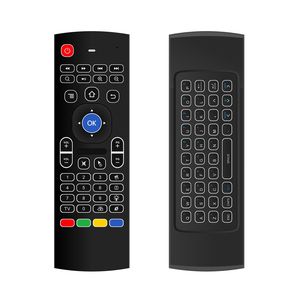
Description
1) Support System: Google/ Android OS, Mac OS, Linux OS, Windows
2) Compatible: Android Smart TV, Google Android TV Box, IPTV, Networked set-top Box, Mini PC, HTPC, PCTV, Xbox360, PS3/PS4
Specification:
1) Transmission: 2.4G RF wireless
2) Sensor: 3-Gyro + 3-Gsensor
3) Number of keys:81 keys
4) Range: 10m
5) Battery Type: AAA*2 (Not included in the package)
6) Material: Plastic and silicone
7) Size: 172*52*19mm
8) Weight: About 100g
IR Learning
There are five buttons which could be programmed to your TV remote keys: the top left Power button and the bottom four color buttons as showed in Product Diagram. Please be noted your TV remote has to support NEC protocol for learning.
1) Pointing IR emitters of the TV remote and the airmouse to each other.
2) Press and hold the TV key on the remote for 4-5 seconds until LED slowly flashes.
3) While you see LED slowly flashing, press the key on your TV remote to learn.
4) While the IR signal is received to the remote, LED light will turn solid. You will have to choose one of those 5 learning keys.
5) Press TV button to finish the learning. Start from step 1 to revise or start a new set up.
Important Notice:
1) Since it's a universal controller, it's normal that a few keys might not be applicable to your device because of different codes by different manufacturer.
2) For Smart TVs, please test with normal wired keyboard. If they work, then this remote is compatible with your Smart TV.
3) This is a remote controller, it cannot be used as gamepad.
2) Compatible: Android Smart TV, Google Android TV Box, IPTV, Networked set-top Box, Mini PC, HTPC, PCTV, Xbox360, PS3/PS4
Specification:
1) Transmission: 2.4G RF wireless
2) Sensor: 3-Gyro + 3-Gsensor
3) Number of keys:81 keys
4) Range: 10m
5) Battery Type: AAA*2 (Not included in the package)
6) Material: Plastic and silicone
7) Size: 172*52*19mm
8) Weight: About 100g
IR Learning
There are five buttons which could be programmed to your TV remote keys: the top left Power button and the bottom four color buttons as showed in Product Diagram. Please be noted your TV remote has to support NEC protocol for learning.
1) Pointing IR emitters of the TV remote and the airmouse to each other.
2) Press and hold the TV key on the remote for 4-5 seconds until LED slowly flashes.
3) While you see LED slowly flashing, press the key on your TV remote to learn.
4) While the IR signal is received to the remote, LED light will turn solid. You will have to choose one of those 5 learning keys.
5) Press TV button to finish the learning. Start from step 1 to revise or start a new set up.
Important Notice:
1) Since it's a universal controller, it's normal that a few keys might not be applicable to your device because of different codes by different manufacturer.
2) For Smart TVs, please test with normal wired keyboard. If they work, then this remote is compatible with your Smart TV.
3) This is a remote controller, it cannot be used as gamepad.
Mitid Backlit Wireless Mini Keyboard with Mouse Touchpad Combos for Computer, Google Android TV Box, IPTV, HTPC, KODI (Gyro Controller)
Price is below average
Current Price
$11.99
Average
$15.38
Min Price
$11.99
Max Price
$18.99
Price dynamics
22%
Description
1) Support System: Google/ Android OS, Mac OS, Linux OS, Windows
2) Compatible: Android Smart TV, Google Android TV Box, IPTV, Networked set-top Box, Mini PC, HTPC, PCTV, Xbox360, PS3/PS4
Specification:
1) Transmission: 2.4G RF wireless
2) Sensor: 3-Gyro + 3-Gsensor
3) Number of keys:81 keys
4) Range: 10m
5) Battery Type: AAA*2 (Not included in the package)
6) Material: Plastic and silicone
7) Size: 172*52*19mm
8) Weight: About 100g
IR Learning
There are five buttons which could be programmed to your TV remote keys: the top left Power button and the bottom four color buttons as showed in Product Diagram. Please be noted your TV remote has to support NEC protocol for learning.
1) Pointing IR emitters of the TV remote and the airmouse to each other.
2) Press and hold the TV key on the remote for 4-5 seconds until LED slowly flashes.
3) While you see LED slowly flashing, press the key on your TV remote to learn.
4) While the IR signal is received to the remote, LED light will turn solid. You will have to choose one of those 5 learning keys.
5) Press TV button to finish the learning. Start from step 1 to revise or start a new set up.
Important Notice:
1) Since it's a universal controller, it's normal that a few keys might not be applicable to your device because of different codes by different manufacturer.
2) For Smart TVs, please test with normal wired keyboard. If they work, then this remote is compatible with your Smart TV.
3) This is a remote controller, it cannot be used as gamepad.
2) Compatible: Android Smart TV, Google Android TV Box, IPTV, Networked set-top Box, Mini PC, HTPC, PCTV, Xbox360, PS3/PS4
Specification:
1) Transmission: 2.4G RF wireless
2) Sensor: 3-Gyro + 3-Gsensor
3) Number of keys:81 keys
4) Range: 10m
5) Battery Type: AAA*2 (Not included in the package)
6) Material: Plastic and silicone
7) Size: 172*52*19mm
8) Weight: About 100g
IR Learning
There are five buttons which could be programmed to your TV remote keys: the top left Power button and the bottom four color buttons as showed in Product Diagram. Please be noted your TV remote has to support NEC protocol for learning.
1) Pointing IR emitters of the TV remote and the airmouse to each other.
2) Press and hold the TV key on the remote for 4-5 seconds until LED slowly flashes.
3) While you see LED slowly flashing, press the key on your TV remote to learn.
4) While the IR signal is received to the remote, LED light will turn solid. You will have to choose one of those 5 learning keys.
5) Press TV button to finish the learning. Start from step 1 to revise or start a new set up.
Important Notice:
1) Since it's a universal controller, it's normal that a few keys might not be applicable to your device because of different codes by different manufacturer.
2) For Smart TVs, please test with normal wired keyboard. If they work, then this remote is compatible with your Smart TV.
3) This is a remote controller, it cannot be used as gamepad.
Price will be lower
in next 2 weeks
in next 2 weeks
According to the data, price will be lower in next two weeks, so not waste your money and track better price!
Product review & video
hey everybody hope you having a great day and today I am doing a review on this mini keyboard and it's also backlit which is very nice it is the world's most mini wireless keyboard mouse combo great for different uses for your computer for using a Android box one of those TV boxes and others with the touch touchpad DPI adjustable functions better match the different size of screens so you can see it's got a lot there on this mini keyboard we'll take out of the box in a minute it's saying here can be used with the Xbox type devices consoles pc notebooks netbooks tablets Android TV boxes Smart TV cat and then smartphones will be interesting to see I would work with a smartphone since there's no Bluetooth so I'm not really sure how that might work but we'll try it out so let's go ahead and take it out of the box and let's see we've got instructions here and it's the user manual so you've g



Similar products





































