Description
SMART STYLUS
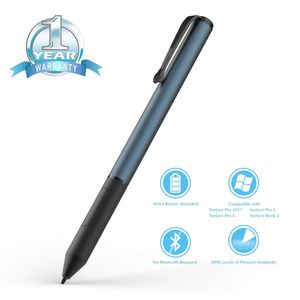
Can simply pick up your Ciscle Digital Pen, instantly start your favorite pen-enabled apps, and begin noting or sketching down anything that comes into your mind.
The Digital Pen is designed for an enhanced natural and authentic writing experience that is optimized for Windows Ink with MPP protocol.
WRITE WITH CONFIDENCE
Customers will notice the ease of writing and drawing as they move their Stylus Pen across the screen of their device.
The Pen allows for the optimization of a personal mobile computing device by allowing users to effortlessly take notes, capture ideas, sketch, even scribble instantly on their Windows device.
SUPERIOR CONSTRUCTION
The Ciscle stylus is designed for users who want a superior digital pen using experience.
One of the main highlights of the Ciscle Stylus is its realistic "pen-like" feel complete with excellent hand balancing nuances, and an ergonomic design aimed at providing our customers with a comfortable Pen-to-Hand fit for hours of use.
PRESCISION IN DETAIL
The Ciscle Pen utilizes max 4096 pressure points which are designed to respond to the slightest touch of your hand.
EFFICIENCY IN DESIGN
Enhance the speed of your work or creative project by using the Right-Click and Erase buttons.
FREE YOURSELF FROM HASSLE
Two easily replaceable soft and hard Nib types allow for a more personalized, authentic on-screen feel.
High tech pressure sensing turns every stroke of digital pen into a precision digital reflection of the user's ideas.
COMPATIBILITY
Surface Pro(2017)
Surface Book/ laptop/ Studio
Surface Pro4/ Pro3
Surface 3
ASUS Transformer 3 Pro T303UA
ASUS Transformer Mini T102HA/T103HA
ASUS Transformer 3 T305CA
ASUS Transformer Pro T304UA
HP Spectre X360(2017)
Vaio Z Canvas
Vaio Z flip
Sony VAIO Duo 13/11
Not compatible with Surface Pro1/ Pro2, and RT.
Can simply pick up your Ciscle Digital Pen, instantly start your favorite pen-enabled apps, and begin noting or sketching down anything that comes into your mind.
The Digital Pen is designed for an enhanced natural and authentic writing experience that is optimized for Windows Ink with MPP protocol.
WRITE WITH CONFIDENCE
Customers will notice the ease of writing and drawing as they move their Stylus Pen across the screen of their device.
The Pen allows for the optimization of a personal mobile computing device by allowing users to effortlessly take notes, capture ideas, sketch, even scribble instantly on their Windows device.
SUPERIOR CONSTRUCTION
The Ciscle stylus is designed for users who want a superior digital pen using experience.
One of the main highlights of the Ciscle Stylus is its realistic "pen-like" feel complete with excellent hand balancing nuances, and an ergonomic design aimed at providing our customers with a comfortable Pen-to-Hand fit for hours of use.
PRESCISION IN DETAIL
The Ciscle Pen utilizes max 4096 pressure points which are designed to respond to the slightest touch of your hand.
EFFICIENCY IN DESIGN
Enhance the speed of your work or creative project by using the Right-Click and Erase buttons.
FREE YOURSELF FROM HASSLE
Two easily replaceable soft and hard Nib types allow for a more personalized, authentic on-screen feel.
High tech pressure sensing turns every stroke of digital pen into a precision digital reflection of the user's ideas.
COMPATIBILITY
Surface Pro(2017)
Surface Book/ laptop/ Studio
Surface Pro4/ Pro3
Surface 3
ASUS Transformer 3 Pro T303UA
ASUS Transformer Mini T102HA/T103HA
ASUS Transformer 3 T305CA
ASUS Transformer Pro T304UA
HP Spectre X360(2017)
Vaio Z Canvas
Vaio Z flip
Sony VAIO Duo 13/11
Not compatible with Surface Pro1/ Pro2, and RT.
Surface Pen, Ciscle Active Surface Stylus Pen with Max 4096 Levels of Pressure Sensitivity, Right Click and Erase Buttons for Surface Pro(2017)/Pro 4/Pro 3, Surface Go/Book/Studio-Cobalt Blue
Price is below average
Current Price
$29.99
Average
$33.21
Min Price
$26.99
Max Price
$40.99
Price dynamics
10%
Description
SMART STYLUS
Can simply pick up your Ciscle Digital Pen, instantly start your favorite pen-enabled apps, and begin noting or sketching down anything that comes into your mind.
The Digital Pen is designed for an enhanced natural and authentic writing experience that is optimized for Windows Ink with MPP protocol.
WRITE WITH CONFIDENCE
Customers will notice the ease of writing and drawing as they move their Stylus Pen across the screen of their device.
The Pen allows for the optimization of a personal mobile computing device by allowing users to effortlessly take notes, capture ideas, sketch, even scribble instantly on their Windows device.
SUPERIOR CONSTRUCTION
The Ciscle stylus is designed for users who want a superior digital pen using experience.
One of the main highlights of the Ciscle Stylus is its realistic "pen-like" feel complete with excellent hand balancing nuances, and an ergonomic design aimed at providing our customers with a comfortable Pen-to-Hand fit for hours of use.
PRESCISION IN DETAIL
The Ciscle Pen utilizes max 4096 pressure points which are designed to respond to the slightest touch of your hand.
EFFICIENCY IN DESIGN
Enhance the speed of your work or creative project by using the Right-Click and Erase buttons.
FREE YOURSELF FROM HASSLE
Two easily replaceable soft and hard Nib types allow for a more personalized, authentic on-screen feel.
High tech pressure sensing turns every stroke of digital pen into a precision digital reflection of the user's ideas.
COMPATIBILITY
Surface Pro(2017)
Surface Book/ laptop/ Studio
Surface Pro4/ Pro3
Surface 3
ASUS Transformer 3 Pro T303UA
ASUS Transformer Mini T102HA/T103HA
ASUS Transformer 3 T305CA
ASUS Transformer Pro T304UA
HP Spectre X360(2017)
Vaio Z Canvas
Vaio Z flip
Sony VAIO Duo 13/11
Not compatible with Surface Pro1/ Pro2, and RT.
Can simply pick up your Ciscle Digital Pen, instantly start your favorite pen-enabled apps, and begin noting or sketching down anything that comes into your mind.
The Digital Pen is designed for an enhanced natural and authentic writing experience that is optimized for Windows Ink with MPP protocol.
WRITE WITH CONFIDENCE
Customers will notice the ease of writing and drawing as they move their Stylus Pen across the screen of their device.
The Pen allows for the optimization of a personal mobile computing device by allowing users to effortlessly take notes, capture ideas, sketch, even scribble instantly on their Windows device.
SUPERIOR CONSTRUCTION
The Ciscle stylus is designed for users who want a superior digital pen using experience.
One of the main highlights of the Ciscle Stylus is its realistic "pen-like" feel complete with excellent hand balancing nuances, and an ergonomic design aimed at providing our customers with a comfortable Pen-to-Hand fit for hours of use.
PRESCISION IN DETAIL
The Ciscle Pen utilizes max 4096 pressure points which are designed to respond to the slightest touch of your hand.
EFFICIENCY IN DESIGN
Enhance the speed of your work or creative project by using the Right-Click and Erase buttons.
FREE YOURSELF FROM HASSLE
Two easily replaceable soft and hard Nib types allow for a more personalized, authentic on-screen feel.
High tech pressure sensing turns every stroke of digital pen into a precision digital reflection of the user's ideas.
COMPATIBILITY
Surface Pro(2017)
Surface Book/ laptop/ Studio
Surface Pro4/ Pro3
Surface 3
ASUS Transformer 3 Pro T303UA
ASUS Transformer Mini T102HA/T103HA
ASUS Transformer 3 T305CA
ASUS Transformer Pro T304UA
HP Spectre X360(2017)
Vaio Z Canvas
Vaio Z flip
Sony VAIO Duo 13/11
Not compatible with Surface Pro1/ Pro2, and RT.
Price will be lower
in next 2 weeks
in next 2 weeks
According to the data, price will be lower in next two weeks, so not waste your money and track better price!
Product review & video
>> It was very important
for us as we're building Windows 10 to make sure that this does more than just
take handwritten notes, sign your name or circle something. We want to make it, so that
you can use your Surface Pen as a mouse and a keyboard
throughout Windows. So I want to show you a bit
about how that works. By default, your pen will behave
like a mouse throughout Windows. So as I press the Start Menu or if I'm scrolling through the different
apps and tiles that I have, click and drag is
just press and hold, and move your Pen across the screen. It will behave like that mouse. Now, if I want to
right-click on something, on the barrel of my Pen, this flat edge here, is where I have this button. I'm going to press and hold
on this right-click button, and then tap anywhere on the screen. That's going to perform
the right-click function wherever I'd like. So I have all of
that nice ad


Similar products


































