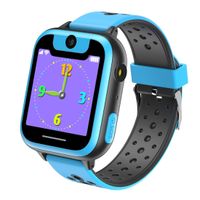
Description
Real GPRS smart watch and Watch finder function
The watch with GPS Positioning function(GPS+LBS+WIFI three mode location, more precisely).
And if you have lost the watch at home, Click on Watch finder button on the app and watch will ring the bell.
Voice Micro Chat:
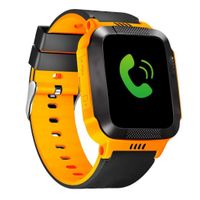
Watch not only can make a call, but also can make a voice Micro chat with parents.
Remote Monitoring Function: One way listening to the sound about the kid's environment at any time. To join the day of the child.
Do not disturb period:
You don't have to worry about smart watches affecting your child's learning. You can set three non-interference periods.
The watch masks all calls during these three periods.
How to use the watch: (Not every one will met the offline problem)
Register the APP
Step 1:
Scan the QR code to download the APP.
Step 2:
Enter the APP. And then enter all the needed information.
Step 3:
Please note that the "Area" in the lower right corner. You need to choose the correct area where your country belong to.
Device offline problem
If you met the "Device Offline" Or "No equipment connect".
Step 1: Please send this command to the watch. "pw,123456,ts#" And you will get a reply.
Step 2: Check the IP is correct. If it's incorrect. Please send this command to change it."pw,123456,ip,(IP address),8001#".
For Example: if you need to change it to North America IP. Send this: "pw,123456,ip, 54.153.6.9,8001#". Set successfully, will get a reply message like "[surl, 54.153.6.9,port,8001#]ok!"
Note:
IP in each region is not the same.
If you encounter problems, you do not need to immediately return the product. Please contact us in time. We will solve your problem within 24 hours.
The watch with GPS Positioning function(GPS+LBS+WIFI three mode location, more precisely).
And if you have lost the watch at home, Click on Watch finder button on the app and watch will ring the bell.
Voice Micro Chat:
Watch not only can make a call, but also can make a voice Micro chat with parents.
Remote Monitoring Function: One way listening to the sound about the kid's environment at any time. To join the day of the child.
Do not disturb period:
You don't have to worry about smart watches affecting your child's learning. You can set three non-interference periods.
The watch masks all calls during these three periods.
How to use the watch: (Not every one will met the offline problem)
Register the APP
Step 1:
Scan the QR code to download the APP.
Step 2:
Enter the APP. And then enter all the needed information.
Step 3:
Please note that the "Area" in the lower right corner. You need to choose the correct area where your country belong to.
Device offline problem
If you met the "Device Offline" Or "No equipment connect".
Step 1: Please send this command to the watch. "pw,123456,ts#" And you will get a reply.
Step 2: Check the IP is correct. If it's incorrect. Please send this command to change it."pw,123456,ip,(IP address),8001#".
For Example: if you need to change it to North America IP. Send this: "pw,123456,ip, 54.153.6.9,8001#". Set successfully, will get a reply message like "[surl, 54.153.6.9,port,8001#]ok!"
Note:
IP in each region is not the same.
If you encounter problems, you do not need to immediately return the product. Please contact us in time. We will solve your problem within 24 hours.
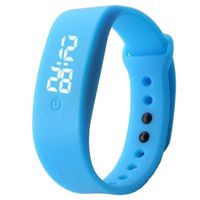
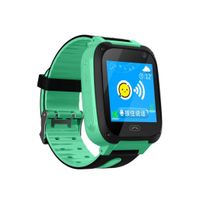
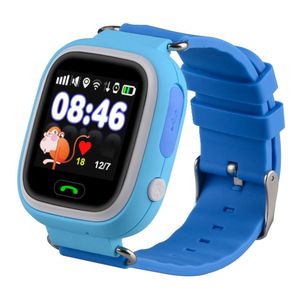
Kids Smart Watch Phone, GPS Tracker Smart Wrist Watch with SOS Anti-lost Alarm Sim Card Slot Touch Screen Smartwatch for 3-12 Year Old Children Girls Boys Compatible for iPhone Android (Blue)
Price is below average
Current Price
$29.99
Average
$34.36
Min Price
$26.99
Max Price
$37.99
Price dynamics
13%
Description
Real GPRS smart watch and Watch finder function
The watch with GPS Positioning function(GPS+LBS+WIFI three mode location, more precisely).
And if you have lost the watch at home, Click on Watch finder button on the app and watch will ring the bell.
Voice Micro Chat:
Watch not only can make a call, but also can make a voice Micro chat with parents.
Remote Monitoring Function: One way listening to the sound about the kid's environment at any time. To join the day of the child.
Do not disturb period:
You don't have to worry about smart watches affecting your child's learning. You can set three non-interference periods.
The watch masks all calls during these three periods.
How to use the watch: (Not every one will met the offline problem)
Register the APP
Step 1:
Scan the QR code to download the APP.
Step 2:
Enter the APP. And then enter all the needed information.
Step 3:
Please note that the "Area" in the lower right corner. You need to choose the correct area where your country belong to.
Device offline problem
If you met the "Device Offline" Or "No equipment connect".
Step 1: Please send this command to the watch. "pw,123456,ts#" And you will get a reply.
Step 2: Check the IP is correct. If it's incorrect. Please send this command to change it."pw,123456,ip,(IP address),8001#".
For Example: if you need to change it to North America IP. Send this: "pw,123456,ip, 54.153.6.9,8001#". Set successfully, will get a reply message like "[surl, 54.153.6.9,port,8001#]ok!"
Note:
IP in each region is not the same.
If you encounter problems, you do not need to immediately return the product. Please contact us in time. We will solve your problem within 24 hours.
The watch with GPS Positioning function(GPS+LBS+WIFI three mode location, more precisely).
And if you have lost the watch at home, Click on Watch finder button on the app and watch will ring the bell.
Voice Micro Chat:
Watch not only can make a call, but also can make a voice Micro chat with parents.
Remote Monitoring Function: One way listening to the sound about the kid's environment at any time. To join the day of the child.
Do not disturb period:
You don't have to worry about smart watches affecting your child's learning. You can set three non-interference periods.
The watch masks all calls during these three periods.
How to use the watch: (Not every one will met the offline problem)
Register the APP
Step 1:
Scan the QR code to download the APP.
Step 2:
Enter the APP. And then enter all the needed information.
Step 3:
Please note that the "Area" in the lower right corner. You need to choose the correct area where your country belong to.
Device offline problem
If you met the "Device Offline" Or "No equipment connect".
Step 1: Please send this command to the watch. "pw,123456,ts#" And you will get a reply.
Step 2: Check the IP is correct. If it's incorrect. Please send this command to change it."pw,123456,ip,(IP address),8001#".
For Example: if you need to change it to North America IP. Send this: "pw,123456,ip, 54.153.6.9,8001#". Set successfully, will get a reply message like "[surl, 54.153.6.9,port,8001#]ok!"
Note:
IP in each region is not the same.
If you encounter problems, you do not need to immediately return the product. Please contact us in time. We will solve your problem within 24 hours.
Price will be lower
in next 2 weeks
in next 2 weeks
According to the data, price will be lower in next two weeks, so not waste your money and track better price!
Product review & video
parents tend to keep their kids close
and worry when they're not with them however in the digital age we've got
gadgets to help us keep an eye on them as wearables are now popular that only
adults get the benefits from them there are no smartwatches for kids and let's
see what features it has to offer hello this is Emmy for SmartWatch
Authority and today we're going to review the Q02 SmartWatch for kids but
before we start with the review we've got a little announcement to me now back
to the Q02 this would be the very first kids SmartWatch that we will be unboxing
and reviewing so let's get started we got this from Aliexpress and it comes in
two colors which are pink and blue what we will be trying is the blue one when
this arrived the seller included freebies which are stickers and a thank
you card which is really thoughtful as most sellers from Aliexpress don't send
freebies it comes


Similar products