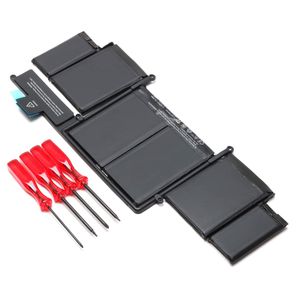
Description
Compatible Part Numbers:
A1582 020-8148
Compatible with Laptop Models:
Mac Book Pro 12.1 13" Retina A1502
MF839xx/A / MF840xx/A/ MF841xx/A/ MF843xx/A - (Early 2015 Version)
Mac Book Pro 13" Retina "Core i5" 2.7GHz
Mac Book Pro 13" Retina "Core i5" 2.9GHz
Mac Book Pro 13" Retina "Core i7" 3.1GHz
FAQ:
1.Q:why battery don't hold a charge, how to fix it?
A:this is new battery,for first use, we suggest buyer:
Remove the battery for a while
Install battery and full charge it by ac adapter
Leave charger and let the battery drain to shut off
Repeat above charging and discharging at least 2 times.
you charge the battery when power lower than 20%. If available, connect ac charger when doing computer work.
If run the battery shut down often, it will shorten the battery life.
2.Q:battery can't charge fully,how to fix it?
A: Remove the battery for a while
Install battery and full charge it by ac adapter
Leave charger and let the battery drain to shut off
Repeat above charging and discharging at least 2 times.
3.Q:Battery can't be recognized by my laptop, do i need exchange a new one,
A:we met this issue before, maybe because of your laptop system, we suggest you can:
Remove all battery drivers
Remove battery
Connect laptop using AC charger, double check no battery drivers installed
Connect battery
Drivers will install automatically
Full charge the battery by ac adapter
Leave charger and let the battery drain to shut off
Repeat full charge and full discharge about 2 times.
if still not be solved, please contact us and exchange a new one
A1582 020-8148
Compatible with Laptop Models:
Mac Book Pro 12.1 13" Retina A1502
MF839xx/A / MF840xx/A/ MF841xx/A/ MF843xx/A - (Early 2015 Version)
Mac Book Pro 13" Retina "Core i5" 2.7GHz
Mac Book Pro 13" Retina "Core i5" 2.9GHz
Mac Book Pro 13" Retina "Core i7" 3.1GHz
FAQ:
1.Q:why battery don't hold a charge, how to fix it?
A:this is new battery,for first use, we suggest buyer:
Remove the battery for a while
Install battery and full charge it by ac adapter
Leave charger and let the battery drain to shut off
Repeat above charging and discharging at least 2 times.
you charge the battery when power lower than 20%. If available, connect ac charger when doing computer work.
If run the battery shut down often, it will shorten the battery life.
2.Q:battery can't charge fully,how to fix it?
A: Remove the battery for a while
Install battery and full charge it by ac adapter
Leave charger and let the battery drain to shut off
Repeat above charging and discharging at least 2 times.
3.Q:Battery can't be recognized by my laptop, do i need exchange a new one,
A:we met this issue before, maybe because of your laptop system, we suggest you can:
Remove all battery drivers
Remove battery
Connect laptop using AC charger, double check no battery drivers installed
Connect battery
Drivers will install automatically
Full charge the battery by ac adapter
Leave charger and let the battery drain to shut off
Repeat full charge and full discharge about 2 times.
if still not be solved, please contact us and exchange a new one
A1582 Laptop Battery Replacement for MacBook Pro 13" Retina A1582 A1502 (2015 Version) MF839xx/A ME864 ME865 [11.42 V 74.9Wh]
Price is below average
Current Price
$45.99
Average
$47.99
Min Price
$36.99
Max Price
$58.99
Price dynamics
4%
Description
Compatible Part Numbers:
A1582 020-8148
Compatible with Laptop Models:
Mac Book Pro 12.1 13" Retina A1502
MF839xx/A / MF840xx/A/ MF841xx/A/ MF843xx/A - (Early 2015 Version)
Mac Book Pro 13" Retina "Core i5" 2.7GHz
Mac Book Pro 13" Retina "Core i5" 2.9GHz
Mac Book Pro 13" Retina "Core i7" 3.1GHz
FAQ:
1.Q:why battery don't hold a charge, how to fix it?
A:this is new battery,for first use, we suggest buyer:
Remove the battery for a while
Install battery and full charge it by ac adapter
Leave charger and let the battery drain to shut off
Repeat above charging and discharging at least 2 times.
you charge the battery when power lower than 20%. If available, connect ac charger when doing computer work.
If run the battery shut down often, it will shorten the battery life.
2.Q:battery can't charge fully,how to fix it?
A: Remove the battery for a while
Install battery and full charge it by ac adapter
Leave charger and let the battery drain to shut off
Repeat above charging and discharging at least 2 times.
3.Q:Battery can't be recognized by my laptop, do i need exchange a new one,
A:we met this issue before, maybe because of your laptop system, we suggest you can:
Remove all battery drivers
Remove battery
Connect laptop using AC charger, double check no battery drivers installed
Connect battery
Drivers will install automatically
Full charge the battery by ac adapter
Leave charger and let the battery drain to shut off
Repeat full charge and full discharge about 2 times.
if still not be solved, please contact us and exchange a new one
A1582 020-8148
Compatible with Laptop Models:
Mac Book Pro 12.1 13" Retina A1502
MF839xx/A / MF840xx/A/ MF841xx/A/ MF843xx/A - (Early 2015 Version)
Mac Book Pro 13" Retina "Core i5" 2.7GHz
Mac Book Pro 13" Retina "Core i5" 2.9GHz
Mac Book Pro 13" Retina "Core i7" 3.1GHz
FAQ:
1.Q:why battery don't hold a charge, how to fix it?
A:this is new battery,for first use, we suggest buyer:
Remove the battery for a while
Install battery and full charge it by ac adapter
Leave charger and let the battery drain to shut off
Repeat above charging and discharging at least 2 times.
you charge the battery when power lower than 20%. If available, connect ac charger when doing computer work.
If run the battery shut down often, it will shorten the battery life.
2.Q:battery can't charge fully,how to fix it?
A: Remove the battery for a while
Install battery and full charge it by ac adapter
Leave charger and let the battery drain to shut off
Repeat above charging and discharging at least 2 times.
3.Q:Battery can't be recognized by my laptop, do i need exchange a new one,
A:we met this issue before, maybe because of your laptop system, we suggest you can:
Remove all battery drivers
Remove battery
Connect laptop using AC charger, double check no battery drivers installed
Connect battery
Drivers will install automatically
Full charge the battery by ac adapter
Leave charger and let the battery drain to shut off
Repeat full charge and full discharge about 2 times.
if still not be solved, please contact us and exchange a new one
Price will be lower
in next 2 weeks
in next 2 weeks
According to the data, price will be lower in next two weeks, so not waste your money and track better price!

Similar products






































