Description
The difference compare to ordinary headphones:
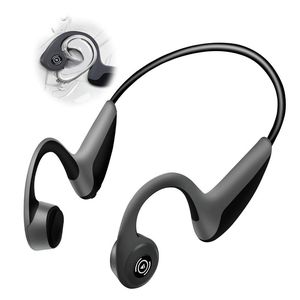
Traditional headphones send sound through your eardrums. Bone conduction headphones send sound through the bones of your skull. Instead of speakers, bone conduction headphones have transducers that send vibrations through your cheekbones to your cochleas, so your eardrums are free to take in your surroundings. The wireless headset microphone give you convenience of calling and listening to the music while doing sports or outdoor activities.
Operating instruction:
1.Charge
Charge the headphones with the included Micro USB charging cable. Red LED means it's charging, the LED indicator will turn blue from red when charging is complete.
2.Turn on/off
Keep pressing the volume up button for 3 seconds, there is a voice prompt by the word "Power on" or "Power off".
3.Pair
While the headphone is power off, press and hold the volume up button for 5 seconds until the LED flashes red and blue alternately and there is voice prompt by the word "Pairing".
4.Connect
In paring mode, enable the Bluetooth settings in your device and search the product, the product will be connected within seconds and there is a voice prompt by the word "Connected".
Specifications:
Bluetooth version: 4.1 CSR8645
Charging time: 1.5 hrs
Talking time: 6 hrs
Music time: 6 hrs
Standby time: 240 hrs
Battery capacity: 180 mAh
Transmission range: 33 ft
Traditional headphones send sound through your eardrums. Bone conduction headphones send sound through the bones of your skull. Instead of speakers, bone conduction headphones have transducers that send vibrations through your cheekbones to your cochleas, so your eardrums are free to take in your surroundings. The wireless headset microphone give you convenience of calling and listening to the music while doing sports or outdoor activities.
Operating instruction:
1.Charge
Charge the headphones with the included Micro USB charging cable. Red LED means it's charging, the LED indicator will turn blue from red when charging is complete.
2.Turn on/off
Keep pressing the volume up button for 3 seconds, there is a voice prompt by the word "Power on" or "Power off".
3.Pair
While the headphone is power off, press and hold the volume up button for 5 seconds until the LED flashes red and blue alternately and there is voice prompt by the word "Pairing".
4.Connect
In paring mode, enable the Bluetooth settings in your device and search the product, the product will be connected within seconds and there is a voice prompt by the word "Connected".
Specifications:
Bluetooth version: 4.1 CSR8645
Charging time: 1.5 hrs
Talking time: 6 hrs
Music time: 6 hrs
Standby time: 240 hrs
Battery capacity: 180 mAh
Transmission range: 33 ft
Earphones Microphone mic Built Titanium Earbuds Smartphones Enable Devices
Price is below average
Current Price
$29.99
Average
$49.5
Min Price
$29.99
Max Price
$59.99
Price dynamics
39%
Description
The difference compare to ordinary headphones:
Traditional headphones send sound through your eardrums. Bone conduction headphones send sound through the bones of your skull. Instead of speakers, bone conduction headphones have transducers that send vibrations through your cheekbones to your cochleas, so your eardrums are free to take in your surroundings. The wireless headset microphone give you convenience of calling and listening to the music while doing sports or outdoor activities.
Operating instruction:
1.Charge
Charge the headphones with the included Micro USB charging cable. Red LED means it's charging, the LED indicator will turn blue from red when charging is complete.
2.Turn on/off
Keep pressing the volume up button for 3 seconds, there is a voice prompt by the word "Power on" or "Power off".
3.Pair
While the headphone is power off, press and hold the volume up button for 5 seconds until the LED flashes red and blue alternately and there is voice prompt by the word "Pairing".
4.Connect
In paring mode, enable the Bluetooth settings in your device and search the product, the product will be connected within seconds and there is a voice prompt by the word "Connected".
Specifications:
Bluetooth version: 4.1 CSR8645
Charging time: 1.5 hrs
Talking time: 6 hrs
Music time: 6 hrs
Standby time: 240 hrs
Battery capacity: 180 mAh
Transmission range: 33 ft
Traditional headphones send sound through your eardrums. Bone conduction headphones send sound through the bones of your skull. Instead of speakers, bone conduction headphones have transducers that send vibrations through your cheekbones to your cochleas, so your eardrums are free to take in your surroundings. The wireless headset microphone give you convenience of calling and listening to the music while doing sports or outdoor activities.
Operating instruction:
1.Charge
Charge the headphones with the included Micro USB charging cable. Red LED means it's charging, the LED indicator will turn blue from red when charging is complete.
2.Turn on/off
Keep pressing the volume up button for 3 seconds, there is a voice prompt by the word "Power on" or "Power off".
3.Pair
While the headphone is power off, press and hold the volume up button for 5 seconds until the LED flashes red and blue alternately and there is voice prompt by the word "Pairing".
4.Connect
In paring mode, enable the Bluetooth settings in your device and search the product, the product will be connected within seconds and there is a voice prompt by the word "Connected".
Specifications:
Bluetooth version: 4.1 CSR8645
Charging time: 1.5 hrs
Talking time: 6 hrs
Music time: 6 hrs
Standby time: 240 hrs
Battery capacity: 180 mAh
Transmission range: 33 ft
Price will be lower
in next 2 weeks
in next 2 weeks
According to the data, price will be lower in next two weeks, so not waste your money and track better price!
Product review & video
hello guys sometimes it happens that your headphones or earphones don't come with an inbuilt mic audio mic is not working and you have to listen in to the audio to headphones and record your sound to the phone's microphone by default there's no such option in droid devices but there is an app on Play Store that can help you to use headphones and phone's microphone simultaneously if you just have to go to the Play Store search for an app named Lester or use which this is it just install it I have installed it already open it and go to the settings now by default this option will be on ticked you have to take this go back then next to the headphones you have to click on this icon by default this will be on this now you have to take on the internal microphone option and then click on turn now you're good to go and you will be able to use your phone's built-in mic with the earphones attache



Similar products



































