Description
Precision
A natural extension of you.
Bring your ideas to life with S Pen's responsiveness and control. With its fine 0.7mm tip and 4096 levels of pressure, your precise strokes will feel as graceful as putting pen to paper.
Remote camera access
Point, pose, and click from anywhere.
No more rushing to beat the timer, straining your arm for a selfie, or getting left out of a group shot. The S Pen's remote camera feature lets you be photographer, subject, and art director all at once.
Presentation control
Command your slideshow without touching your phone.
Own the pitch. Connect your Note9 to Samsung DeX, pull up your presentation, and switch slides with the S Pen to make an impression with just the press of a button.
Enhanced apps
Your favorite apps, but better.
The S Pen doesn't just snap selfies and switch slides. Use the S Pen to shuffle music or pause and play shows from up to 30 feet away.1 Connect your S Pen to a variety of installed and third-party apps3 or set custom commands for more control than ever.
Screen off memo
Ready when you are.
Pop out the S Pen to turn on the Screen off memo notepad?all without unlocking your phone. From to-do lists to notes, write and pin them to the Always On Display for easy access or find it later in the Samsung Notes app. See coordinating colors below.
Samsung Notes
Powerful productivity at your fingertips.
Discover the simplest way to keep it all together. The Samsung Notes app tracks your brainstorms, stores your Screen off memos, and categorizes your ideas so you can access meeting notes, project drawings, and other essentials with ease.
A natural extension of you.
Bring your ideas to life with S Pen's responsiveness and control. With its fine 0.7mm tip and 4096 levels of pressure, your precise strokes will feel as graceful as putting pen to paper.
Remote camera access
Point, pose, and click from anywhere.
No more rushing to beat the timer, straining your arm for a selfie, or getting left out of a group shot. The S Pen's remote camera feature lets you be photographer, subject, and art director all at once.
Presentation control
Command your slideshow without touching your phone.
Own the pitch. Connect your Note9 to Samsung DeX, pull up your presentation, and switch slides with the S Pen to make an impression with just the press of a button.
Enhanced apps
Your favorite apps, but better.
The S Pen doesn't just snap selfies and switch slides. Use the S Pen to shuffle music or pause and play shows from up to 30 feet away.1 Connect your S Pen to a variety of installed and third-party apps3 or set custom commands for more control than ever.
Screen off memo
Ready when you are.
Pop out the S Pen to turn on the Screen off memo notepad?all without unlocking your phone. From to-do lists to notes, write and pin them to the Always On Display for easy access or find it later in the Samsung Notes app. See coordinating colors below.
Samsung Notes
Powerful productivity at your fingertips.
Discover the simplest way to keep it all together. The Samsung Notes app tracks your brainstorms, stores your Screen off memos, and categorizes your ideas so you can access meeting notes, project drawings, and other essentials with ease.
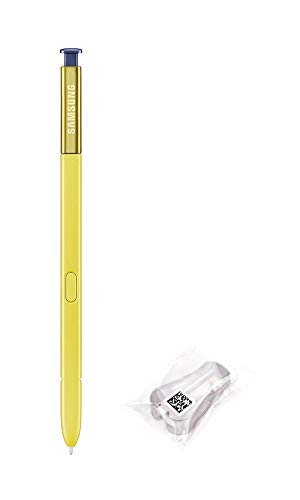
Samsung Galaxy Note9 Original Replacement S Pen EJ-PN960BLKGKR Yellow/Ocean Blue
Price is below average
Current Price
$29.99
Average
$33.51
Min Price
$26
Max Price
$49.99
Price dynamics
11%
Description
Precision
A natural extension of you.
Bring your ideas to life with S Pen's responsiveness and control. With its fine 0.7mm tip and 4096 levels of pressure, your precise strokes will feel as graceful as putting pen to paper.
Remote camera access
Point, pose, and click from anywhere.
No more rushing to beat the timer, straining your arm for a selfie, or getting left out of a group shot. The S Pen's remote camera feature lets you be photographer, subject, and art director all at once.
Presentation control
Command your slideshow without touching your phone.
Own the pitch. Connect your Note9 to Samsung DeX, pull up your presentation, and switch slides with the S Pen to make an impression with just the press of a button.
Enhanced apps
Your favorite apps, but better.
The S Pen doesn't just snap selfies and switch slides. Use the S Pen to shuffle music or pause and play shows from up to 30 feet away.1 Connect your S Pen to a variety of installed and third-party apps3 or set custom commands for more control than ever.
Screen off memo
Ready when you are.
Pop out the S Pen to turn on the Screen off memo notepad?all without unlocking your phone. From to-do lists to notes, write and pin them to the Always On Display for easy access or find it later in the Samsung Notes app. See coordinating colors below.
Samsung Notes
Powerful productivity at your fingertips.
Discover the simplest way to keep it all together. The Samsung Notes app tracks your brainstorms, stores your Screen off memos, and categorizes your ideas so you can access meeting notes, project drawings, and other essentials with ease.
A natural extension of you.
Bring your ideas to life with S Pen's responsiveness and control. With its fine 0.7mm tip and 4096 levels of pressure, your precise strokes will feel as graceful as putting pen to paper.
Remote camera access
Point, pose, and click from anywhere.
No more rushing to beat the timer, straining your arm for a selfie, or getting left out of a group shot. The S Pen's remote camera feature lets you be photographer, subject, and art director all at once.
Presentation control
Command your slideshow without touching your phone.
Own the pitch. Connect your Note9 to Samsung DeX, pull up your presentation, and switch slides with the S Pen to make an impression with just the press of a button.
Enhanced apps
Your favorite apps, but better.
The S Pen doesn't just snap selfies and switch slides. Use the S Pen to shuffle music or pause and play shows from up to 30 feet away.1 Connect your S Pen to a variety of installed and third-party apps3 or set custom commands for more control than ever.
Screen off memo
Ready when you are.
Pop out the S Pen to turn on the Screen off memo notepad?all without unlocking your phone. From to-do lists to notes, write and pin them to the Always On Display for easy access or find it later in the Samsung Notes app. See coordinating colors below.
Samsung Notes
Powerful productivity at your fingertips.
Discover the simplest way to keep it all together. The Samsung Notes app tracks your brainstorms, stores your Screen off memos, and categorizes your ideas so you can access meeting notes, project drawings, and other essentials with ease.
Price will be lower
in next 2 weeks
in next 2 weeks
According to the data, price will be lower in next two weeks, so not waste your money and track better price!
Product review & video
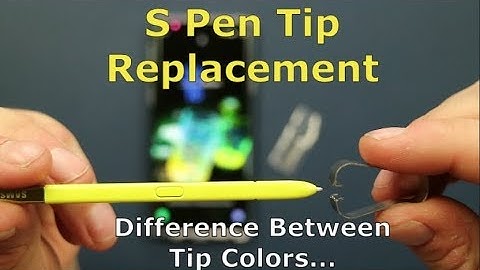
hello everybody Jimmy's Pro my hair back you another awesome video and in today's video I will show you how you're able to replace the tip on your S Pen for your Samsung Galaxy Note 8 as well as your Galaxy Note 9 now if you are brand new here at the channel of gym use promo and you own a samsung galaxy device don't forget to hit on that subscribe button as well as the Bell for notifications so you get notified for future videos and don't forget about that playlist tab on the very top to check out the entire playlist I've made so far for the samsung galaxy note 9 so inside of your box you do have a few important things other than just the cell phone and the wall charger you do have some adapters you also have your EKG headset along with additional earpieces for different ear sizes if you need either small medium or large and then the most important thing for the note series is this tool


Similar products