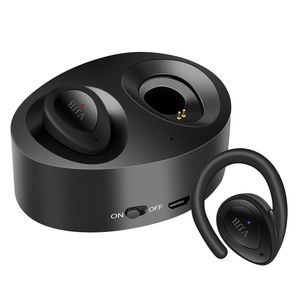
Description
How To Pair K2 Bluetooth Headset?
1. Hold down left and right earbuds together until two indicators flash red and blue alternately. (Only when flash red and blue by turns, meaning earbuds go into pairing mode).
2. Wait for another 5-10 secs, left and right earbuds will connect to each other automatically.
How To Use Bluetooth Earbuds:
Power On: Press multi-function keys about 4-7 seconds until the earbud led light flash red, at the same time there will be voice prompt "Power On" .
Power Off: Press multi-function keys about 4-7 seconds until the earbud led light disappears, at the same time there will be voice prompt "Power Off" .
How To Set The Language?
Hold down the earbuds for 4-7 second unit the led light flashes red and blue light nonstop. Then wear the earbud, please QUICK double-click the multi-function key to switch
Specs & Details
1.Version: BT4.1+EDR
2.Support: HSP/HFP/A2DP/AVRCP
3.Battery Capacity(Earbuds): 40mAh
4.Battery Capacity(Box): 450mAh(Provides 3-4 Times Charges)
5.Work Time: one for 3-4 hours, and a set for 2-3 hours
6.Charge Time: About 1-2 hours
7.Stand-by Time: one for 120 hours, and a set for 60 hours
Package Including:
2x TWS-K2 Wireless Bluetooth Earbuds
3x Spare Ear Tips( L/M/S)
2x Ear Hooks
1x 450 mAh Charging Box
1x Usb Charging Cable
1x User Manual
Please Note:
1. When calling, only the Left Channel Earbuds has Voice. This safety feature allows you to hear the traffic while driving.
2. Make sure earbuds and charging case full charged when first use.
1. Hold down left and right earbuds together until two indicators flash red and blue alternately. (Only when flash red and blue by turns, meaning earbuds go into pairing mode).
2. Wait for another 5-10 secs, left and right earbuds will connect to each other automatically.
How To Use Bluetooth Earbuds:
Power On: Press multi-function keys about 4-7 seconds until the earbud led light flash red, at the same time there will be voice prompt "Power On" .
Power Off: Press multi-function keys about 4-7 seconds until the earbud led light disappears, at the same time there will be voice prompt "Power Off" .
How To Set The Language?
Hold down the earbuds for 4-7 second unit the led light flashes red and blue light nonstop. Then wear the earbud, please QUICK double-click the multi-function key to switch
Specs & Details
1.Version: BT4.1+EDR
2.Support: HSP/HFP/A2DP/AVRCP
3.Battery Capacity(Earbuds): 40mAh
4.Battery Capacity(Box): 450mAh(Provides 3-4 Times Charges)
5.Work Time: one for 3-4 hours, and a set for 2-3 hours
6.Charge Time: About 1-2 hours
7.Stand-by Time: one for 120 hours, and a set for 60 hours
Package Including:
2x TWS-K2 Wireless Bluetooth Earbuds
3x Spare Ear Tips( L/M/S)
2x Ear Hooks
1x 450 mAh Charging Box
1x Usb Charging Cable
1x User Manual
Please Note:
1. When calling, only the Left Channel Earbuds has Voice. This safety feature allows you to hear the traffic while driving.
2. Make sure earbuds and charging case full charged when first use.
VJJB Bluetooth Headphones, TWS K2 Mini Twins Stereo Wireless Earbuds, Mini Cordfree Invisible Earphones Bluetooth 4.1 Wireless Headsets with Portable Charging Case for iPhone Samsung Smartphones
Price is below average
Current Price
$23.09
Average
$23.56
Min Price
$18.42
Max Price
$29.9
Price dynamics
2%
Description
How To Pair K2 Bluetooth Headset?
1. Hold down left and right earbuds together until two indicators flash red and blue alternately. (Only when flash red and blue by turns, meaning earbuds go into pairing mode).
2. Wait for another 5-10 secs, left and right earbuds will connect to each other automatically.
How To Use Bluetooth Earbuds:
Power On: Press multi-function keys about 4-7 seconds until the earbud led light flash red, at the same time there will be voice prompt "Power On" .
Power Off: Press multi-function keys about 4-7 seconds until the earbud led light disappears, at the same time there will be voice prompt "Power Off" .
How To Set The Language?
Hold down the earbuds for 4-7 second unit the led light flashes red and blue light nonstop. Then wear the earbud, please QUICK double-click the multi-function key to switch
Specs & Details
1.Version: BT4.1+EDR
2.Support: HSP/HFP/A2DP/AVRCP
3.Battery Capacity(Earbuds): 40mAh
4.Battery Capacity(Box): 450mAh(Provides 3-4 Times Charges)
5.Work Time: one for 3-4 hours, and a set for 2-3 hours
6.Charge Time: About 1-2 hours
7.Stand-by Time: one for 120 hours, and a set for 60 hours
Package Including:
2x TWS-K2 Wireless Bluetooth Earbuds
3x Spare Ear Tips( L/M/S)
2x Ear Hooks
1x 450 mAh Charging Box
1x Usb Charging Cable
1x User Manual
Please Note:
1. When calling, only the Left Channel Earbuds has Voice. This safety feature allows you to hear the traffic while driving.
2. Make sure earbuds and charging case full charged when first use.
1. Hold down left and right earbuds together until two indicators flash red and blue alternately. (Only when flash red and blue by turns, meaning earbuds go into pairing mode).
2. Wait for another 5-10 secs, left and right earbuds will connect to each other automatically.
How To Use Bluetooth Earbuds:
Power On: Press multi-function keys about 4-7 seconds until the earbud led light flash red, at the same time there will be voice prompt "Power On" .
Power Off: Press multi-function keys about 4-7 seconds until the earbud led light disappears, at the same time there will be voice prompt "Power Off" .
How To Set The Language?
Hold down the earbuds for 4-7 second unit the led light flashes red and blue light nonstop. Then wear the earbud, please QUICK double-click the multi-function key to switch
Specs & Details
1.Version: BT4.1+EDR
2.Support: HSP/HFP/A2DP/AVRCP
3.Battery Capacity(Earbuds): 40mAh
4.Battery Capacity(Box): 450mAh(Provides 3-4 Times Charges)
5.Work Time: one for 3-4 hours, and a set for 2-3 hours
6.Charge Time: About 1-2 hours
7.Stand-by Time: one for 120 hours, and a set for 60 hours
Package Including:
2x TWS-K2 Wireless Bluetooth Earbuds
3x Spare Ear Tips( L/M/S)
2x Ear Hooks
1x 450 mAh Charging Box
1x Usb Charging Cable
1x User Manual
Please Note:
1. When calling, only the Left Channel Earbuds has Voice. This safety feature allows you to hear the traffic while driving.
2. Make sure earbuds and charging case full charged when first use.
Price will be lower
in next 2 weeks
in next 2 weeks
According to the data, price will be lower in next two weeks, so not waste your money and track better price!

Similar products



































