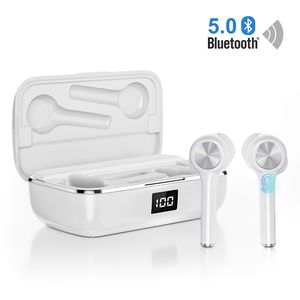
Description
Specification:
Bluetooth version: Bluetooth V5.0
Range: 15 m (without obstacles). 6 H
Charging time: approx. 2 H
The charging case can charge the headset 4-6 times.
User Guide
Bluetooth Connection: Open the charging case and then Auto pair with your recently connected smartphone.
Play / Pause / Answer / End a call: Single-click MFB
Previous: Triple-click MFB
Next: Double-click MFB to reject a call: Press and hold MFB for about 2 seconds.
Activate the voice assistant: Hold down MFB for about 2 seconds while in music or standby mode.
Two modes
Stereo mode
The earphones can be automatically turned on and paired when two earphones are removed from the charging case. At this time, activate the Bluetooth of the mobile phone to search for # OR02 #.
Mono mode
The headset can be automatically turned on and paired when one of the earbuds is removed At this time, activate the Bluetooth of the cell phone to search for # OR02-L # or # OR02-R #.
Attention 1.Please press the charging case button before removing the headphones or after inserting them. 2.When the pairing time is less than 3 minutes, it will be turned off automatically.
3.In stereo mode, the host headphone (L or R) consumes more power, making it faster to turn off, but the other (R or L) can still be used alone. 4.When the headset is not removed from the charging cradle, press and hold the MFB for about 3 seconds to turn on the power.
Scope of delivery
1 pair * Earphones and 2 pairs * Ear plugs and 1 piece * Type C charging cable
1 piece * Charging case
1 piece * Multilingual user manual
1 piece * Warm Tips Map
Bluetooth version: Bluetooth V5.0
Range: 15 m (without obstacles). 6 H
Charging time: approx. 2 H
The charging case can charge the headset 4-6 times.
User Guide
Bluetooth Connection: Open the charging case and then Auto pair with your recently connected smartphone.
Play / Pause / Answer / End a call: Single-click MFB
Previous: Triple-click MFB
Next: Double-click MFB to reject a call: Press and hold MFB for about 2 seconds.
Activate the voice assistant: Hold down MFB for about 2 seconds while in music or standby mode.
Two modes
Stereo mode
The earphones can be automatically turned on and paired when two earphones are removed from the charging case. At this time, activate the Bluetooth of the mobile phone to search for # OR02 #.
Mono mode
The headset can be automatically turned on and paired when one of the earbuds is removed At this time, activate the Bluetooth of the cell phone to search for # OR02-L # or # OR02-R #.
Attention 1.Please press the charging case button before removing the headphones or after inserting them. 2.When the pairing time is less than 3 minutes, it will be turned off automatically.
3.In stereo mode, the host headphone (L or R) consumes more power, making it faster to turn off, but the other (R or L) can still be used alone. 4.When the headset is not removed from the charging cradle, press and hold the MFB for about 3 seconds to turn on the power.
Scope of delivery
1 pair * Earphones and 2 pairs * Ear plugs and 1 piece * Type C charging cable
1 piece * Charging case
1 piece * Multilingual user manual
1 piece * Warm Tips Map
Ture Wireless Earbuds Bluetooth 5.0, in-Ear Noise Cancelling Bluetooth Headphones 40H Playtime with Dual-Mic Stereo Headset Touch Control Compatible with Smartphones Tablets
Price is below average
Current Price
$53.99
Average
$54.77
Min Price
$53.99
Max Price
$55.55
Price dynamics
1%
Description
Specification:
Bluetooth version: Bluetooth V5.0
Range: 15 m (without obstacles). 6 H
Charging time: approx. 2 H
The charging case can charge the headset 4-6 times.
User Guide
Bluetooth Connection: Open the charging case and then Auto pair with your recently connected smartphone.
Play / Pause / Answer / End a call: Single-click MFB
Previous: Triple-click MFB
Next: Double-click MFB to reject a call: Press and hold MFB for about 2 seconds.
Activate the voice assistant: Hold down MFB for about 2 seconds while in music or standby mode.
Two modes
Stereo mode
The earphones can be automatically turned on and paired when two earphones are removed from the charging case. At this time, activate the Bluetooth of the mobile phone to search for # OR02 #.
Mono mode
The headset can be automatically turned on and paired when one of the earbuds is removed At this time, activate the Bluetooth of the cell phone to search for # OR02-L # or # OR02-R #.
Attention 1.Please press the charging case button before removing the headphones or after inserting them. 2.When the pairing time is less than 3 minutes, it will be turned off automatically.
3.In stereo mode, the host headphone (L or R) consumes more power, making it faster to turn off, but the other (R or L) can still be used alone. 4.When the headset is not removed from the charging cradle, press and hold the MFB for about 3 seconds to turn on the power.
Scope of delivery
1 pair * Earphones and 2 pairs * Ear plugs and 1 piece * Type C charging cable
1 piece * Charging case
1 piece * Multilingual user manual
1 piece * Warm Tips Map
Bluetooth version: Bluetooth V5.0
Range: 15 m (without obstacles). 6 H
Charging time: approx. 2 H
The charging case can charge the headset 4-6 times.
User Guide
Bluetooth Connection: Open the charging case and then Auto pair with your recently connected smartphone.
Play / Pause / Answer / End a call: Single-click MFB
Previous: Triple-click MFB
Next: Double-click MFB to reject a call: Press and hold MFB for about 2 seconds.
Activate the voice assistant: Hold down MFB for about 2 seconds while in music or standby mode.
Two modes
Stereo mode
The earphones can be automatically turned on and paired when two earphones are removed from the charging case. At this time, activate the Bluetooth of the mobile phone to search for # OR02 #.
Mono mode
The headset can be automatically turned on and paired when one of the earbuds is removed At this time, activate the Bluetooth of the cell phone to search for # OR02-L # or # OR02-R #.
Attention 1.Please press the charging case button before removing the headphones or after inserting them. 2.When the pairing time is less than 3 minutes, it will be turned off automatically.
3.In stereo mode, the host headphone (L or R) consumes more power, making it faster to turn off, but the other (R or L) can still be used alone. 4.When the headset is not removed from the charging cradle, press and hold the MFB for about 3 seconds to turn on the power.
Scope of delivery
1 pair * Earphones and 2 pairs * Ear plugs and 1 piece * Type C charging cable
1 piece * Charging case
1 piece * Multilingual user manual
1 piece * Warm Tips Map
Price will be lower
in next 2 weeks
in next 2 weeks
According to the data, price will be lower in next two weeks, so not waste your money and track better price!

Similar products



































