Description
Package included:
1x Surface Pen
1x Battery AAAA
1x Hang Belt
1x User Manual
Compatible with the following devices :
Microsoft Surface Pro3 / Microsoft Surface Pro4 / Microsoft Surface Pro(2017) / Microsoft Surface Laptop / Microsoft Surface Book Series / Microsoft Surface Studio / Microsoft Surface Go
Available time
Continuous Use : 200 Hours
Standby : 360 Days Max.
Exchangeable Battery
AAAA (625mAH/1.5V) X 1
Pen Tip
Plastic POM and Anti-friction tip with 1.5mm diameter.
The tip on Ink is durable and should be able to cover over 20 km before getting worn out on smooth glass
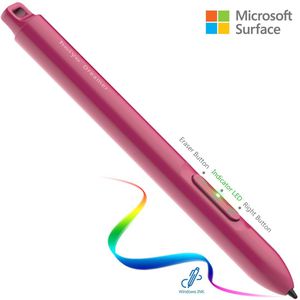
Eraser Button
Push the button to erase in the Apps
In some Apps, need to push the pen tip to enable the function.
Indicator LED
(1) Green - Power On
(2) None - Power Off
(3) Flash Green
Fast-1 second/time, power off final sequence, it will flash 5 times before power off.
Slow-3 seconds/time, low power, need to exchange battery. But It still can work for 3 hours.
Right Button
(1)Use as the right click function in different Apps with different action.
Just push the button on the touch screen to enable the function.
(2)Push the button about 5 seconds to wake up the pen.( Indicator LED turns to green)
Push the button about 10 seconds to power off.( After 5 seconds, LED flash 5 seconds)
Be aware that never let go during 10 seconds if want to power off.
Pen Cap
(1)Screw out to exchange the AAAA Battery
(2)Tie the hang belt through the hole on the pen cap
1x Surface Pen
1x Battery AAAA
1x Hang Belt
1x User Manual
Compatible with the following devices :
Microsoft Surface Pro3 / Microsoft Surface Pro4 / Microsoft Surface Pro(2017) / Microsoft Surface Laptop / Microsoft Surface Book Series / Microsoft Surface Studio / Microsoft Surface Go
Available time
Continuous Use : 200 Hours
Standby : 360 Days Max.
Exchangeable Battery
AAAA (625mAH/1.5V) X 1
Pen Tip
Plastic POM and Anti-friction tip with 1.5mm diameter.
The tip on Ink is durable and should be able to cover over 20 km before getting worn out on smooth glass
Eraser Button
Push the button to erase in the Apps
In some Apps, need to push the pen tip to enable the function.
Indicator LED
(1) Green - Power On
(2) None - Power Off
(3) Flash Green
Fast-1 second/time, power off final sequence, it will flash 5 times before power off.
Slow-3 seconds/time, low power, need to exchange battery. But It still can work for 3 hours.
Right Button
(1)Use as the right click function in different Apps with different action.
Just push the button on the touch screen to enable the function.
(2)Push the button about 5 seconds to wake up the pen.( Indicator LED turns to green)
Push the button about 10 seconds to power off.( After 5 seconds, LED flash 5 seconds)
Be aware that never let go during 10 seconds if want to power off.
Pen Cap
(1)Screw out to exchange the AAAA Battery
(2)Tie the hang belt through the hole on the pen cap
Surface Pen, Microsoft Certified 4096 Pressure Sensitivity Surface Stylus with AAAA Battery, 200hr Continuous Using Surface Go Pen Compatible with Surface Pro/Go/Laptop/Book/Studio/Neo(Red)
Current Price
$29.99
Average
$27.61
Min Price
$26.49
Max Price
$29.99
Price dynamics
8%
Description
Package included:
1x Surface Pen
1x Battery AAAA
1x Hang Belt
1x User Manual
Compatible with the following devices :
Microsoft Surface Pro3 / Microsoft Surface Pro4 / Microsoft Surface Pro(2017) / Microsoft Surface Laptop / Microsoft Surface Book Series / Microsoft Surface Studio / Microsoft Surface Go
Available time
Continuous Use : 200 Hours
Standby : 360 Days Max.
Exchangeable Battery
AAAA (625mAH/1.5V) X 1
Pen Tip
Plastic POM and Anti-friction tip with 1.5mm diameter.
The tip on Ink is durable and should be able to cover over 20 km before getting worn out on smooth glass
Eraser Button
Push the button to erase in the Apps
In some Apps, need to push the pen tip to enable the function.
Indicator LED
(1) Green - Power On
(2) None - Power Off
(3) Flash Green
Fast-1 second/time, power off final sequence, it will flash 5 times before power off.
Slow-3 seconds/time, low power, need to exchange battery. But It still can work for 3 hours.
Right Button
(1)Use as the right click function in different Apps with different action.
Just push the button on the touch screen to enable the function.
(2)Push the button about 5 seconds to wake up the pen.( Indicator LED turns to green)
Push the button about 10 seconds to power off.( After 5 seconds, LED flash 5 seconds)
Be aware that never let go during 10 seconds if want to power off.
Pen Cap
(1)Screw out to exchange the AAAA Battery
(2)Tie the hang belt through the hole on the pen cap
1x Surface Pen
1x Battery AAAA
1x Hang Belt
1x User Manual
Compatible with the following devices :
Microsoft Surface Pro3 / Microsoft Surface Pro4 / Microsoft Surface Pro(2017) / Microsoft Surface Laptop / Microsoft Surface Book Series / Microsoft Surface Studio / Microsoft Surface Go
Available time
Continuous Use : 200 Hours
Standby : 360 Days Max.
Exchangeable Battery
AAAA (625mAH/1.5V) X 1
Pen Tip
Plastic POM and Anti-friction tip with 1.5mm diameter.
The tip on Ink is durable and should be able to cover over 20 km before getting worn out on smooth glass
Eraser Button
Push the button to erase in the Apps
In some Apps, need to push the pen tip to enable the function.
Indicator LED
(1) Green - Power On
(2) None - Power Off
(3) Flash Green
Fast-1 second/time, power off final sequence, it will flash 5 times before power off.
Slow-3 seconds/time, low power, need to exchange battery. But It still can work for 3 hours.
Right Button
(1)Use as the right click function in different Apps with different action.
Just push the button on the touch screen to enable the function.
(2)Push the button about 5 seconds to wake up the pen.( Indicator LED turns to green)
Push the button about 10 seconds to power off.( After 5 seconds, LED flash 5 seconds)
Be aware that never let go during 10 seconds if want to power off.
Pen Cap
(1)Screw out to exchange the AAAA Battery
(2)Tie the hang belt through the hole on the pen cap
Price will be lower
in next 2 weeks
in next 2 weeks
According to the data, price will be lower in next two weeks, so not waste your money and track better price!
Product review & video
>> It was very important
for us as we're building Windows 10 to make sure that this does more than just
take handwritten notes, sign your name or circle something. We want to make it, so that
you can use your Surface Pen as a mouse and a keyboard
throughout Windows. So I want to show you a bit
about how that works. By default, your pen will behave
like a mouse throughout Windows. So as I press the Start Menu or if I'm scrolling through the different
apps and tiles that I have, click and drag is
just press and hold, and move your Pen across the screen. It will behave like that mouse. Now, if I want to
right-click on something, on the barrel of my Pen, this flat edge here, is where I have this button. I'm going to press and hold
on this right-click button, and then tap anywhere on the screen. That's going to perform
the right-click function wherever I'd like. So I have all of
that nice ad


Similar products


































