Description
PLEASE CONTACT US IN TIME IF YOU MEET PROBLEMS THAT YOU CAN'T SOLVE :
Dear Buyer: If you meet any problems with smart watch, please don't worry, just send us an email, we will solve your problems in time, sometimes you may just don't know why it happens, please contact us, we will try our best to make you have a happy shopping experience.
BRING BACK A FITNESS TRACKER TO LOOK AT YOUR BOD'S HIDDEN DATAS!
( Take a little time to learn about it, it will be a data machine. If you don't, it may just a beautiful watch.)
Next, I will briefly introduce the correct smart watch use method and answer common questions.
1. When you get your smart watch, press the button beside the smart watch screen for a few seconds to start up. ( If it's not on, don't worry, there should be no electricity, just charge it for two hours)
2. Install APP: Scan QR code by mobile phone or search for "H Band" in APP store or Google Play to download the APP, then enter into the app, click setting-bind the device, select the same device name with your smart watch to connect.
3. After download the APP, please spend a little time to learn the functions in app, you will understand your smart watch more fully with app. Also please turn on the phone app permissions.
4. You can swipe the screen up and down to switch between the watch's features
5. In addition to the various functions of the watch, there are more functions on the APP that you can use in detail.
IF YOU STILL HAVE SOME QUESTIONS OR MEET SOME PROBLEMS AFTER TAKE TIME TO LEARN ABOUT IT, PLEASE FEEL FREE TO CONTACT US, WE WILL HELP YOU IN TIME!
Dear Buyer: If you meet any problems with smart watch, please don't worry, just send us an email, we will solve your problems in time, sometimes you may just don't know why it happens, please contact us, we will try our best to make you have a happy shopping experience.
BRING BACK A FITNESS TRACKER TO LOOK AT YOUR BOD'S HIDDEN DATAS!
( Take a little time to learn about it, it will be a data machine. If you don't, it may just a beautiful watch.)
Next, I will briefly introduce the correct smart watch use method and answer common questions.
1. When you get your smart watch, press the button beside the smart watch screen for a few seconds to start up. ( If it's not on, don't worry, there should be no electricity, just charge it for two hours)
2. Install APP: Scan QR code by mobile phone or search for "H Band" in APP store or Google Play to download the APP, then enter into the app, click setting-bind the device, select the same device name with your smart watch to connect.
3. After download the APP, please spend a little time to learn the functions in app, you will understand your smart watch more fully with app. Also please turn on the phone app permissions.
4. You can swipe the screen up and down to switch between the watch's features
5. In addition to the various functions of the watch, there are more functions on the APP that you can use in detail.
IF YOU STILL HAVE SOME QUESTIONS OR MEET SOME PROBLEMS AFTER TAKE TIME TO LEARN ABOUT IT, PLEASE FEEL FREE TO CONTACT US, WE WILL HELP YOU IN TIME!
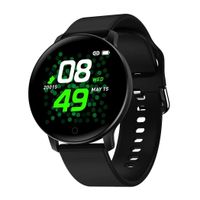
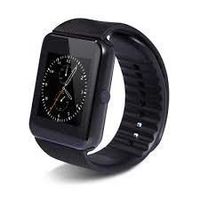
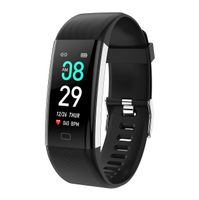
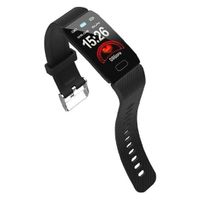
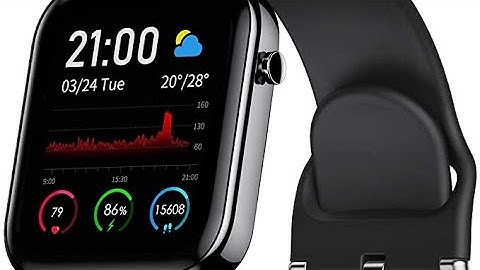
maxtop Smart Watch with Curved Screen - Waterproof Health Watch for Android/iOS Phone with All Day Heart Rate Monitoring and Alarm, Sleep Mornitoring and Exercise Data Monitoring for Unisex (Black)
Current Price
$52.99
Average
$52.99
Min Price
$52.99
Max Price
$52.99
Description
PLEASE CONTACT US IN TIME IF YOU MEET PROBLEMS THAT YOU CAN'T SOLVE :
Dear Buyer: If you meet any problems with smart watch, please don't worry, just send us an email, we will solve your problems in time, sometimes you may just don't know why it happens, please contact us, we will try our best to make you have a happy shopping experience.
BRING BACK A FITNESS TRACKER TO LOOK AT YOUR BOD'S HIDDEN DATAS!
( Take a little time to learn about it, it will be a data machine. If you don't, it may just a beautiful watch.)
Next, I will briefly introduce the correct smart watch use method and answer common questions.
1. When you get your smart watch, press the button beside the smart watch screen for a few seconds to start up. ( If it's not on, don't worry, there should be no electricity, just charge it for two hours)
2. Install APP: Scan QR code by mobile phone or search for "H Band" in APP store or Google Play to download the APP, then enter into the app, click setting-bind the device, select the same device name with your smart watch to connect.
3. After download the APP, please spend a little time to learn the functions in app, you will understand your smart watch more fully with app. Also please turn on the phone app permissions.
4. You can swipe the screen up and down to switch between the watch's features
5. In addition to the various functions of the watch, there are more functions on the APP that you can use in detail.
IF YOU STILL HAVE SOME QUESTIONS OR MEET SOME PROBLEMS AFTER TAKE TIME TO LEARN ABOUT IT, PLEASE FEEL FREE TO CONTACT US, WE WILL HELP YOU IN TIME!
Dear Buyer: If you meet any problems with smart watch, please don't worry, just send us an email, we will solve your problems in time, sometimes you may just don't know why it happens, please contact us, we will try our best to make you have a happy shopping experience.
BRING BACK A FITNESS TRACKER TO LOOK AT YOUR BOD'S HIDDEN DATAS!
( Take a little time to learn about it, it will be a data machine. If you don't, it may just a beautiful watch.)
Next, I will briefly introduce the correct smart watch use method and answer common questions.
1. When you get your smart watch, press the button beside the smart watch screen for a few seconds to start up. ( If it's not on, don't worry, there should be no electricity, just charge it for two hours)
2. Install APP: Scan QR code by mobile phone or search for "H Band" in APP store or Google Play to download the APP, then enter into the app, click setting-bind the device, select the same device name with your smart watch to connect.
3. After download the APP, please spend a little time to learn the functions in app, you will understand your smart watch more fully with app. Also please turn on the phone app permissions.
4. You can swipe the screen up and down to switch between the watch's features
5. In addition to the various functions of the watch, there are more functions on the APP that you can use in detail.
IF YOU STILL HAVE SOME QUESTIONS OR MEET SOME PROBLEMS AFTER TAKE TIME TO LEARN ABOUT IT, PLEASE FEEL FREE TO CONTACT US, WE WILL HELP YOU IN TIME!
Price will be lower
in next 2 weeks
in next 2 weeks
According to the data, price will be lower in next two weeks, so not waste your money and track better price!
Product review & video
hey guys do you want to get an apple watch or a fitbit but they're way too expensive and can't justify the 250 or 300 what do you think this is 100 70 50 30. stay tuned and you'll find out so getting right to the point this item is thirty dollars in canada so let's open it up and see the features that we get inside so just looking at the box you get camera control track steps calories and notifications about text messages now on ios you can't respond to these uh you have call notification waterproof and a heart rate sensor and sleep monitor so let's check it out that's a nice it's a slice it's like me getting out of pants at night so you have your fit bit esque charger usb and your watch includes one band looks pretty cool looks kind of like an apple come on you got juice come on man you can do it i believe yeah hello whoa you booted up fast whoa the ui is interactive right away that's

Similar products