Description
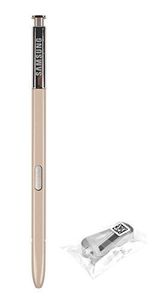
The color of the product is actually close to beige. Please refer to the actual product picture.
Meet your new best pen
S Pen replicates the ease, accuracy, and size of a real pen, allowing for a natural drawing and writing experience. The refined elastomer tip gaurantees unsurpassable accuracy. Also, it's battery-free.
4096 Levels of pen pressure.
0.7 Millimeter pen tip
Live Message
Say it with a hand‑drawn message.
Draw your own emojis, make animated GIFs or write handwritten messages on photos. Live messaging with the S Pen makes every message a more personal one.
Smart select
Create your own GIFs.
Use the S Pen's Smart select feature to select a section of a video and share them with your friends or on social media. You can also select intricate shapes from images to share or paste where you need them.
Samsung Notes
Draw it like you dreamed it.
Use the S Pen to sketch drawings or take the time to create a masterpiece. Bring all your ideas to life with Samsung Notes' selection of brushes, pens and colors.
Screen off memo
Take notes without unlocking.
Scribble notes, make lists and capture brilliant ideas while they come to you. Just remove the S Pen and screen off memo lets you write notes straight from standby - and can keep them handy by pinning them to the Always On Display.
Productivity tools
Tackle your to‑do list.
Just because you're not at a computer doesn't mean you can't be productive. Comb through fine-print, read a foreign language, multitask and mark up documents on the go using the S Pen's unique hover interaction.
Meet your new best pen
S Pen replicates the ease, accuracy, and size of a real pen, allowing for a natural drawing and writing experience. The refined elastomer tip gaurantees unsurpassable accuracy. Also, it's battery-free.
4096 Levels of pen pressure.
0.7 Millimeter pen tip
Live Message
Say it with a hand‑drawn message.
Draw your own emojis, make animated GIFs or write handwritten messages on photos. Live messaging with the S Pen makes every message a more personal one.
Smart select
Create your own GIFs.
Use the S Pen's Smart select feature to select a section of a video and share them with your friends or on social media. You can also select intricate shapes from images to share or paste where you need them.
Samsung Notes
Draw it like you dreamed it.
Use the S Pen to sketch drawings or take the time to create a masterpiece. Bring all your ideas to life with Samsung Notes' selection of brushes, pens and colors.
Screen off memo
Take notes without unlocking.
Scribble notes, make lists and capture brilliant ideas while they come to you. Just remove the S Pen and screen off memo lets you write notes straight from standby - and can keep them handy by pinning them to the Always On Display.
Productivity tools
Tackle your to‑do list.
Just because you're not at a computer doesn't mean you can't be productive. Comb through fine-print, read a foreign language, multitask and mark up documents on the go using the S Pen's unique hover interaction.
Samsung Korea Galaxy Note8 Original Replacement S-Pen, EJ-PN950BFEGKR (Gold)
Current Price
$29.05
Average
$28.88
Min Price
$22.99
Max Price
$29.5
Price dynamics
1%
Description
The color of the product is actually close to beige. Please refer to the actual product picture.
Meet your new best pen
S Pen replicates the ease, accuracy, and size of a real pen, allowing for a natural drawing and writing experience. The refined elastomer tip gaurantees unsurpassable accuracy. Also, it's battery-free.
4096 Levels of pen pressure.
0.7 Millimeter pen tip
Live Message
Say it with a hand‑drawn message.
Draw your own emojis, make animated GIFs or write handwritten messages on photos. Live messaging with the S Pen makes every message a more personal one.
Smart select
Create your own GIFs.
Use the S Pen's Smart select feature to select a section of a video and share them with your friends or on social media. You can also select intricate shapes from images to share or paste where you need them.
Samsung Notes
Draw it like you dreamed it.
Use the S Pen to sketch drawings or take the time to create a masterpiece. Bring all your ideas to life with Samsung Notes' selection of brushes, pens and colors.
Screen off memo
Take notes without unlocking.
Scribble notes, make lists and capture brilliant ideas while they come to you. Just remove the S Pen and screen off memo lets you write notes straight from standby - and can keep them handy by pinning them to the Always On Display.
Productivity tools
Tackle your to‑do list.
Just because you're not at a computer doesn't mean you can't be productive. Comb through fine-print, read a foreign language, multitask and mark up documents on the go using the S Pen's unique hover interaction.
Meet your new best pen
S Pen replicates the ease, accuracy, and size of a real pen, allowing for a natural drawing and writing experience. The refined elastomer tip gaurantees unsurpassable accuracy. Also, it's battery-free.
4096 Levels of pen pressure.
0.7 Millimeter pen tip
Live Message
Say it with a hand‑drawn message.
Draw your own emojis, make animated GIFs or write handwritten messages on photos. Live messaging with the S Pen makes every message a more personal one.
Smart select
Create your own GIFs.
Use the S Pen's Smart select feature to select a section of a video and share them with your friends or on social media. You can also select intricate shapes from images to share or paste where you need them.
Samsung Notes
Draw it like you dreamed it.
Use the S Pen to sketch drawings or take the time to create a masterpiece. Bring all your ideas to life with Samsung Notes' selection of brushes, pens and colors.
Screen off memo
Take notes without unlocking.
Scribble notes, make lists and capture brilliant ideas while they come to you. Just remove the S Pen and screen off memo lets you write notes straight from standby - and can keep them handy by pinning them to the Always On Display.
Productivity tools
Tackle your to‑do list.
Just because you're not at a computer doesn't mean you can't be productive. Comb through fine-print, read a foreign language, multitask and mark up documents on the go using the S Pen's unique hover interaction.
Price will be lower
in next 2 weeks
in next 2 weeks
According to the data, price will be lower in next two weeks, so not waste your money and track better price!
Product review & video
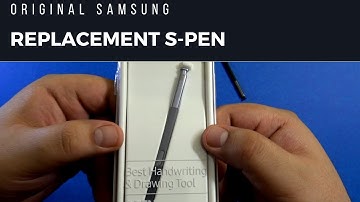
hello everyone welcome to another video from your tech today in this video we're gonna take a look at a problem that I have been having with the S Pen that came with my note 8 so a brief history is that this S Pen broke from here a few months back probably one and a half months back and it was not due to force or anything it just broke so easily from here and I have noticed a lot of people complaining about this and there are videos out there that the S Pen of the note it breaks from here very easily so I guess this is a design flaw or something like that from Samsung I'm not really sure but for me it broke and then for the first time I just glued it together very carefully and it was working for another 20 days or something and then obviously it broke again the second time when I glued it back together this stopped working because the glue got into that mechanism where this clicking th


Similar products


































