Description
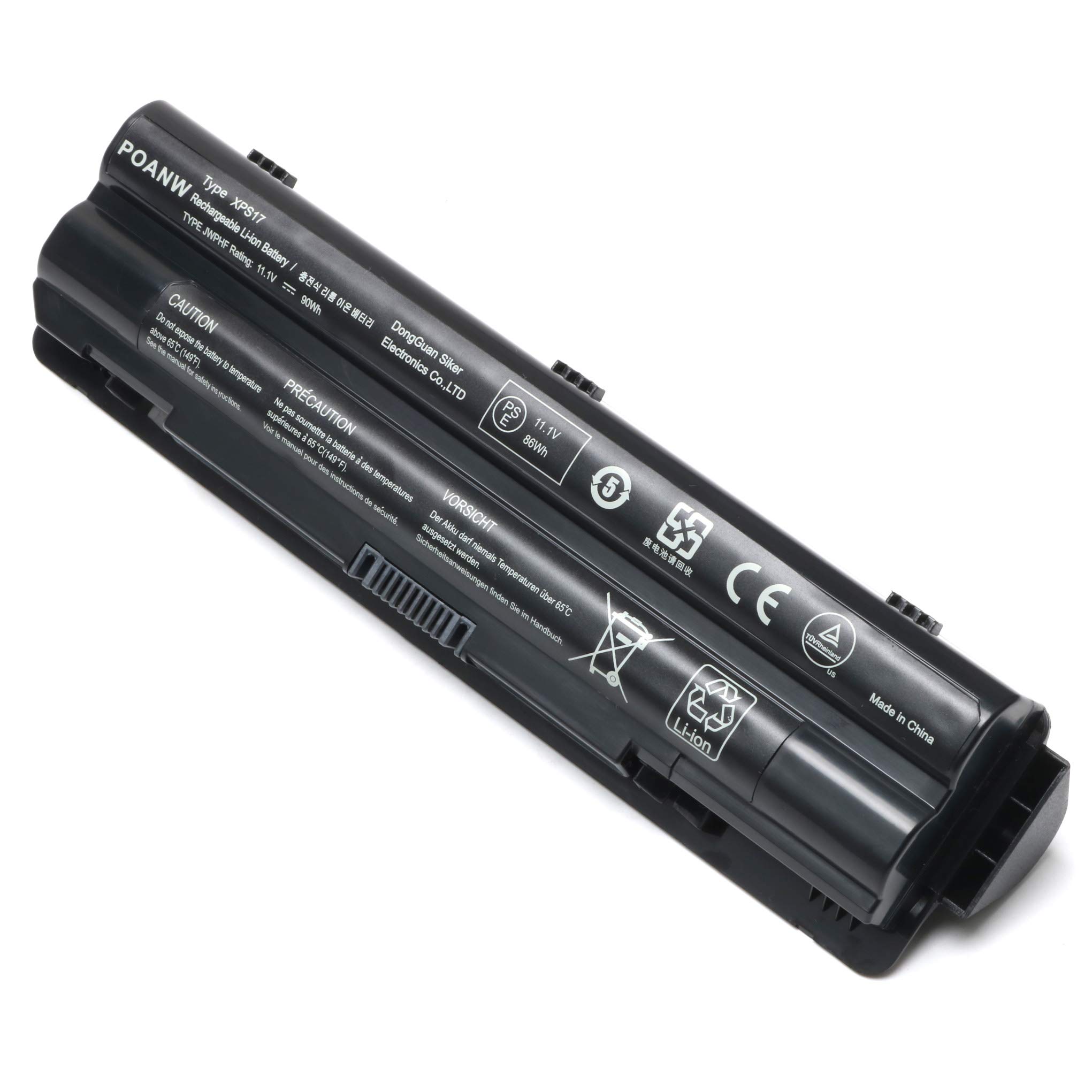
NOTE: This is 9 cell battery,and it won't fit 6 cell battery.Please check your battery part number and Compatible with Laptop Models to ensure you are getting the correct battery for your laptop!
Colour: Black Type: Li-ion Voltage: 11.1V Capacity: 90Wh Cell:9 Compatible with Part Numbers:
08PGNG,0J70W7,0JWPHF,0R4CN5,3121123,8PGNG,991T2021F,999T2128F,AHA63226267,AHA632 26268,AHA63226270,AHA63226276,AHA63226277,J70W7,JWPHF,P09E,P09E001,P09E002,P11F, P11F001,P12G,P12G001,R4CN5, 312-1127,453-10186, WHXY3 Fits Machine Models:
XPS 14,XPS 14 (L401X),XPS 15,XPS 15 (L501X), XPS 17,XPS 17 (L701X),XPS 17 (L702X), XPS L401X,XPS L501X,XP L502X,XPS L701X,XPS L702X,XPS 15-L501X,XPS 15-L502X, XPS 17-L701X,XPS 17-L702X
Before use: For the new battery , we suggest that all of our customer should full charge it by AC power adapter ,because takes a long period, the capacity was strain out by inner PCB circuit, in order to protect your battery life,you can full charge to 100% and drain to 1% 2 times,then the capacity will recover.
f the battery is still not charging fully/being recognized, here is the steps to try: 1.Turn off the laptop. > 2.Unplug AC power. > 3.Remove the battery. > 4.Replace AC power. > 5.Turn on laptop,allow OS to boot. > 6.Once logged in to the machine,perform a normal shut donw. > 7.Unplug AC power. > 8.Replace battery > 9.Turn on laptop,allow os to boot.
Colour: Black Type: Li-ion Voltage: 11.1V Capacity: 90Wh Cell:9 Compatible with Part Numbers:
08PGNG,0J70W7,0JWPHF,0R4CN5,3121123,8PGNG,991T2021F,999T2128F,AHA63226267,AHA632 26268,AHA63226270,AHA63226276,AHA63226277,J70W7,JWPHF,P09E,P09E001,P09E002,P11F, P11F001,P12G,P12G001,R4CN5, 312-1127,453-10186, WHXY3 Fits Machine Models:
XPS 14,XPS 14 (L401X),XPS 15,XPS 15 (L501X), XPS 17,XPS 17 (L701X),XPS 17 (L702X), XPS L401X,XPS L501X,XP L502X,XPS L701X,XPS L702X,XPS 15-L501X,XPS 15-L502X, XPS 17-L701X,XPS 17-L702X
Before use: For the new battery , we suggest that all of our customer should full charge it by AC power adapter ,because takes a long period, the capacity was strain out by inner PCB circuit, in order to protect your battery life,you can full charge to 100% and drain to 1% 2 times,then the capacity will recover.
f the battery is still not charging fully/being recognized, here is the steps to try: 1.Turn off the laptop. > 2.Unplug AC power. > 3.Remove the battery. > 4.Replace AC power. > 5.Turn on laptop,allow OS to boot. > 6.Once logged in to the machine,perform a normal shut donw. > 7.Unplug AC power. > 8.Replace battery > 9.Turn on laptop,allow os to boot.

New XPS17 Laptop Battery Replacement for Dell XPS 14 (L401X)/15 (L501X)/15 (L502x)/17 (L701X)/L702X Laptops; Part Numbers: 312-1123 312-1127 453-10186 J70W7 JWPHF R795X WHXY3
Current Price
$33.99
Average
$30.49
Min Price
$16.99
Max Price
$33.99
Price dynamics
10%
Description
NOTE: This is 9 cell battery,and it won't fit 6 cell battery.Please check your battery part number and Compatible with Laptop Models to ensure you are getting the correct battery for your laptop!
Colour: Black Type: Li-ion Voltage: 11.1V Capacity: 90Wh Cell:9 Compatible with Part Numbers:
08PGNG,0J70W7,0JWPHF,0R4CN5,3121123,8PGNG,991T2021F,999T2128F,AHA63226267,AHA632 26268,AHA63226270,AHA63226276,AHA63226277,J70W7,JWPHF,P09E,P09E001,P09E002,P11F, P11F001,P12G,P12G001,R4CN5, 312-1127,453-10186, WHXY3 Fits Machine Models:
XPS 14,XPS 14 (L401X),XPS 15,XPS 15 (L501X), XPS 17,XPS 17 (L701X),XPS 17 (L702X), XPS L401X,XPS L501X,XP L502X,XPS L701X,XPS L702X,XPS 15-L501X,XPS 15-L502X, XPS 17-L701X,XPS 17-L702X
Before use: For the new battery , we suggest that all of our customer should full charge it by AC power adapter ,because takes a long period, the capacity was strain out by inner PCB circuit, in order to protect your battery life,you can full charge to 100% and drain to 1% 2 times,then the capacity will recover.
f the battery is still not charging fully/being recognized, here is the steps to try: 1.Turn off the laptop. > 2.Unplug AC power. > 3.Remove the battery. > 4.Replace AC power. > 5.Turn on laptop,allow OS to boot. > 6.Once logged in to the machine,perform a normal shut donw. > 7.Unplug AC power. > 8.Replace battery > 9.Turn on laptop,allow os to boot.

Colour: Black Type: Li-ion Voltage: 11.1V Capacity: 90Wh Cell:9 Compatible with Part Numbers:
08PGNG,0J70W7,0JWPHF,0R4CN5,3121123,8PGNG,991T2021F,999T2128F,AHA63226267,AHA632 26268,AHA63226270,AHA63226276,AHA63226277,J70W7,JWPHF,P09E,P09E001,P09E002,P11F, P11F001,P12G,P12G001,R4CN5, 312-1127,453-10186, WHXY3 Fits Machine Models:
XPS 14,XPS 14 (L401X),XPS 15,XPS 15 (L501X), XPS 17,XPS 17 (L701X),XPS 17 (L702X), XPS L401X,XPS L501X,XP L502X,XPS L701X,XPS L702X,XPS 15-L501X,XPS 15-L502X, XPS 17-L701X,XPS 17-L702X
Before use: For the new battery , we suggest that all of our customer should full charge it by AC power adapter ,because takes a long period, the capacity was strain out by inner PCB circuit, in order to protect your battery life,you can full charge to 100% and drain to 1% 2 times,then the capacity will recover.
f the battery is still not charging fully/being recognized, here is the steps to try: 1.Turn off the laptop. > 2.Unplug AC power. > 3.Remove the battery. > 4.Replace AC power. > 5.Turn on laptop,allow OS to boot. > 6.Once logged in to the machine,perform a normal shut donw. > 7.Unplug AC power. > 8.Replace battery > 9.Turn on laptop,allow os to boot.

Price will be lower
in next 2 weeks
in next 2 weeks
According to the data, price will be lower in next two weeks, so not waste your money and track better price!
Similar products