- HomeElectronicsAccessories & SuppliesAudio & Video AccessoriesCables & InterconnectsVideo CablesHDMI Cables
Description
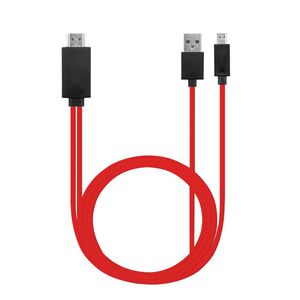
This MHL to HDMI HDTV Converter helps you connect your MHL supported Phone or Tablet to your HDTV to mirror small screen to big screen with 1080P Resolution.
Pls check if your devices are MHL supported before you purchasing this product, you can check it out on this description page or search on the website: http://www.mhltech.org/devices.aspx.
Compatible Models: 11 Pin devices: Galaxy S5, S4(i9500, i9505), S3(i9300, i9305), Galaxy Note 4(SM-N910A, SM-N910P, SM-N910T, SM-N910V), Galaxy Note 3(N5100, N9000, N9006), Galaxy Note 2(N7100, N7105), Galaxy Tab 3 8.0 (T310), Tab 3 10.1(P5210), Note 8(N5110), Note Pro
Compatible Models: 5 Pin devices: Galaxy S2(i777),HTC EVO View 4G HTC One M8,Opti
Not Support: Samsung Galaxy S8, Samsung Galaxy S8 PLUS, Samsung Galaxy S7 Edge, Samsung Galaxy S7, Samsung Galaxy S6, Samsung Galaxy S6 Edge, Samsung Galaxy Tab 3 7.0, Samsung Galaxy Note 3 N9008V, Samsung Galaxy Note 5, Samsung Galaxy Note 10.1 (20XX Edition), Samsung Galaxy Grand Prime, Samsung Galaxy Stratosphere II, Google Nexus 5, Google Nexus 7, LG G2 G3 G4 V10 Vista, Kindle Fire, Nokia 635, ZTE ZMAX 2, Asus Zenfone 2, and other device don't support MHL function.
How to use?
1. For 5 Pin devices: plug the Mirco USB cable to your devices directly; For 11 Pin devices: connect the adapter to Mirco USB first, then plug it to your devices
2. Plug the HDMI cable to your TV and switch the TV to HDMI channel
3. Plug the USB cable to power adapter (at lease 5V 1A)
4. Restart your devices after all connection finished
Package include: 1 Piece MHL to HDMI Adapter
Pls check if your devices are MHL supported before you purchasing this product, you can check it out on this description page or search on the website: http://www.mhltech.org/devices.aspx.
Compatible Models: 11 Pin devices: Galaxy S5, S4(i9500, i9505), S3(i9300, i9305), Galaxy Note 4(SM-N910A, SM-N910P, SM-N910T, SM-N910V), Galaxy Note 3(N5100, N9000, N9006), Galaxy Note 2(N7100, N7105), Galaxy Tab 3 8.0 (T310), Tab 3 10.1(P5210), Note 8(N5110), Note Pro
Compatible Models: 5 Pin devices: Galaxy S2(i777),HTC EVO View 4G HTC One M8,Opti
Not Support: Samsung Galaxy S8, Samsung Galaxy S8 PLUS, Samsung Galaxy S7 Edge, Samsung Galaxy S7, Samsung Galaxy S6, Samsung Galaxy S6 Edge, Samsung Galaxy Tab 3 7.0, Samsung Galaxy Note 3 N9008V, Samsung Galaxy Note 5, Samsung Galaxy Note 10.1 (20XX Edition), Samsung Galaxy Grand Prime, Samsung Galaxy Stratosphere II, Google Nexus 5, Google Nexus 7, LG G2 G3 G4 V10 Vista, Kindle Fire, Nokia 635, ZTE ZMAX 2, Asus Zenfone 2, and other device don't support MHL function.
How to use?
1. For 5 Pin devices: plug the Mirco USB cable to your devices directly; For 11 Pin devices: connect the adapter to Mirco USB first, then plug it to your devices
2. Plug the HDMI cable to your TV and switch the TV to HDMI channel
3. Plug the USB cable to power adapter (at lease 5V 1A)
4. Restart your devices after all connection finished
Package include: 1 Piece MHL to HDMI Adapter

MHL to HDMI, Micro USB to HDMI Cable Cord 1080P HDTV Adapter for Samsung Galaxy S5, S4, S3, Note 3, Note 2, Galaxy Tab 3 8.0, Tab 3 10.1, Tab Pro, Galaxy Note 8, Note Pro 12.2
Price is below average
Current Price
$7.99
Average
$9.57
Min Price
$7.66
Max Price
$11.99
Price dynamics
17%
Description
This MHL to HDMI HDTV Converter helps you connect your MHL supported Phone or Tablet to your HDTV to mirror small screen to big screen with 1080P Resolution.
Pls check if your devices are MHL supported before you purchasing this product, you can check it out on this description page or search on the website: http://www.mhltech.org/devices.aspx.
Compatible Models: 11 Pin devices: Galaxy S5, S4(i9500, i9505), S3(i9300, i9305), Galaxy Note 4(SM-N910A, SM-N910P, SM-N910T, SM-N910V), Galaxy Note 3(N5100, N9000, N9006), Galaxy Note 2(N7100, N7105), Galaxy Tab 3 8.0 (T310), Tab 3 10.1(P5210), Note 8(N5110), Note Pro
Compatible Models: 5 Pin devices: Galaxy S2(i777),HTC EVO View 4G HTC One M8,Opti
Not Support: Samsung Galaxy S8, Samsung Galaxy S8 PLUS, Samsung Galaxy S7 Edge, Samsung Galaxy S7, Samsung Galaxy S6, Samsung Galaxy S6 Edge, Samsung Galaxy Tab 3 7.0, Samsung Galaxy Note 3 N9008V, Samsung Galaxy Note 5, Samsung Galaxy Note 10.1 (20XX Edition), Samsung Galaxy Grand Prime, Samsung Galaxy Stratosphere II, Google Nexus 5, Google Nexus 7, LG G2 G3 G4 V10 Vista, Kindle Fire, Nokia 635, ZTE ZMAX 2, Asus Zenfone 2, and other device don't support MHL function.
How to use?
1. For 5 Pin devices: plug the Mirco USB cable to your devices directly; For 11 Pin devices: connect the adapter to Mirco USB first, then plug it to your devices
2. Plug the HDMI cable to your TV and switch the TV to HDMI channel
3. Plug the USB cable to power adapter (at lease 5V 1A)
4. Restart your devices after all connection finished
Package include: 1 Piece MHL to HDMI Adapter

Pls check if your devices are MHL supported before you purchasing this product, you can check it out on this description page or search on the website: http://www.mhltech.org/devices.aspx.
Compatible Models: 11 Pin devices: Galaxy S5, S4(i9500, i9505), S3(i9300, i9305), Galaxy Note 4(SM-N910A, SM-N910P, SM-N910T, SM-N910V), Galaxy Note 3(N5100, N9000, N9006), Galaxy Note 2(N7100, N7105), Galaxy Tab 3 8.0 (T310), Tab 3 10.1(P5210), Note 8(N5110), Note Pro
Compatible Models: 5 Pin devices: Galaxy S2(i777),HTC EVO View 4G HTC One M8,Opti
Not Support: Samsung Galaxy S8, Samsung Galaxy S8 PLUS, Samsung Galaxy S7 Edge, Samsung Galaxy S7, Samsung Galaxy S6, Samsung Galaxy S6 Edge, Samsung Galaxy Tab 3 7.0, Samsung Galaxy Note 3 N9008V, Samsung Galaxy Note 5, Samsung Galaxy Note 10.1 (20XX Edition), Samsung Galaxy Grand Prime, Samsung Galaxy Stratosphere II, Google Nexus 5, Google Nexus 7, LG G2 G3 G4 V10 Vista, Kindle Fire, Nokia 635, ZTE ZMAX 2, Asus Zenfone 2, and other device don't support MHL function.
How to use?
1. For 5 Pin devices: plug the Mirco USB cable to your devices directly; For 11 Pin devices: connect the adapter to Mirco USB first, then plug it to your devices
2. Plug the HDMI cable to your TV and switch the TV to HDMI channel
3. Plug the USB cable to power adapter (at lease 5V 1A)
4. Restart your devices after all connection finished
Package include: 1 Piece MHL to HDMI Adapter

Price will be lower
in next 2 weeks
in next 2 weeks
According to the data, price will be lower in next two weeks, so not waste your money and track better price!
Similar products




































