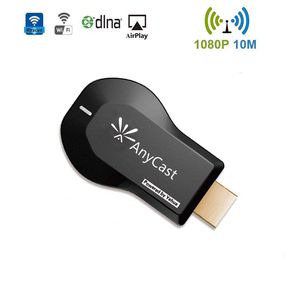
Description
The wifi display dongle supports DLNA/Airplay Mirror/Miracast/Ezcast Function for iOS/Android/Samsung/LG/ Nokia/iPhone/iPad Air/Mini/Pro devices, which is perfect for watching movies, conference use and gaming to pursuit different audio-visual feast. Compared with traditional receiver, the item has better connectivity and strong anti-jamming that give smoother data transfer.
Do you have trouble with small screen:
★ Want to share screen with people at home, meeting, conference at the same time.
★ Want to protect your kid's eyesight and your love
★ Have fun with your friend together
Anycast Adapter is the solution Lightweight design, Easy Setup, Hassle free No App or drivers required. 3 steps to enjoy media on large screen: Plug->Connect->Mirroring
USAGE
Step 1:
Plug into HDMI port. Set your TV to the HDMI port you picked.
Step: 2
Connect to AnyCast Dongle WiFi (Get SSID and Password on screen)
Configure HDMI WiFi Dongle to hook up Home WiFi Go to a browser and input 192.168.49.1 to come to the setting menu => Select Home WiFi SSID and type in Password => Save and Connect to Home WiFi
Step 3:
Mirroring(iOS) Pull up Control Center and tap "Airplay Mirroring". Once you tap it your iPhone/iPad screen will now be cast to your TV.
Mirroring(Android) Pull down "Control Center" on your phone and turn on Miracast (Screen mirroring/ Multicreen / Smartview) and select it.
Do you have trouble with small screen:
★ Want to share screen with people at home, meeting, conference at the same time.
★ Want to protect your kid's eyesight and your love
★ Have fun with your friend together
Anycast Adapter is the solution Lightweight design, Easy Setup, Hassle free No App or drivers required. 3 steps to enjoy media on large screen: Plug->Connect->Mirroring
USAGE
Step 1:
Plug into HDMI port. Set your TV to the HDMI port you picked.
Step: 2
Connect to AnyCast Dongle WiFi (Get SSID and Password on screen)
Configure HDMI WiFi Dongle to hook up Home WiFi Go to a browser and input 192.168.49.1 to come to the setting menu => Select Home WiFi SSID and type in Password => Save and Connect to Home WiFi
Step 3:
Mirroring(iOS) Pull up Control Center and tap "Airplay Mirroring". Once you tap it your iPhone/iPad screen will now be cast to your TV.
Mirroring(Android) Pull down "Control Center" on your phone and turn on Miracast (Screen mirroring/ Multicreen / Smartview) and select it.
WiFi Wireless Display Dongle 1080P Mini Receiver Sharing HD Video from Projectors Cell Phones Tablet PC Support Airplay/ Chromecast/Chromecast Tv/Miracast/Miracast Dongle for Tv
Price is below average
Current Price
$17.99
Average
$20
Min Price
$13.79
Max Price
$30.99
Price dynamics
10%
Description
The wifi display dongle supports DLNA/Airplay Mirror/Miracast/Ezcast Function for iOS/Android/Samsung/LG/ Nokia/iPhone/iPad Air/Mini/Pro devices, which is perfect for watching movies, conference use and gaming to pursuit different audio-visual feast. Compared with traditional receiver, the item has better connectivity and strong anti-jamming that give smoother data transfer.
Do you have trouble with small screen:
★ Want to share screen with people at home, meeting, conference at the same time.
★ Want to protect your kid's eyesight and your love
★ Have fun with your friend together
Anycast Adapter is the solution Lightweight design, Easy Setup, Hassle free No App or drivers required. 3 steps to enjoy media on large screen: Plug->Connect->Mirroring
USAGE
Step 1:
Plug into HDMI port. Set your TV to the HDMI port you picked.
Step: 2
Connect to AnyCast Dongle WiFi (Get SSID and Password on screen)
Configure HDMI WiFi Dongle to hook up Home WiFi Go to a browser and input 192.168.49.1 to come to the setting menu => Select Home WiFi SSID and type in Password => Save and Connect to Home WiFi
Step 3:
Mirroring(iOS) Pull up Control Center and tap "Airplay Mirroring". Once you tap it your iPhone/iPad screen will now be cast to your TV.
Mirroring(Android) Pull down "Control Center" on your phone and turn on Miracast (Screen mirroring/ Multicreen / Smartview) and select it.
Do you have trouble with small screen:
★ Want to share screen with people at home, meeting, conference at the same time.
★ Want to protect your kid's eyesight and your love
★ Have fun with your friend together
Anycast Adapter is the solution Lightweight design, Easy Setup, Hassle free No App or drivers required. 3 steps to enjoy media on large screen: Plug->Connect->Mirroring
USAGE
Step 1:
Plug into HDMI port. Set your TV to the HDMI port you picked.
Step: 2
Connect to AnyCast Dongle WiFi (Get SSID and Password on screen)
Configure HDMI WiFi Dongle to hook up Home WiFi Go to a browser and input 192.168.49.1 to come to the setting menu => Select Home WiFi SSID and type in Password => Save and Connect to Home WiFi
Step 3:
Mirroring(iOS) Pull up Control Center and tap "Airplay Mirroring". Once you tap it your iPhone/iPad screen will now be cast to your TV.
Mirroring(Android) Pull down "Control Center" on your phone and turn on Miracast (Screen mirroring/ Multicreen / Smartview) and select it.
Price will be lower
in next 2 weeks
in next 2 weeks
According to the data, price will be lower in next two weeks, so not waste your money and track better price!
Product review & video
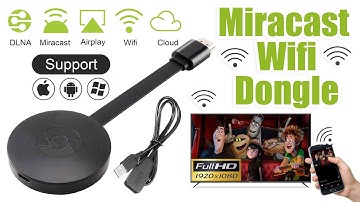
[Music] hello guys uh we are back with one of our new product and today we are going to check this ez chromecast it's a mirror cast device you can easily mirror with your phone to your tv wireless so let's see what we get inside first of all user manual we have main device it's uh actually my phone over here here you can see there is a power port and a reset button and here we can get one wireless receiver power adapter micro usb and usb port you can plug back to your tv or you can use uh adapter 5 volt adapter so it will be easy to get constant 5 for 5.0 volt power you can use this kind of adapter over here just plug it this way it's easy and connect this device to your easier cast and this one goes back to your tv and you can mirror from your phone directly to your tv okay guys so here we have a hdmi cable from back to our tv okay so what we're going to do we just connect it this devi


Similar products





































