Description
Specification
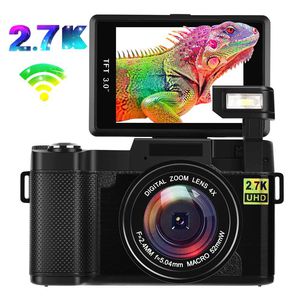
Image Resolution: JPG; 24M
Video Resolution: 2.7K,1080FHD, VGA
Storage Medium: External Micro SD card(1G - 32GB)
File Format: JPEG, MOV
Sequence: On/Off
Digital Zoom: 4X
Exposure Control: Exposure value(EV, +2~-2)
Flashlight Mode: Auto, Force Flash, Anti-red Eye Flash, Flash Off
PC Interface:USB 2.0
Power Supply: 3.7V Lithium Battery
OSD Language: English, French, Spanish, Portuguese, German, Italian, Chinese, Russian, Japanese;
Package Content:
Digital Camera x 1
52mm UV lens x1
800mAh Lithium ion battery x1
Charger x1
USB cable x1
Neck strap x1
User manual x1
Good to Know:
1.Please read the user manual carefully!
2.Please format Micro card before using the camera.
3.Micro card(up to 32 GB)and Tripod(Tripod Stand with 1/4 Inch Screw Hole) are not included in the standard package.
How to connect WIFI:
1.Insert the micro SD card, turn on the camera, press WIFI key to open Wifi, and then the display screen of the camera would display relevant information about WIFI.
2. Open the Wifi on the phone or tablet, find the wireless network signal with the same SSID displayed on the camera screen, and then click Connect until the system displays the success of the connection. For the connection for the first time, it is necessary to input the password, which would be displayed on the screen of the camera.
3. Click to open the "PPSHOW" application icon on your Android/IOS phone or tablet, and click Connect. After such operations, users could see the preview screen delivered by the camera directly on your phone or tablet, and then perform related operation.
Image Resolution: JPG; 24M
Video Resolution: 2.7K,1080FHD, VGA
Storage Medium: External Micro SD card(1G - 32GB)
File Format: JPEG, MOV
Sequence: On/Off
Digital Zoom: 4X
Exposure Control: Exposure value(EV, +2~-2)
Flashlight Mode: Auto, Force Flash, Anti-red Eye Flash, Flash Off
PC Interface:USB 2.0
Power Supply: 3.7V Lithium Battery
OSD Language: English, French, Spanish, Portuguese, German, Italian, Chinese, Russian, Japanese;
Package Content:
Digital Camera x 1
52mm UV lens x1
800mAh Lithium ion battery x1
Charger x1
USB cable x1
Neck strap x1
User manual x1
Good to Know:
1.Please read the user manual carefully!
2.Please format Micro card before using the camera.
3.Micro card(up to 32 GB)and Tripod(Tripod Stand with 1/4 Inch Screw Hole) are not included in the standard package.
How to connect WIFI:
1.Insert the micro SD card, turn on the camera, press WIFI key to open Wifi, and then the display screen of the camera would display relevant information about WIFI.
2. Open the Wifi on the phone or tablet, find the wireless network signal with the same SSID displayed on the camera screen, and then click Connect until the system displays the success of the connection. For the connection for the first time, it is necessary to input the password, which would be displayed on the screen of the camera.
3. Click to open the "PPSHOW" application icon on your Android/IOS phone or tablet, and click Connect. After such operations, users could see the preview screen delivered by the camera directly on your phone or tablet, and then perform related operation.
Digital Camera Vlogging Camera,24MP Ultra HD 2.7K WiFi YouTube Camera with 3.0 Inch Flip Screen and Retractable Flashlight (AC1)
Current Price
$99.99
Average
$99.99
Min Price
$99.99
Max Price
$99.99
Description
Specification
Image Resolution: JPG; 24M
Video Resolution: 2.7K,1080FHD, VGA
Storage Medium: External Micro SD card(1G - 32GB)
File Format: JPEG, MOV
Sequence: On/Off
Digital Zoom: 4X
Exposure Control: Exposure value(EV, +2~-2)
Flashlight Mode: Auto, Force Flash, Anti-red Eye Flash, Flash Off
PC Interface:USB 2.0
Power Supply: 3.7V Lithium Battery
OSD Language: English, French, Spanish, Portuguese, German, Italian, Chinese, Russian, Japanese;
Package Content:
Digital Camera x 1
52mm UV lens x1
800mAh Lithium ion battery x1
Charger x1
USB cable x1
Neck strap x1
User manual x1
Good to Know:
1.Please read the user manual carefully!
2.Please format Micro card before using the camera.
3.Micro card(up to 32 GB)and Tripod(Tripod Stand with 1/4 Inch Screw Hole) are not included in the standard package.
How to connect WIFI:
1.Insert the micro SD card, turn on the camera, press WIFI key to open Wifi, and then the display screen of the camera would display relevant information about WIFI.
2. Open the Wifi on the phone or tablet, find the wireless network signal with the same SSID displayed on the camera screen, and then click Connect until the system displays the success of the connection. For the connection for the first time, it is necessary to input the password, which would be displayed on the screen of the camera.
3. Click to open the "PPSHOW" application icon on your Android/IOS phone or tablet, and click Connect. After such operations, users could see the preview screen delivered by the camera directly on your phone or tablet, and then perform related operation.
Image Resolution: JPG; 24M
Video Resolution: 2.7K,1080FHD, VGA
Storage Medium: External Micro SD card(1G - 32GB)
File Format: JPEG, MOV
Sequence: On/Off
Digital Zoom: 4X
Exposure Control: Exposure value(EV, +2~-2)
Flashlight Mode: Auto, Force Flash, Anti-red Eye Flash, Flash Off
PC Interface:USB 2.0
Power Supply: 3.7V Lithium Battery
OSD Language: English, French, Spanish, Portuguese, German, Italian, Chinese, Russian, Japanese;
Package Content:
Digital Camera x 1
52mm UV lens x1
800mAh Lithium ion battery x1
Charger x1
USB cable x1
Neck strap x1
User manual x1
Good to Know:
1.Please read the user manual carefully!
2.Please format Micro card before using the camera.
3.Micro card(up to 32 GB)and Tripod(Tripod Stand with 1/4 Inch Screw Hole) are not included in the standard package.
How to connect WIFI:
1.Insert the micro SD card, turn on the camera, press WIFI key to open Wifi, and then the display screen of the camera would display relevant information about WIFI.
2. Open the Wifi on the phone or tablet, find the wireless network signal with the same SSID displayed on the camera screen, and then click Connect until the system displays the success of the connection. For the connection for the first time, it is necessary to input the password, which would be displayed on the screen of the camera.
3. Click to open the "PPSHOW" application icon on your Android/IOS phone or tablet, and click Connect. After such operations, users could see the preview screen delivered by the camera directly on your phone or tablet, and then perform related operation.
Price will be lower
in next 2 weeks
in next 2 weeks
According to the data, price will be lower in next two weeks, so not waste your money and track better price!
Product review & video
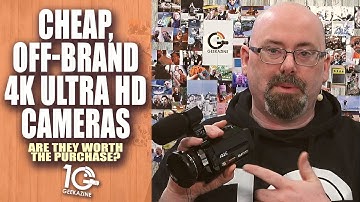
of course the holiday is coming up you might be getting your shopping done you might want to have something to actually record the family as they're opening up their presents don't want to use the phone maybe use a prosumer type camera and you're looking up on Amazon you're seeing all these deals and you see a lot of these these brands that you don't know the names of but you want to get something that's not gonna break the bank so what do you get we're gonna take a look at this one this is from kick tech this is the 4k Ultra HD camera comes with a onboard microphone and we're gonna take a look at next on geek Izzie hey everybody Jeffrey powers here from geek axanthic magazine put in a geek he got me and today we are taking a look at this the digital video camera for came from a company called kik tech I chose this one simply because it was tagged as an Amazon choice first of all I do h