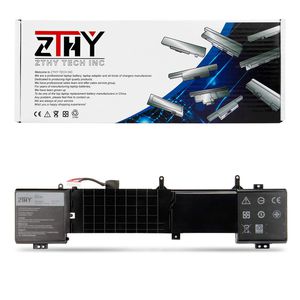
Description
Specification:
Battery type:Li-ion
Voltage:14.8V
Capacity: 92Wh
Certificate: CE,RoHS,FCC
Condition: 100% New from Manufacturer, Grade A Cell, 12 Months Replacement
Replace Part Number:
6JHDV 05046J 5046J
Compatible Laptop/NoteBook:
Dell Alienware 17 R2,Alienware 17 R3 Series
ALW17ED-1728, ALW17ED-1828T, ALW17ED-2728,
ALW17ED-3728, ALW17ED-3828, ALW17ED-4718,
ALW17ED-4738, ALW17ED-4838, ALW17ER-4738,
ALW17ER-4838,AW17R3-8342SLV, AW17R3-7092SLV,
ANW17-2136SLV, P43F, P43F001, P43F002
NOTE:
1. For using the ZTHY new battery, try to fill the electricity and use up to 5%-10%, charge and discharge it cycle about 3-4 times.
2. When using the ZTHY battery, care should be taken to prevent exposure and moisture.
3.Exhaust the battery before charging and avoid charging for too long
4. Please check your laptop model before purchasing, if can't make sure, please feel free to contact us, we will help you.
Frequently Questions:
If it has quality problem, how do I get a warranty?
If it has quality problems within a year, you can contact us, we will try our best to solve it and make you satisfied.
Why should I choose this battery?
The price is cheaper than the original one. Saved you from buying a new computer and you can unplug your laptop and use
anywhere, without having to keep the ac adapter plugged in all the time. Or as a backup for your laptop to use it when needed
Battery type:Li-ion
Voltage:14.8V
Capacity: 92Wh
Certificate: CE,RoHS,FCC
Condition: 100% New from Manufacturer, Grade A Cell, 12 Months Replacement
Replace Part Number:
6JHDV 05046J 5046J
Compatible Laptop/NoteBook:
Dell Alienware 17 R2,Alienware 17 R3 Series
ALW17ED-1728, ALW17ED-1828T, ALW17ED-2728,
ALW17ED-3728, ALW17ED-3828, ALW17ED-4718,
ALW17ED-4738, ALW17ED-4838, ALW17ER-4738,
ALW17ER-4838,AW17R3-8342SLV, AW17R3-7092SLV,
ANW17-2136SLV, P43F, P43F001, P43F002
NOTE:
1. For using the ZTHY new battery, try to fill the electricity and use up to 5%-10%, charge and discharge it cycle about 3-4 times.
2. When using the ZTHY battery, care should be taken to prevent exposure and moisture.
3.Exhaust the battery before charging and avoid charging for too long
4. Please check your laptop model before purchasing, if can't make sure, please feel free to contact us, we will help you.
Frequently Questions:
If it has quality problem, how do I get a warranty?
If it has quality problems within a year, you can contact us, we will try our best to solve it and make you satisfied.
Why should I choose this battery?
The price is cheaper than the original one. Saved you from buying a new computer and you can unplug your laptop and use
anywhere, without having to keep the ac adapter plugged in all the time. Or as a backup for your laptop to use it when needed
ZTHY 6JHDV Notebook Battery for Dell Alienware 17 R3 P43F002 R2 P43F001 ALW17ED-1728 2728 3728 3828 4718 4738 AW17R3-3758SLV 7092SLV 4175SLV 8342SLV 1675SLV Gaming Laptop 6JHCY 5046J YKWXX 8-Cell 92WH
Price is below average
Current Price
$79.99
Average
$93.72
Min Price
$79.99
Max Price
$103.99
Price dynamics
15%
Description
Specification:
Battery type:Li-ion
Voltage:14.8V
Capacity: 92Wh
Certificate: CE,RoHS,FCC
Condition: 100% New from Manufacturer, Grade A Cell, 12 Months Replacement
Replace Part Number:
6JHDV 05046J 5046J
Compatible Laptop/NoteBook:
Dell Alienware 17 R2,Alienware 17 R3 Series
ALW17ED-1728, ALW17ED-1828T, ALW17ED-2728,
ALW17ED-3728, ALW17ED-3828, ALW17ED-4718,
ALW17ED-4738, ALW17ED-4838, ALW17ER-4738,
ALW17ER-4838,AW17R3-8342SLV, AW17R3-7092SLV,
ANW17-2136SLV, P43F, P43F001, P43F002
NOTE:
1. For using the ZTHY new battery, try to fill the electricity and use up to 5%-10%, charge and discharge it cycle about 3-4 times.
2. When using the ZTHY battery, care should be taken to prevent exposure and moisture.
3.Exhaust the battery before charging and avoid charging for too long
4. Please check your laptop model before purchasing, if can't make sure, please feel free to contact us, we will help you.
Frequently Questions:
If it has quality problem, how do I get a warranty?
If it has quality problems within a year, you can contact us, we will try our best to solve it and make you satisfied.
Why should I choose this battery?
The price is cheaper than the original one. Saved you from buying a new computer and you can unplug your laptop and use
anywhere, without having to keep the ac adapter plugged in all the time. Or as a backup for your laptop to use it when needed
Battery type:Li-ion
Voltage:14.8V
Capacity: 92Wh
Certificate: CE,RoHS,FCC
Condition: 100% New from Manufacturer, Grade A Cell, 12 Months Replacement
Replace Part Number:
6JHDV 05046J 5046J
Compatible Laptop/NoteBook:
Dell Alienware 17 R2,Alienware 17 R3 Series
ALW17ED-1728, ALW17ED-1828T, ALW17ED-2728,
ALW17ED-3728, ALW17ED-3828, ALW17ED-4718,
ALW17ED-4738, ALW17ED-4838, ALW17ER-4738,
ALW17ER-4838,AW17R3-8342SLV, AW17R3-7092SLV,
ANW17-2136SLV, P43F, P43F001, P43F002
NOTE:
1. For using the ZTHY new battery, try to fill the electricity and use up to 5%-10%, charge and discharge it cycle about 3-4 times.
2. When using the ZTHY battery, care should be taken to prevent exposure and moisture.
3.Exhaust the battery before charging and avoid charging for too long
4. Please check your laptop model before purchasing, if can't make sure, please feel free to contact us, we will help you.
Frequently Questions:
If it has quality problem, how do I get a warranty?
If it has quality problems within a year, you can contact us, we will try our best to solve it and make you satisfied.
Why should I choose this battery?
The price is cheaper than the original one. Saved you from buying a new computer and you can unplug your laptop and use
anywhere, without having to keep the ac adapter plugged in all the time. Or as a backup for your laptop to use it when needed
Price will be lower
in next 2 weeks
in next 2 weeks
According to the data, price will be lower in next two weeks, so not waste your money and track better price!
Product review & video
hey what's up this is Ricardo and in this video I'll show you how to remove the battery from a Dell Alienware 17 person r3 if you're looking for parts for this laptop go to our website and use this coupon for a 5% off discount first unscrew and remove access door then disconnect battery cable now disconnect cables from motherboard then remove palm wrist screws now separate and turn over palm rest now disconnect and remove palm wrist now remove cables from motherboard then unscrew and remove battery need more check out these other tutorials for batteries click here for hard drives click here for wireless cards click here thanks for watching if you enjoyed this tutorial give this video a like and subscribe to our YouTube channel check the video description below for links to written tutorials and replacement parts [Music]



Similar products






































