Description
►Charging Instruction:
- Connect the Android Data Cable to USB charger to bluetooth headband.
- RED light constant on shows that device is charging
- RED Light off and then became blue when charged fully.
►How to connect with Bluetooth device?
- Close all your Bluetooth on the phone.
- Long press the "ON/OFF" button till the red/blue indicator light flash.
- Open the Bluetooth in your phone and match with Bluetooth name "BT-FAAH".
►Product Specification:
- Charging Time: 2-2.5 hours
-Bluetooth continuous working time: > 8 Hoursv -Power/Handfree/Stop/Play
-Vol Up/Next
-Vol Down/previous
►Product Characteristic:
- Support bluetooth communication and bluetooth Music
-Low loss high quality stereo sound
-In build lithium ion battery with micro USB charging function
-User-friendly function design
-LED display for working status
-No beeps
►Bluetooth Hands-free:
- Incoming call, press once PLAY/STOP Button for auto receives call
-Incoming call, press and hold PLAY/STOP button for 3 sec to reject call
-During call, long press PLAY/STOP Button for 3 sec to switch to mobile device,press.PLAY /STOP Button again for 3 sec will switch back to earphone
►Notes:
-Can be washable when take out the bluetooth module
-Both speakers are not fixed,can adjust placement accordingly based on your size
-Please check USB cable if can't work to charge
-Please adjust the volume from your mobile or Long press Vol+ from Bluetooth if you can't hear any music
-The sound may have a bit noise if there's environmental interference
-Hope you like our product,please let us know if have any question or concern and share your smart thought if any need to be improved
- Connect the Android Data Cable to USB charger to bluetooth headband.
- RED light constant on shows that device is charging
- RED Light off and then became blue when charged fully.
►How to connect with Bluetooth device?
- Close all your Bluetooth on the phone.
- Long press the "ON/OFF" button till the red/blue indicator light flash.
- Open the Bluetooth in your phone and match with Bluetooth name "BT-FAAH".
►Product Specification:
- Charging Time: 2-2.5 hours
-Bluetooth continuous working time: > 8 Hoursv -Power/Handfree/Stop/Play
-Vol Up/Next
-Vol Down/previous
►Product Characteristic:
- Support bluetooth communication and bluetooth Music
-Low loss high quality stereo sound
-In build lithium ion battery with micro USB charging function
-User-friendly function design
-LED display for working status
-No beeps
►Bluetooth Hands-free:
- Incoming call, press once PLAY/STOP Button for auto receives call
-Incoming call, press and hold PLAY/STOP button for 3 sec to reject call
-During call, long press PLAY/STOP Button for 3 sec to switch to mobile device,press.PLAY /STOP Button again for 3 sec will switch back to earphone
►Notes:
-Can be washable when take out the bluetooth module
-Both speakers are not fixed,can adjust placement accordingly based on your size
-Please check USB cable if can't work to charge
-Please adjust the volume from your mobile or Long press Vol+ from Bluetooth if you can't hear any music
-The sound may have a bit noise if there's environmental interference
-Hope you like our product,please let us know if have any question or concern and share your smart thought if any need to be improved
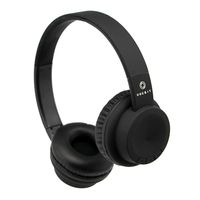
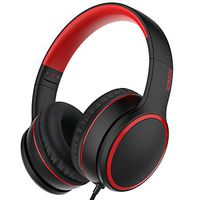
Joseche Kids Headphones Wireless V4.2 Wireless Sleep Headband Adjustable Comfortable Fleece Headband Sleep Headphone with Microphone for Travel and Home
Price is below average
Current Price
$15.99
Average
$16.99
Min Price
$15.99
Max Price
$21.99
Price dynamics
6%
Description
►Charging Instruction:
- Connect the Android Data Cable to USB charger to bluetooth headband.
- RED light constant on shows that device is charging
- RED Light off and then became blue when charged fully.
►How to connect with Bluetooth device?
- Close all your Bluetooth on the phone.
- Long press the "ON/OFF" button till the red/blue indicator light flash.
- Open the Bluetooth in your phone and match with Bluetooth name "BT-FAAH".
►Product Specification:
- Charging Time: 2-2.5 hours
-Bluetooth continuous working time: > 8 Hoursv -Power/Handfree/Stop/Play
-Vol Up/Next
-Vol Down/previous
►Product Characteristic:
- Support bluetooth communication and bluetooth Music
-Low loss high quality stereo sound
-In build lithium ion battery with micro USB charging function
-User-friendly function design
-LED display for working status
-No beeps
►Bluetooth Hands-free:
- Incoming call, press once PLAY/STOP Button for auto receives call
-Incoming call, press and hold PLAY/STOP button for 3 sec to reject call
-During call, long press PLAY/STOP Button for 3 sec to switch to mobile device,press.PLAY /STOP Button again for 3 sec will switch back to earphone
►Notes:
-Can be washable when take out the bluetooth module
-Both speakers are not fixed,can adjust placement accordingly based on your size
-Please check USB cable if can't work to charge
-Please adjust the volume from your mobile or Long press Vol+ from Bluetooth if you can't hear any music
-The sound may have a bit noise if there's environmental interference
-Hope you like our product,please let us know if have any question or concern and share your smart thought if any need to be improved
- Connect the Android Data Cable to USB charger to bluetooth headband.
- RED light constant on shows that device is charging
- RED Light off and then became blue when charged fully.
►How to connect with Bluetooth device?
- Close all your Bluetooth on the phone.
- Long press the "ON/OFF" button till the red/blue indicator light flash.
- Open the Bluetooth in your phone and match with Bluetooth name "BT-FAAH".
►Product Specification:
- Charging Time: 2-2.5 hours
-Bluetooth continuous working time: > 8 Hoursv -Power/Handfree/Stop/Play
-Vol Up/Next
-Vol Down/previous
►Product Characteristic:
- Support bluetooth communication and bluetooth Music
-Low loss high quality stereo sound
-In build lithium ion battery with micro USB charging function
-User-friendly function design
-LED display for working status
-No beeps
►Bluetooth Hands-free:
- Incoming call, press once PLAY/STOP Button for auto receives call
-Incoming call, press and hold PLAY/STOP button for 3 sec to reject call
-During call, long press PLAY/STOP Button for 3 sec to switch to mobile device,press.PLAY /STOP Button again for 3 sec will switch back to earphone
►Notes:
-Can be washable when take out the bluetooth module
-Both speakers are not fixed,can adjust placement accordingly based on your size
-Please check USB cable if can't work to charge
-Please adjust the volume from your mobile or Long press Vol+ from Bluetooth if you can't hear any music
-The sound may have a bit noise if there's environmental interference
-Hope you like our product,please let us know if have any question or concern and share your smart thought if any need to be improved
Price will be lower
in next 2 weeks
in next 2 weeks
According to the data, price will be lower in next two weeks, so not waste your money and track better price!
Similar products