Description
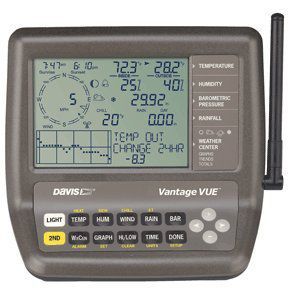
Vantage Vue Wireless Console/ReceiverThe console of the Vantage Vue wireless weather station displays and records your station's weather data, provides graph and alarm functions, and interfaces to a computer using the optional WeatherLink software.The Vantage Vue station also includes an outdoor Integrated Sensor Suite (ISS) that transmits outside sensor data to the console via a low-power radio. The console displays all the information coming from the ISS in an easy-to-use format. It can also receive data from a Davis Vantage Pro2 weather station.The compact console is loaded with features, including a backlit LCD screen and glow-in-the-dark keypad that makes viewing weather data easy, day or night. Unique Weather Center feature allows you to view multiple screens of weather data simply and quickly.Vantage Vue gives you the weather data you need. You'll see current weather conditions, including indoor and outdoor temperature and humidity, barometric pressure, wind speed and direction, dew point and rainfall. You'll also get weather forecast icons, moon phase, sunrise/sunset times, graphing of weather trends, alarms and more. Vantage Vue also boasts the unique Weather Center button that displays additional data on weather variables for today and over the last 25 days.Time & Date View the current time and date or time of sunrise/sunset.Moon PhaseSee the eight phases of the moon from new to full.Forecast IconsIcons let you know to expect sun, part sun, clouds, rain, or snow.Temperature & HumidityConsole updates outside temperature every 10 seconds and inside temperature every minute. In addition, outside humidity Updates every 50 seconds and inside humidity every minute.RetransmitsMain console can extend range to additional consoles up to 1,000 ft. (300 m).br
Davis Vantage Vue 2nd Station Console/Receiver
Price is below average
Current Price
$143.91
Average
$152.97
Min Price
$143.91
Max Price
$167.72
Price dynamics
6%
Description
Vantage Vue Wireless Console/ReceiverThe console of the Vantage Vue wireless weather station displays and records your station's weather data, provides graph and alarm functions, and interfaces to a computer using the optional WeatherLink software.The Vantage Vue station also includes an outdoor Integrated Sensor Suite (ISS) that transmits outside sensor data to the console via a low-power radio. The console displays all the information coming from the ISS in an easy-to-use format. It can also receive data from a Davis Vantage Pro2 weather station.The compact console is loaded with features, including a backlit LCD screen and glow-in-the-dark keypad that makes viewing weather data easy, day or night. Unique Weather Center feature allows you to view multiple screens of weather data simply and quickly.Vantage Vue gives you the weather data you need. You'll see current weather conditions, including indoor and outdoor temperature and humidity, barometric pressure, wind speed and direction, dew point and rainfall. You'll also get weather forecast icons, moon phase, sunrise/sunset times, graphing of weather trends, alarms and more. Vantage Vue also boasts the unique Weather Center button that displays additional data on weather variables for today and over the last 25 days.Time & Date View the current time and date or time of sunrise/sunset.Moon PhaseSee the eight phases of the moon from new to full.Forecast IconsIcons let you know to expect sun, part sun, clouds, rain, or snow.Temperature & HumidityConsole updates outside temperature every 10 seconds and inside temperature every minute. In addition, outside humidity Updates every 50 seconds and inside humidity every minute.RetransmitsMain console can extend range to additional consoles up to 1,000 ft. (300 m).br
Price will be lower
in next 2 weeks
in next 2 weeks
According to the data, price will be lower in next two weeks, so not waste your money and track better price!
Product review & video
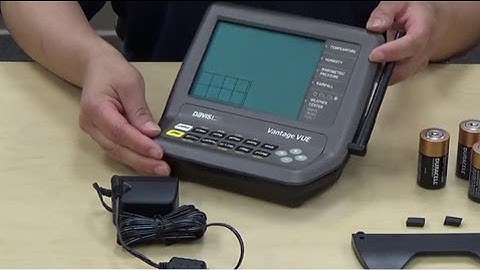
hi I'm with Davis issuance and today we're going to go over figuration of your vantage view let's get started let's get your console ready for configuration first install the kickstand we've included this so that you can place your console on a flat surface place the tabs into the hole and press up to lock your kicks down in place now install the rubber feet onto the kickstand we've included two additional rubber feet for the bottom of your console we've installed them already now it's time to power your console on simply grab your AC adapter and insert it into the port on the side of your console if you decide not to use the AC adapter or want battery backup you can use 3c cell batteries simply remove the battery cover and slide your batteries into place reinstall the battery cover and your console will power on you will hear three beeps to ensure your console is functioning properly n

Similar products