Description
Product advantage:
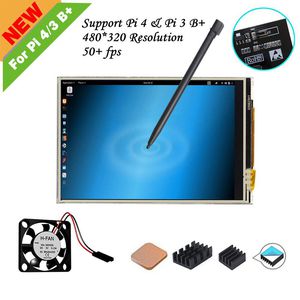
1. The power interface is designed on the screen PCB board. It can be connected to the fan, which can cool the Raspberry Pi quickly with the heat sink to prevent Raspberry Pi malfunction from high temperature .
2. Up to 50fps refresh rate, 125MHz signal input, stable and flicker free.
3. Provides detailed tutorials to solve the problem of installing drivers and some of the tools that are often used for the Raspberry Pi.
4. The size is the same as the Raspberry Pi, it can be a touch screen and provide a better human-computer interaction experience.
Notice:
1. After the screen is cover, GPIO cannot be used. And Don't have backlight ON/Off Key
2. Need to install the driver, customers often say that after the driver is installed, the system crashes or can display nothing on the screen after installation (If you are not familiar with the Raspberry Pi, it is strongly recommended you that use the system with the driver installed)
3. The resolution is small, only 320*480 P, the screen often cannot display the complete interface.
4. GPIO connection method, customers often have wrong connection, Led to the touch function can not be used
5.Does not support other systems such as Windows.
6. It's not IPS screen, The best viewable is in the vertical position
Working with Raspberry Pi 3/3 B+ Tutorial:
http://www.lcdwiki.com/MHS-3.5inch_RPi_Display
Working with Raspberry Pi 4, please use follow RASPBAIN BUSTER system image (had installed Driver, 902MB, Keep Patience to download):
https://drive.google.com/open?id=1nQ4-l6b6hYrdO-6KRtAoN9lNS5qXzcEm
If want to show back with HDMI monitor, please execute the command:
cd LCD-show/
sudo ./LCD-hdmi
Package include:
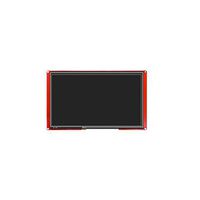
1* 3.5 Screen
1* mini fan
1* Touch Pen
3pcs heat-sinks
1. The power interface is designed on the screen PCB board. It can be connected to the fan, which can cool the Raspberry Pi quickly with the heat sink to prevent Raspberry Pi malfunction from high temperature .
2. Up to 50fps refresh rate, 125MHz signal input, stable and flicker free.
3. Provides detailed tutorials to solve the problem of installing drivers and some of the tools that are often used for the Raspberry Pi.
4. The size is the same as the Raspberry Pi, it can be a touch screen and provide a better human-computer interaction experience.
Notice:
1. After the screen is cover, GPIO cannot be used. And Don't have backlight ON/Off Key
2. Need to install the driver, customers often say that after the driver is installed, the system crashes or can display nothing on the screen after installation (If you are not familiar with the Raspberry Pi, it is strongly recommended you that use the system with the driver installed)
3. The resolution is small, only 320*480 P, the screen often cannot display the complete interface.
4. GPIO connection method, customers often have wrong connection, Led to the touch function can not be used
5.Does not support other systems such as Windows.
6. It's not IPS screen, The best viewable is in the vertical position
Working with Raspberry Pi 3/3 B+ Tutorial:
http://www.lcdwiki.com/MHS-3.5inch_RPi_Display
Working with Raspberry Pi 4, please use follow RASPBAIN BUSTER system image (had installed Driver, 902MB, Keep Patience to download):
https://drive.google.com/open?id=1nQ4-l6b6hYrdO-6KRtAoN9lNS5qXzcEm
If want to show back with HDMI monitor, please execute the command:
cd LCD-show/
sudo ./LCD-hdmi
Package include:
1* 3.5 Screen
1* mini fan
1* Touch Pen
3pcs heat-sinks
for Raspberry Pi 4/Pi 3 B+, 3.5 inch Resistive Touch Screen with Mini Fan, 3Pcs Heat-Sinks, 320x480 Pixel Monitor TFT LCD [Support RASPBIAN Buster System]
Price is below average
Current Price
$16.99
Average
$18.19
Min Price
$14.99
Max Price
$20.99
Price dynamics
7%
Description
Product advantage:
1. The power interface is designed on the screen PCB board. It can be connected to the fan, which can cool the Raspberry Pi quickly with the heat sink to prevent Raspberry Pi malfunction from high temperature .
2. Up to 50fps refresh rate, 125MHz signal input, stable and flicker free.
3. Provides detailed tutorials to solve the problem of installing drivers and some of the tools that are often used for the Raspberry Pi.
4. The size is the same as the Raspberry Pi, it can be a touch screen and provide a better human-computer interaction experience.
Notice:
1. After the screen is cover, GPIO cannot be used. And Don't have backlight ON/Off Key
2. Need to install the driver, customers often say that after the driver is installed, the system crashes or can display nothing on the screen after installation (If you are not familiar with the Raspberry Pi, it is strongly recommended you that use the system with the driver installed)
3. The resolution is small, only 320*480 P, the screen often cannot display the complete interface.
4. GPIO connection method, customers often have wrong connection, Led to the touch function can not be used
5.Does not support other systems such as Windows.
6. It's not IPS screen, The best viewable is in the vertical position
Working with Raspberry Pi 3/3 B+ Tutorial:
http://www.lcdwiki.com/MHS-3.5inch_RPi_Display
Working with Raspberry Pi 4, please use follow RASPBAIN BUSTER system image (had installed Driver, 902MB, Keep Patience to download):
https://drive.google.com/open?id=1nQ4-l6b6hYrdO-6KRtAoN9lNS5qXzcEm
If want to show back with HDMI monitor, please execute the command:
cd LCD-show/
sudo ./LCD-hdmi
Package include:
1* 3.5 Screen
1* mini fan
1* Touch Pen
3pcs heat-sinks
1. The power interface is designed on the screen PCB board. It can be connected to the fan, which can cool the Raspberry Pi quickly with the heat sink to prevent Raspberry Pi malfunction from high temperature .
2. Up to 50fps refresh rate, 125MHz signal input, stable and flicker free.
3. Provides detailed tutorials to solve the problem of installing drivers and some of the tools that are often used for the Raspberry Pi.
4. The size is the same as the Raspberry Pi, it can be a touch screen and provide a better human-computer interaction experience.
Notice:
1. After the screen is cover, GPIO cannot be used. And Don't have backlight ON/Off Key
2. Need to install the driver, customers often say that after the driver is installed, the system crashes or can display nothing on the screen after installation (If you are not familiar with the Raspberry Pi, it is strongly recommended you that use the system with the driver installed)
3. The resolution is small, only 320*480 P, the screen often cannot display the complete interface.
4. GPIO connection method, customers often have wrong connection, Led to the touch function can not be used
5.Does not support other systems such as Windows.
6. It's not IPS screen, The best viewable is in the vertical position
Working with Raspberry Pi 3/3 B+ Tutorial:
http://www.lcdwiki.com/MHS-3.5inch_RPi_Display
Working with Raspberry Pi 4, please use follow RASPBAIN BUSTER system image (had installed Driver, 902MB, Keep Patience to download):
https://drive.google.com/open?id=1nQ4-l6b6hYrdO-6KRtAoN9lNS5qXzcEm
If want to show back with HDMI monitor, please execute the command:
cd LCD-show/
sudo ./LCD-hdmi
Package include:
1* 3.5 Screen
1* mini fan
1* Touch Pen
3pcs heat-sinks
Price will be lower
in next 2 weeks
in next 2 weeks
According to the data, price will be lower in next two weeks, so not waste your money and track better price!
Product review & video
[Music] [Music] [Music] [Applause] [Music] [Music] [Music] [Music] [Music] [Applause] [Music] [Music] [Applause] [Music] [Music]


Similar products