- HomeElectronicsAccessories & SuppliesAudio & Video AccessoriesCables & InterconnectsVideo CablesHDMI Cables
Description
Please read the usage and precautions carefully before purchasing.
Attention:
1.The lightning to HDMI adapter must be connected to power source to function. if not , the item will not work.
2.Due to HDCP copyright protection measures, it doesnt work with some paid contents including Netflix,
Amazon video, HBO go, HULU and Honda motor, please refer to the terms and conditions of those apps.
How to use:
1.Connect a HDMI cable to your adapter, then connect the other end of your HDMI cable to your secondary display(TV, monitor, or projector).
2.Connect a 5V/1A Lightning Charger to supply power to your adapter.
3.Plug your digital AV adapter into the charging port on the bottom of your iOS device.
4.Switch the TV/projector's output to corresponding HDMI.
5.For iOS system, the phones' screen will pop out a "Trust" option, just click it then wait it to connect automatically.
Item Features:
1.Extensive Compatibility:
Support iPhone/iPad/iPod devices , audio/Video transfer to display/projector/TV with HDMI port.
2. Plug and Play
No need Personal Hotspot/Airplay, no need any setting/App on your Apple devices(iPhone/iPad/iPod) side only click the "Trust" button while connect it.
3. Full 1080P HD Output
It delivers full 1080P HD Output.Providing ultra-clear overspeed visual experience in daily life and work.
4. Small Screen into Big Screen
Show videos or pictures from your device,present slideshows or browse the web on a larger screen.
Friendly Note:⚠️
Due to copyright protection measures, it won't support some paid contents including Netflix, Amazon Prime videos,
Hulu, Comcast tv, Xfinity, Vudu, DIRECT TV, Honda motor, HBO go, etc.
Please make sure of right adapter, 5w for iPhone and10w/12w for iPad. If lower, it won't work very well.
Can not connect laptop or computer without HDMI port.
Attention:
1.The lightning to HDMI adapter must be connected to power source to function. if not , the item will not work.
2.Due to HDCP copyright protection measures, it doesnt work with some paid contents including Netflix,
Amazon video, HBO go, HULU and Honda motor, please refer to the terms and conditions of those apps.
How to use:
1.Connect a HDMI cable to your adapter, then connect the other end of your HDMI cable to your secondary display(TV, monitor, or projector).
2.Connect a 5V/1A Lightning Charger to supply power to your adapter.
3.Plug your digital AV adapter into the charging port on the bottom of your iOS device.
4.Switch the TV/projector's output to corresponding HDMI.
5.For iOS system, the phones' screen will pop out a "Trust" option, just click it then wait it to connect automatically.
Item Features:
1.Extensive Compatibility:
Support iPhone/iPad/iPod devices , audio/Video transfer to display/projector/TV with HDMI port.
2. Plug and Play
No need Personal Hotspot/Airplay, no need any setting/App on your Apple devices(iPhone/iPad/iPod) side only click the "Trust" button while connect it.
3. Full 1080P HD Output
It delivers full 1080P HD Output.Providing ultra-clear overspeed visual experience in daily life and work.
4. Small Screen into Big Screen
Show videos or pictures from your device,present slideshows or browse the web on a larger screen.
Friendly Note:⚠️
Due to copyright protection measures, it won't support some paid contents including Netflix, Amazon Prime videos,
Hulu, Comcast tv, Xfinity, Vudu, DIRECT TV, Honda motor, HBO go, etc.
Please make sure of right adapter, 5w for iPhone and10w/12w for iPad. If lower, it won't work very well.
Can not connect laptop or computer without HDMI port.
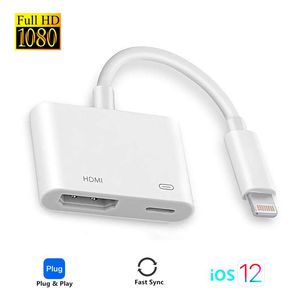
HDMI Adapter for iPhone, Ubluker Compatible with iPhone iPad to HDMI Cable for TV, Compatible for iPhone XS/XSmax/XR/X/8/7/6/plus iPad iPod to TV Projector Monitor (White)
Current Price
$13.99
Average
$12.74
Min Price
$9.99
Max Price
$15.99
Price dynamics
9%
Description
Please read the usage and precautions carefully before purchasing.
Attention:
1.The lightning to HDMI adapter must be connected to power source to function. if not , the item will not work.
2.Due to HDCP copyright protection measures, it doesnt work with some paid contents including Netflix,
Amazon video, HBO go, HULU and Honda motor, please refer to the terms and conditions of those apps.
How to use:
1.Connect a HDMI cable to your adapter, then connect the other end of your HDMI cable to your secondary display(TV, monitor, or projector).
2.Connect a 5V/1A Lightning Charger to supply power to your adapter.
3.Plug your digital AV adapter into the charging port on the bottom of your iOS device.
4.Switch the TV/projector's output to corresponding HDMI.
5.For iOS system, the phones' screen will pop out a "Trust" option, just click it then wait it to connect automatically.
Item Features:
1.Extensive Compatibility:
Support iPhone/iPad/iPod devices , audio/Video transfer to display/projector/TV with HDMI port.
2. Plug and Play
No need Personal Hotspot/Airplay, no need any setting/App on your Apple devices(iPhone/iPad/iPod) side only click the "Trust" button while connect it.
3. Full 1080P HD Output
It delivers full 1080P HD Output.Providing ultra-clear overspeed visual experience in daily life and work.
4. Small Screen into Big Screen
Show videos or pictures from your device,present slideshows or browse the web on a larger screen.
Friendly Note:⚠️
Due to copyright protection measures, it won't support some paid contents including Netflix, Amazon Prime videos,
Hulu, Comcast tv, Xfinity, Vudu, DIRECT TV, Honda motor, HBO go, etc.
Please make sure of right adapter, 5w for iPhone and10w/12w for iPad. If lower, it won't work very well.
Can not connect laptop or computer without HDMI port.
Attention:
1.The lightning to HDMI adapter must be connected to power source to function. if not , the item will not work.
2.Due to HDCP copyright protection measures, it doesnt work with some paid contents including Netflix,
Amazon video, HBO go, HULU and Honda motor, please refer to the terms and conditions of those apps.
How to use:
1.Connect a HDMI cable to your adapter, then connect the other end of your HDMI cable to your secondary display(TV, monitor, or projector).
2.Connect a 5V/1A Lightning Charger to supply power to your adapter.
3.Plug your digital AV adapter into the charging port on the bottom of your iOS device.
4.Switch the TV/projector's output to corresponding HDMI.
5.For iOS system, the phones' screen will pop out a "Trust" option, just click it then wait it to connect automatically.
Item Features:
1.Extensive Compatibility:
Support iPhone/iPad/iPod devices , audio/Video transfer to display/projector/TV with HDMI port.
2. Plug and Play
No need Personal Hotspot/Airplay, no need any setting/App on your Apple devices(iPhone/iPad/iPod) side only click the "Trust" button while connect it.
3. Full 1080P HD Output
It delivers full 1080P HD Output.Providing ultra-clear overspeed visual experience in daily life and work.
4. Small Screen into Big Screen
Show videos or pictures from your device,present slideshows or browse the web on a larger screen.
Friendly Note:⚠️
Due to copyright protection measures, it won't support some paid contents including Netflix, Amazon Prime videos,
Hulu, Comcast tv, Xfinity, Vudu, DIRECT TV, Honda motor, HBO go, etc.
Please make sure of right adapter, 5w for iPhone and10w/12w for iPad. If lower, it won't work very well.
Can not connect laptop or computer without HDMI port.
Price will be lower
in next 2 weeks
in next 2 weeks
According to the data, price will be lower in next two weeks, so not waste your money and track better price!

Similar products






































