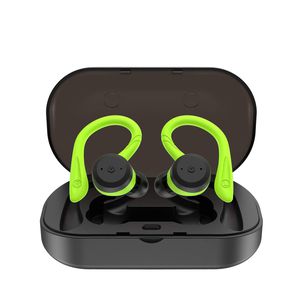
Description
This TWS earbuds can play on 5 hours. And with a charging case, the play time can goes up tp more than 20 hours. Very convenient for travel, out sports and climbing.
How to use(twin stereo mode):
1. Press the button of the charging case to power on (flash blue light)
2. Take out both earbuds, they will automatically power on and pair with each other, Left earbud blink blue and red light, right earbud flashed blue light
3. Search and select TWS Earbuds-L to confirm pairing on your smartphone
FAST ANSWER QUESTION:
1. Left earbud does not connect with right earbud:
There are 2 ways to solve this question:
-Turn off the 2 earbuds, in the meantime long press both earbuds for 5 seconds, both earbuds flash red and blue light, then they will automatically connect with each other.
-Put the 2 earbuds back to the charging case, when the charging case is charging the earbuds, they will turn on red light. Then take out the earbuds from the charging case, they will connect each other automatically.
2. The earbuds cannot connect my phone:
-Turn off the phone bluetooth and earbuds. Then turn on the earbuds and phone bluetooth again to connect.
-If the earbuds has been connected to your phone before, click the right name of the earbuds on your phone bluetooth list and then connect again.
-Delete the earbuds bluetooth name in your phone list, and then search for the earbuds bluetooth name and connect again.
3. When charging, the earbuds cannot turn on red light:
-Before charging, please check the conencting pin, it needs to be clean.
-Please check the charging case, whether it has power or not.
-The earbuds power is too low, in this case, please wait for the earbuds to turn on red light and keep charging.
How to use(twin stereo mode):
1. Press the button of the charging case to power on (flash blue light)
2. Take out both earbuds, they will automatically power on and pair with each other, Left earbud blink blue and red light, right earbud flashed blue light
3. Search and select TWS Earbuds-L to confirm pairing on your smartphone
FAST ANSWER QUESTION:
1. Left earbud does not connect with right earbud:
There are 2 ways to solve this question:
-Turn off the 2 earbuds, in the meantime long press both earbuds for 5 seconds, both earbuds flash red and blue light, then they will automatically connect with each other.
-Put the 2 earbuds back to the charging case, when the charging case is charging the earbuds, they will turn on red light. Then take out the earbuds from the charging case, they will connect each other automatically.
2. The earbuds cannot connect my phone:
-Turn off the phone bluetooth and earbuds. Then turn on the earbuds and phone bluetooth again to connect.
-If the earbuds has been connected to your phone before, click the right name of the earbuds on your phone bluetooth list and then connect again.
-Delete the earbuds bluetooth name in your phone list, and then search for the earbuds bluetooth name and connect again.
3. When charging, the earbuds cannot turn on red light:
-Before charging, please check the conencting pin, it needs to be clean.
-Please check the charging case, whether it has power or not.
-The earbuds power is too low, in this case, please wait for the earbuds to turn on red light and keep charging.
True Wireless Earbuds Bluetooth 5.0 Headphones with Mic HiFi Bass IPX7 Waterproof TWS Stereo Headsets Noise Cancelling Earphones up to 15 Hours with Battery Charging Case (Green)
Current Price
$49.99
Average
$49.99
Min Price
$49.99
Max Price
$49.99
Description
This TWS earbuds can play on 5 hours. And with a charging case, the play time can goes up tp more than 20 hours. Very convenient for travel, out sports and climbing.
How to use(twin stereo mode):
1. Press the button of the charging case to power on (flash blue light)
2. Take out both earbuds, they will automatically power on and pair with each other, Left earbud blink blue and red light, right earbud flashed blue light
3. Search and select TWS Earbuds-L to confirm pairing on your smartphone
FAST ANSWER QUESTION:
1. Left earbud does not connect with right earbud:
There are 2 ways to solve this question:
-Turn off the 2 earbuds, in the meantime long press both earbuds for 5 seconds, both earbuds flash red and blue light, then they will automatically connect with each other.
-Put the 2 earbuds back to the charging case, when the charging case is charging the earbuds, they will turn on red light. Then take out the earbuds from the charging case, they will connect each other automatically.
2. The earbuds cannot connect my phone:
-Turn off the phone bluetooth and earbuds. Then turn on the earbuds and phone bluetooth again to connect.
-If the earbuds has been connected to your phone before, click the right name of the earbuds on your phone bluetooth list and then connect again.
-Delete the earbuds bluetooth name in your phone list, and then search for the earbuds bluetooth name and connect again.
3. When charging, the earbuds cannot turn on red light:
-Before charging, please check the conencting pin, it needs to be clean.
-Please check the charging case, whether it has power or not.
-The earbuds power is too low, in this case, please wait for the earbuds to turn on red light and keep charging.
How to use(twin stereo mode):
1. Press the button of the charging case to power on (flash blue light)
2. Take out both earbuds, they will automatically power on and pair with each other, Left earbud blink blue and red light, right earbud flashed blue light
3. Search and select TWS Earbuds-L to confirm pairing on your smartphone
FAST ANSWER QUESTION:
1. Left earbud does not connect with right earbud:
There are 2 ways to solve this question:
-Turn off the 2 earbuds, in the meantime long press both earbuds for 5 seconds, both earbuds flash red and blue light, then they will automatically connect with each other.
-Put the 2 earbuds back to the charging case, when the charging case is charging the earbuds, they will turn on red light. Then take out the earbuds from the charging case, they will connect each other automatically.
2. The earbuds cannot connect my phone:
-Turn off the phone bluetooth and earbuds. Then turn on the earbuds and phone bluetooth again to connect.
-If the earbuds has been connected to your phone before, click the right name of the earbuds on your phone bluetooth list and then connect again.
-Delete the earbuds bluetooth name in your phone list, and then search for the earbuds bluetooth name and connect again.
3. When charging, the earbuds cannot turn on red light:
-Before charging, please check the conencting pin, it needs to be clean.
-Please check the charging case, whether it has power or not.
-The earbuds power is too low, in this case, please wait for the earbuds to turn on red light and keep charging.
Price will be lower
in next 2 weeks
in next 2 weeks
According to the data, price will be lower in next two weeks, so not waste your money and track better price!
Product review & video
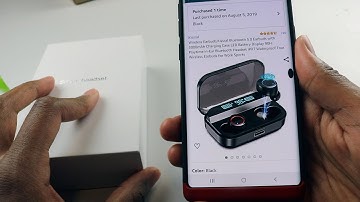
yo sup guys this is going to be a quick review on this wireless earbuds a part from Amazon now the name-brand on this aha I have to go back to my order again the name-brand of this is called let's look at this kiss role and this earbuds are very nice I've been using it for a while now he actually supports Bluetooth 5.0 so if you have like a new smartphone you're gonna notice the quality of those airports being like ridiculously better and also there could like connect on and off significantly faster than an old 4.0 bluetooth now this one has 3000 milliamp our charging battery which is like insane we gotta talk about that soon which equivalents to 90 hours of a plate at 90 hours of playtime in your ear I mean we're gonna talk about all that all I could tell you is 90 hours is ridiculously high in comparison apples have Apple earbud I believe to only has 24 hours of playback time which is


Similar products



































