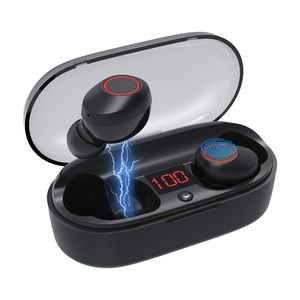
Description
ANSGEC Bluetooth Wireless Earbuds
Highlight Features:
✔Bluetooth 5.0 Wireless Earbuds
✔4D Surround Heavy Bass Sound Quality
✔True Wireless Stereo Sound
✔IPX5 Waterproof
✔Separate Used simultaneously
✔Light Weight
✔One Step Pair
✔Portable Charging Box
How to Use the Wireless Earbuds:
1.Pick up 2 earbuds from charging box, charging case with power, take out two and they will power on automatically right one will flash blue and red alternately then come into pairing mode.
2. Turn on Bluetooth on your phone/media device and scan for"J29-R"and pair.Enjoy your music freely.
Earburds Pairing Solution :
Suppose two uynits failed for pairing at first time:
Long press L&R units until RED and BLUE light flash alternately.
Release button, then you will see L unit flash BLUE, and R unit flash RED and BLUE alternately. Means two units pair successfully.
Turn on Bluetooth on your phone/media device and scan for "J29-R"and pair.
Package include:
2 x Truly Wireless Earbuds
1 x Micro USB Charging Cable
1 x Charging Case
2 x Extra Earmuffs
Please Note:
1. Earbuds can't be used while charging.
2. Once the earbuds are fully charged, blue light will no longer flash.
3. Earbuds will be turned off automatically when placed back into the charging case.
4. Make sure the Bluetooth function is available on your electronic device. Specific pairing procedures may vary slightly depending on the device.
Highlight Features:
✔Bluetooth 5.0 Wireless Earbuds
✔4D Surround Heavy Bass Sound Quality
✔True Wireless Stereo Sound
✔IPX5 Waterproof
✔Separate Used simultaneously
✔Light Weight
✔One Step Pair
✔Portable Charging Box
How to Use the Wireless Earbuds:
1.Pick up 2 earbuds from charging box, charging case with power, take out two and they will power on automatically right one will flash blue and red alternately then come into pairing mode.
2. Turn on Bluetooth on your phone/media device and scan for"J29-R"and pair.Enjoy your music freely.
Earburds Pairing Solution :
Suppose two uynits failed for pairing at first time:
Long press L&R units until RED and BLUE light flash alternately.
Release button, then you will see L unit flash BLUE, and R unit flash RED and BLUE alternately. Means two units pair successfully.
Turn on Bluetooth on your phone/media device and scan for "J29-R"and pair.
Package include:
2 x Truly Wireless Earbuds
1 x Micro USB Charging Cable
1 x Charging Case
2 x Extra Earmuffs
Please Note:
1. Earbuds can't be used while charging.
2. Once the earbuds are fully charged, blue light will no longer flash.
3. Earbuds will be turned off automatically when placed back into the charging case.
4. Make sure the Bluetooth function is available on your electronic device. Specific pairing procedures may vary slightly depending on the device.
Wireless Earbuds, Bluetooth Headphones Bluetooth 5.0 Wireless Headphones 4D Surroud Heavy Bass IPX5 Waterproof True Wireless Stereo Headsets Noise Canceling
Price is below average
Current Price
$29.99
Average
$33.99
Min Price
$25.99
Max Price
$45.99
Price dynamics
12%
Description
ANSGEC Bluetooth Wireless Earbuds
Highlight Features:
✔Bluetooth 5.0 Wireless Earbuds
✔4D Surround Heavy Bass Sound Quality
✔True Wireless Stereo Sound
✔IPX5 Waterproof
✔Separate Used simultaneously
✔Light Weight
✔One Step Pair
✔Portable Charging Box
How to Use the Wireless Earbuds:
1.Pick up 2 earbuds from charging box, charging case with power, take out two and they will power on automatically right one will flash blue and red alternately then come into pairing mode.
2. Turn on Bluetooth on your phone/media device and scan for"J29-R"and pair.Enjoy your music freely.
Earburds Pairing Solution :
Suppose two uynits failed for pairing at first time:
Long press L&R units until RED and BLUE light flash alternately.
Release button, then you will see L unit flash BLUE, and R unit flash RED and BLUE alternately. Means two units pair successfully.
Turn on Bluetooth on your phone/media device and scan for "J29-R"and pair.
Package include:
2 x Truly Wireless Earbuds
1 x Micro USB Charging Cable
1 x Charging Case
2 x Extra Earmuffs
Please Note:
1. Earbuds can't be used while charging.
2. Once the earbuds are fully charged, blue light will no longer flash.
3. Earbuds will be turned off automatically when placed back into the charging case.
4. Make sure the Bluetooth function is available on your electronic device. Specific pairing procedures may vary slightly depending on the device.
Highlight Features:
✔Bluetooth 5.0 Wireless Earbuds
✔4D Surround Heavy Bass Sound Quality
✔True Wireless Stereo Sound
✔IPX5 Waterproof
✔Separate Used simultaneously
✔Light Weight
✔One Step Pair
✔Portable Charging Box
How to Use the Wireless Earbuds:
1.Pick up 2 earbuds from charging box, charging case with power, take out two and they will power on automatically right one will flash blue and red alternately then come into pairing mode.
2. Turn on Bluetooth on your phone/media device and scan for"J29-R"and pair.Enjoy your music freely.
Earburds Pairing Solution :
Suppose two uynits failed for pairing at first time:
Long press L&R units until RED and BLUE light flash alternately.
Release button, then you will see L unit flash BLUE, and R unit flash RED and BLUE alternately. Means two units pair successfully.
Turn on Bluetooth on your phone/media device and scan for "J29-R"and pair.
Package include:
2 x Truly Wireless Earbuds
1 x Micro USB Charging Cable
1 x Charging Case
2 x Extra Earmuffs
Please Note:
1. Earbuds can't be used while charging.
2. Once the earbuds are fully charged, blue light will no longer flash.
3. Earbuds will be turned off automatically when placed back into the charging case.
4. Make sure the Bluetooth function is available on your electronic device. Specific pairing procedures may vary slightly depending on the device.
Price will be lower
in next 2 weeks
in next 2 weeks
According to the data, price will be lower in next two weeks, so not waste your money and track better price!
Product review & video
What is going on guys? JP here for Ready.Set
GO! and welcome back to another tech video! On our video review for the AUKEY T21S one of our
viewers, Ijaz Rahman 26, left a comment that he was stuck deciding between the AUKEY T21, T21S and the
MPOW MBitsS. Upon checking their specs, I was so impressed with the MBitsS low price and overall set
of features, that I''ve decided to feature them for this unboxing and review. I bought these earbuds on
Amazon for $29.99 with a $10 promotional discount. At only $22 bucks and with over 7,000 positive reviews,
could the MPOW MBitsS be a top budget contender? Even surpassing the AUKEY T21S? Stay tuned to find
out! But before we move on guys, did you know that out of all our viewers, less than one percent are
actually subscribed to our channel? We can't do this without your support guys; so please if you
enjoy our content supp



Similar products



































