Description
Instructions
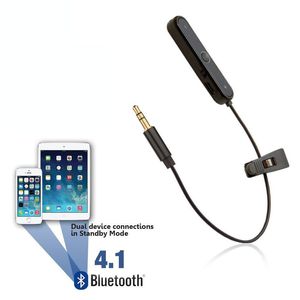
Bluetooth Adapter
Middle Button - Power On / Off & Receive / Hang Up Calls
+ Symbol - Volume Up / Next Song
- Symbol - Volume Down / Previous Song
To pair the device hold down the power button in the middle, the light will flash blue / red. Turn the bluetooth on your device on (your phone or tablet for example) and you should be able to see the new bluetooth device wanting to connect. Click to connect it and it should say connected after a few seconds. If it asks for a passcode to connect please enter '0000' on your device.
Bluetooth Adapter
Middle Button - Power On / Off & Receive / Hang Up Calls
+ Symbol - Volume Up / Next Song
- Symbol - Volume Down / Previous Song
To pair the device hold down the power button in the middle, the light will flash blue / red. Turn the bluetooth on your device on (your phone or tablet for example) and you should be able to see the new bluetooth device wanting to connect. Click to connect it and it should say connected after a few seconds. If it asks for a passcode to connect please enter '0000' on your device.
REYTID Bluetooth Adapter Compatible with Beats Solo, Solo2, Studio, Studio 2.0, MIXr & Pro Detox Headphones - Wireless Converter Receiver Compatible with Apple Earphones On-Ear Over-Ear
Price is below average
Current Price
$23.95
Average
$30.15
Min Price
$21.95
Max Price
$38.04
Price dynamics
21%
Description
Instructions
Bluetooth Adapter
Middle Button - Power On / Off & Receive / Hang Up Calls
+ Symbol - Volume Up / Next Song
- Symbol - Volume Down / Previous Song
To pair the device hold down the power button in the middle, the light will flash blue / red. Turn the bluetooth on your device on (your phone or tablet for example) and you should be able to see the new bluetooth device wanting to connect. Click to connect it and it should say connected after a few seconds. If it asks for a passcode to connect please enter '0000' on your device.
Bluetooth Adapter
Middle Button - Power On / Off & Receive / Hang Up Calls
+ Symbol - Volume Up / Next Song
- Symbol - Volume Down / Previous Song
To pair the device hold down the power button in the middle, the light will flash blue / red. Turn the bluetooth on your device on (your phone or tablet for example) and you should be able to see the new bluetooth device wanting to connect. Click to connect it and it should say connected after a few seconds. If it asks for a passcode to connect please enter '0000' on your device.
Price will be lower
in next 2 weeks
in next 2 weeks
According to the data, price will be lower in next two weeks, so not waste your money and track better price!
Similar products