- HomeElectronicsAccessories & SuppliesAudio & Video AccessoriesCables & InterconnectsVideo CablesHDMI Cables
Description
What can this phone-to-hdmi cable do?
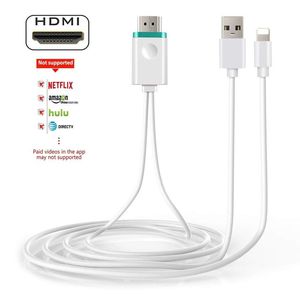
This cable is to mirror the content showing on your iOS device to any HDMI screen such as TV screen/projector/monitor. So you can use your iOS device and see the content on big screen.
HOW TO USE:
1.Plug USB end to an open USB port or other power device that has a USB port(5W for iPhone, 10W/12W for iPad);
2.Plug HDMI end to the HDMI port on the TV/computer/projector;
3.Plug into your iOS devices(iPhone or iPad);
4.Wait about 5 seconds, click "trust" and it will sync successfully.
NOTE:
1.Due to copyright protection measures, it won't support some paid contents including Netflix, Amazon Prime videos, Hulu, Comcast tv, Xfinity, Vudu, DIRECTV, etc. Please refer to the terms and conditions of those apps.
2.Make sure of right adapter, 5W for iPhone, 10W/12W for iPad. iPhone/iPad original adapters are the best choices. If lower voltage, it will not work very well.
3.After connecting the cable, the upper and lower sides of the TV/Monitor's screen may be cut off. If this happens, adjust the video settings on your HDTV and check your user manual for details
4.Any incoming calls or messages will pause the media. After taking the calls or acknowledging the messages, the media will resume playing.
Main Features
CPU: Single Core AM8258D
GPU: 3D GPU 1 x mali 400
OS: Linux 3.0.8
DDR3: 128MB
Flash: 1Gb
Length: 2M
System supported: iOS
Online update: Yes
PACKAGE:
1x HDMI Mirror cable
1x Manual
This cable is to mirror the content showing on your iOS device to any HDMI screen such as TV screen/projector/monitor. So you can use your iOS device and see the content on big screen.
HOW TO USE:
1.Plug USB end to an open USB port or other power device that has a USB port(5W for iPhone, 10W/12W for iPad);
2.Plug HDMI end to the HDMI port on the TV/computer/projector;
3.Plug into your iOS devices(iPhone or iPad);
4.Wait about 5 seconds, click "trust" and it will sync successfully.
NOTE:
1.Due to copyright protection measures, it won't support some paid contents including Netflix, Amazon Prime videos, Hulu, Comcast tv, Xfinity, Vudu, DIRECTV, etc. Please refer to the terms and conditions of those apps.
2.Make sure of right adapter, 5W for iPhone, 10W/12W for iPad. iPhone/iPad original adapters are the best choices. If lower voltage, it will not work very well.
3.After connecting the cable, the upper and lower sides of the TV/Monitor's screen may be cut off. If this happens, adjust the video settings on your HDTV and check your user manual for details
4.Any incoming calls or messages will pause the media. After taking the calls or acknowledging the messages, the media will resume playing.
Main Features
CPU: Single Core AM8258D
GPU: 3D GPU 1 x mali 400
OS: Linux 3.0.8
DDR3: 128MB
Flash: 1Gb
Length: 2M
System supported: iOS
Online update: Yes
PACKAGE:
1x HDMI Mirror cable
1x Manual
Phone to HDMI Cable, 1080P HDTV Digital AV Adapter for iPhone iPad to HDMI Big Screen TV Projector HDMI Display Cable(for iOS Only) (White-Upgraded Version)
Current Price
$15.99
Average
$14.99
Min Price
$10.99
Max Price
$15.99
Price dynamics
6%
Description
What can this phone-to-hdmi cable do?
This cable is to mirror the content showing on your iOS device to any HDMI screen such as TV screen/projector/monitor. So you can use your iOS device and see the content on big screen.
HOW TO USE:
1.Plug USB end to an open USB port or other power device that has a USB port(5W for iPhone, 10W/12W for iPad);
2.Plug HDMI end to the HDMI port on the TV/computer/projector;
3.Plug into your iOS devices(iPhone or iPad);
4.Wait about 5 seconds, click "trust" and it will sync successfully.
NOTE:
1.Due to copyright protection measures, it won't support some paid contents including Netflix, Amazon Prime videos, Hulu, Comcast tv, Xfinity, Vudu, DIRECTV, etc. Please refer to the terms and conditions of those apps.
2.Make sure of right adapter, 5W for iPhone, 10W/12W for iPad. iPhone/iPad original adapters are the best choices. If lower voltage, it will not work very well.
3.After connecting the cable, the upper and lower sides of the TV/Monitor's screen may be cut off. If this happens, adjust the video settings on your HDTV and check your user manual for details
4.Any incoming calls or messages will pause the media. After taking the calls or acknowledging the messages, the media will resume playing.
Main Features
CPU: Single Core AM8258D
GPU: 3D GPU 1 x mali 400
OS: Linux 3.0.8
DDR3: 128MB
Flash: 1Gb
Length: 2M
System supported: iOS
Online update: Yes
PACKAGE:
1x HDMI Mirror cable
1x Manual
This cable is to mirror the content showing on your iOS device to any HDMI screen such as TV screen/projector/monitor. So you can use your iOS device and see the content on big screen.
HOW TO USE:
1.Plug USB end to an open USB port or other power device that has a USB port(5W for iPhone, 10W/12W for iPad);
2.Plug HDMI end to the HDMI port on the TV/computer/projector;
3.Plug into your iOS devices(iPhone or iPad);
4.Wait about 5 seconds, click "trust" and it will sync successfully.
NOTE:
1.Due to copyright protection measures, it won't support some paid contents including Netflix, Amazon Prime videos, Hulu, Comcast tv, Xfinity, Vudu, DIRECTV, etc. Please refer to the terms and conditions of those apps.
2.Make sure of right adapter, 5W for iPhone, 10W/12W for iPad. iPhone/iPad original adapters are the best choices. If lower voltage, it will not work very well.
3.After connecting the cable, the upper and lower sides of the TV/Monitor's screen may be cut off. If this happens, adjust the video settings on your HDTV and check your user manual for details
4.Any incoming calls or messages will pause the media. After taking the calls or acknowledging the messages, the media will resume playing.
Main Features
CPU: Single Core AM8258D
GPU: 3D GPU 1 x mali 400
OS: Linux 3.0.8
DDR3: 128MB
Flash: 1Gb
Length: 2M
System supported: iOS
Online update: Yes
PACKAGE:
1x HDMI Mirror cable
1x Manual
Price will be lower
in next 2 weeks
in next 2 weeks
According to the data, price will be lower in next two weeks, so not waste your money and track better price!
Product review & video
so you can see that in real time that's our camera hey everyone Digital David here today in this video I'm gonna be unboxing and reviewing the Apple lightning 2 digital AV Adapter I did purchase this product myself and any opinion expressed in this video is strictly my own that being said if you're interested in this product the link to it will be in my video description below so please go ahead and check it out there you can see the nice Apple retail box and packaging right here very simple product guys it's just an HDMI dongle so it plugs into the Lightning port on your phone and it provides you with an HDMI port and a Lightning port so you can connect this to your TV monitor or projector now let's go ahead let's open it up and look at the package contents here oh the package contents first up we have your compliance information and your warranty info then we have the dongle itself gu



Similar products






































