- HomeElectronicsAccessories & SuppliesAudio & Video AccessoriesCables & InterconnectsVideo CablesHDMI Cables
Description
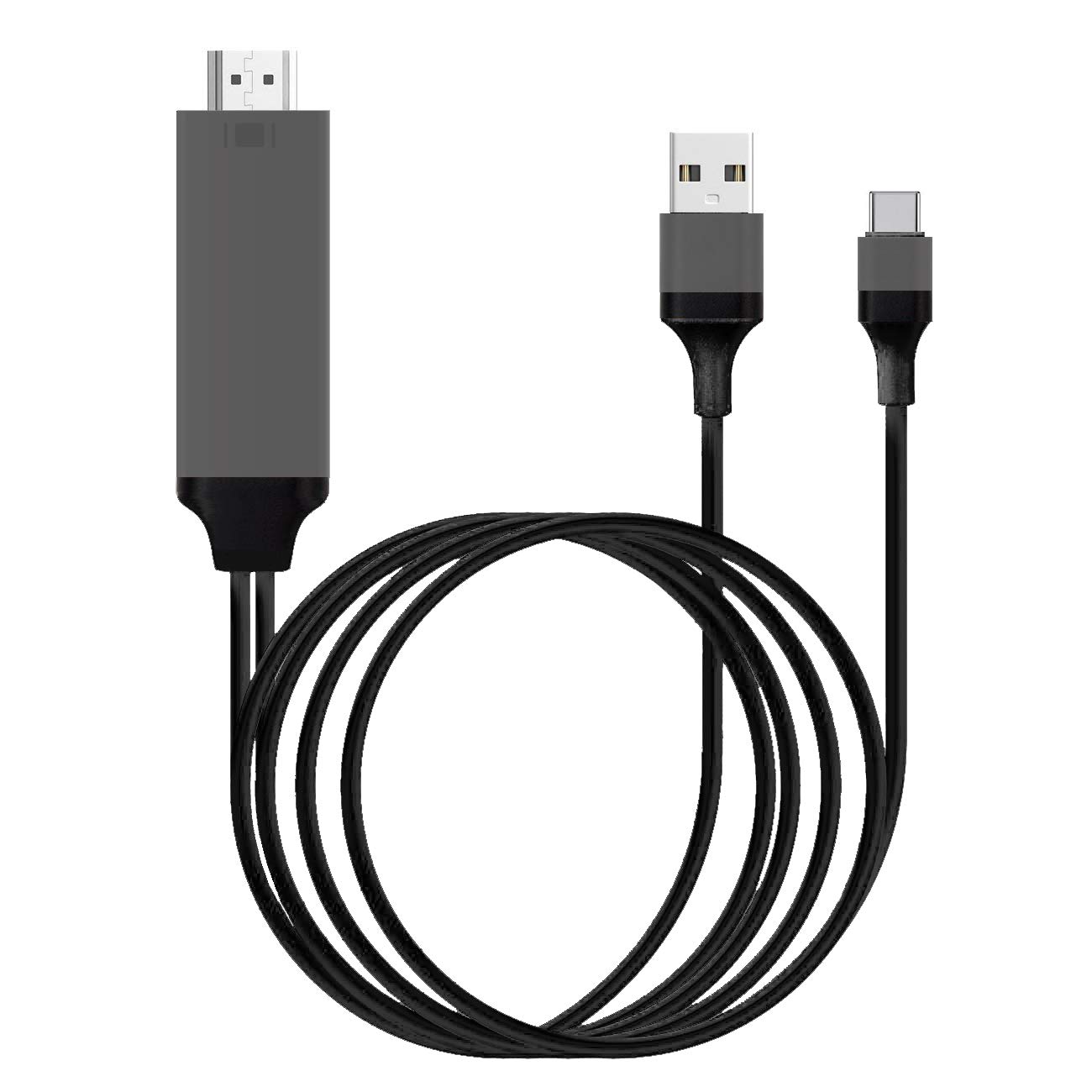
AAXA USB-C Presentation Cable for Samsung Galaxy S8/S9, Macbook Pro (2018 Model)
AAXA Technologies announces a USB-C to HDMI Presentation Cable compatible with AAXA Pico Projectors. This USB Type C (USB-C) to HDMI Cable is capable of mirroring video and audio signals from your USB-C device directly to your AAXA Pico Projector. With this accessory, you can give presentations, show picture slideshows, and watch video clips from your USB-C device on up to a 150-inch screen without cords*.Plug and Play Design
Simply plug in the USB-C port side to your device's USB-C port, the HDMI side to your AAXA Pico Projector, and the USB port to your USB charger, or the USB port on your AAXA Pico Projector. Some AAXA projector models require an HDMI to mini-HDMI Adapter (included).Complete Mobile Presentation Solution
Take your presentation everywhere you go with the AAXA Technologies USB-C to HDMI Presentation Cable. Instead of restricting your presentation to a small screen, share it with everyone on a big screen by connecting your USB-C device to your AAXA Pico Projector.Smartphone Charging
Simply plug in the full-size USB to your smartphone charger to charge your device while mirroring your screen.Compatibility
Compatible with Samsung Galaxy S8/S9, Apple Macbook Pro (2018 Model), Macbook (2018 Model), , Microsoft Surface Book 2, and other USB-C devices which have video out capabilities.NOTE: For smartphone/tablet use, USB Cable MUST be connected to a USB charger.
AAXA USB Type C to HDMI Presentation Cable for Samsung Galaxy S8/S9 MacBook Pro, Plug and Play Design, Up to 4K UHD, Works with AAXA Pico/Micro Projectors
Price is below average
Current Price
$17.99
Average
$21.59
Min Price
$17.99
Max Price
$24.99
Price dynamics
17%
Description
AAXA USB-C Presentation Cable for Samsung Galaxy S8/S9, Macbook Pro (2018 Model)
AAXA Technologies announces a USB-C to HDMI Presentation Cable compatible with AAXA Pico Projectors. This USB Type C (USB-C) to HDMI Cable is capable of mirroring video and audio signals from your USB-C device directly to your AAXA Pico Projector. With this accessory, you can give presentations, show picture slideshows, and watch video clips from your USB-C device on up to a 150-inch screen without cords*.Plug and Play Design
Simply plug in the USB-C port side to your device's USB-C port, the HDMI side to your AAXA Pico Projector, and the USB port to your USB charger, or the USB port on your AAXA Pico Projector. Some AAXA projector models require an HDMI to mini-HDMI Adapter (included).Complete Mobile Presentation Solution
Take your presentation everywhere you go with the AAXA Technologies USB-C to HDMI Presentation Cable. Instead of restricting your presentation to a small screen, share it with everyone on a big screen by connecting your USB-C device to your AAXA Pico Projector.Smartphone Charging
Simply plug in the full-size USB to your smartphone charger to charge your device while mirroring your screen.Compatibility
Compatible with Samsung Galaxy S8/S9, Apple Macbook Pro (2018 Model), Macbook (2018 Model), , Microsoft Surface Book 2, and other USB-C devices which have video out capabilities.NOTE: For smartphone/tablet use, USB Cable MUST be connected to a USB charger.
Price will be lower
in next 2 weeks
in next 2 weeks
According to the data, price will be lower in next two weeks, so not waste your money and track better price!
Product review & video
in today's video I'll be testing a bunch of USB C to HDMI hubs to see which ones will work with your Samsung phone with Samsung backs or just with screen mirroring today I'll be testing the note 9 the s9 plus as well as the Galaxy s8 let's get started everybody welcome to tech with Brett where I help tech work for you to start off this test I will be using the Samsung decks now this is Samsung's Samsung decks device the benefit of one of these is it does have two USB ports it has a fan as well as the HDMI out and a USB C input so you can charge your phone at the same time that's actually required to use Samsung decks now I do want to mention if it requires power you're more likely to be able to run multiple applications at once if you have just like a dongle like this that's just USB C to HDMI you only can open five applications up at one time and so today we're going to be testing out


Similar products