- HomeElectronicsAccessories & SuppliesAudio & Video AccessoriesCables & InterconnectsVideo CablesHDMI Cables
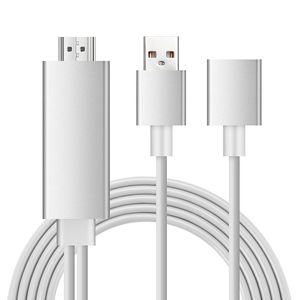
Description
【Compatible】:
For iPhone 5/5S/SE/6/6 Plus/6s/6s Plus/7/7 Plus/iPhone 8 8plus/X/XS/XS Max(iOS 8.0 or above)
For iPad mini/mini 2/mini 3/mini 4/Air/Air 2/Pro (Only 3G/4G version of iPads supported)
For Samsung S6/S8/S8+/S9/Note 5/Note 6/Note 7/Note 8/9
Note: Don't Support Samsung Galaxy S7/S7Edge
For Huawei P8/P9
For Google Nexus 5/ 5x/ 6p,LG,Sony,Motorola,Sony,HTC series and so on
【Installation】
Step 1: Connect it:
● Insert the USB port into the 5V/1A adapter, or 5V/2A USB interface on the TV / Monitor or Projector.
● Insert the HDMI out port of AISIF cable into the HDMI Port of TV / Monitor or Projector.
● Insert the Original power cable of IOS devices/ Samsung phone / Huawei phone into USB female port of AISIF cable.
Step 2: Trust for Different Devices
● For iOS Devices
Connect the phone and the lightning cable with the USB cable, just click"Trust", wait 10 seconds to synchronize the phone screen with the TV.
● For Samsung Cell phone
(1) Please open your cell phone "Developer Options", then choose "USB debugging", then click "OK", trust the devices.
(2) If there is no "Developer Options" on your phone, please click 6 times continuously in "Build number" of the "Software info" in the setting, then "Development Options" will be opened automatically.
●Android phones:
You need download "EZcast"
*Connect to TV or projector via digital AV adapter
*Plug HDMI cable to your Android devices
*Plug USB to power adapter or outlet
*Open "EZcast"to connect , which is also very easy and quick to operate
AISIF MHL Cable adapter backs 45-day money back, 18 Months worry-free & Lifetime technical support ensures your personal interests
For iPhone 5/5S/SE/6/6 Plus/6s/6s Plus/7/7 Plus/iPhone 8 8plus/X/XS/XS Max(iOS 8.0 or above)
For iPad mini/mini 2/mini 3/mini 4/Air/Air 2/Pro (Only 3G/4G version of iPads supported)
For Samsung S6/S8/S8+/S9/Note 5/Note 6/Note 7/Note 8/9
Note: Don't Support Samsung Galaxy S7/S7Edge
For Huawei P8/P9
For Google Nexus 5/ 5x/ 6p,LG,Sony,Motorola,Sony,HTC series and so on
【Installation】
Step 1: Connect it:
● Insert the USB port into the 5V/1A adapter, or 5V/2A USB interface on the TV / Monitor or Projector.
● Insert the HDMI out port of AISIF cable into the HDMI Port of TV / Monitor or Projector.
● Insert the Original power cable of IOS devices/ Samsung phone / Huawei phone into USB female port of AISIF cable.
Step 2: Trust for Different Devices
● For iOS Devices
Connect the phone and the lightning cable with the USB cable, just click"Trust", wait 10 seconds to synchronize the phone screen with the TV.
● For Samsung Cell phone
(1) Please open your cell phone "Developer Options", then choose "USB debugging", then click "OK", trust the devices.
(2) If there is no "Developer Options" on your phone, please click 6 times continuously in "Build number" of the "Software info" in the setting, then "Development Options" will be opened automatically.
●Android phones:
You need download "EZcast"
*Connect to TV or projector via digital AV adapter
*Plug HDMI cable to your Android devices
*Plug USB to power adapter or outlet
*Open "EZcast"to connect , which is also very easy and quick to operate
AISIF MHL Cable adapter backs 45-day money back, 18 Months worry-free & Lifetime technical support ensures your personal interests
AISIF 2019 Latest Mhl to HDMI Adapter Cable,6ft MHL Cable for Android with USB Charging 1080P to HDTV Monitor Projector,Support Android and iOS Phones
Price is below average
Current Price
$17.99
Average
$18.49
Min Price
$15.99
Max Price
$19.99
Price dynamics
3%
Description
【Compatible】:
For iPhone 5/5S/SE/6/6 Plus/6s/6s Plus/7/7 Plus/iPhone 8 8plus/X/XS/XS Max(iOS 8.0 or above)
For iPad mini/mini 2/mini 3/mini 4/Air/Air 2/Pro (Only 3G/4G version of iPads supported)
For Samsung S6/S8/S8+/S9/Note 5/Note 6/Note 7/Note 8/9
Note: Don't Support Samsung Galaxy S7/S7Edge
For Huawei P8/P9
For Google Nexus 5/ 5x/ 6p,LG,Sony,Motorola,Sony,HTC series and so on
【Installation】
Step 1: Connect it:
● Insert the USB port into the 5V/1A adapter, or 5V/2A USB interface on the TV / Monitor or Projector.
● Insert the HDMI out port of AISIF cable into the HDMI Port of TV / Monitor or Projector.
● Insert the Original power cable of IOS devices/ Samsung phone / Huawei phone into USB female port of AISIF cable.
Step 2: Trust for Different Devices
● For iOS Devices
Connect the phone and the lightning cable with the USB cable, just click"Trust", wait 10 seconds to synchronize the phone screen with the TV.
● For Samsung Cell phone
(1) Please open your cell phone "Developer Options", then choose "USB debugging", then click "OK", trust the devices.
(2) If there is no "Developer Options" on your phone, please click 6 times continuously in "Build number" of the "Software info" in the setting, then "Development Options" will be opened automatically.
●Android phones:
You need download "EZcast"
*Connect to TV or projector via digital AV adapter
*Plug HDMI cable to your Android devices
*Plug USB to power adapter or outlet
*Open "EZcast"to connect , which is also very easy and quick to operate
AISIF MHL Cable adapter backs 45-day money back, 18 Months worry-free & Lifetime technical support ensures your personal interests
For iPhone 5/5S/SE/6/6 Plus/6s/6s Plus/7/7 Plus/iPhone 8 8plus/X/XS/XS Max(iOS 8.0 or above)
For iPad mini/mini 2/mini 3/mini 4/Air/Air 2/Pro (Only 3G/4G version of iPads supported)
For Samsung S6/S8/S8+/S9/Note 5/Note 6/Note 7/Note 8/9
Note: Don't Support Samsung Galaxy S7/S7Edge
For Huawei P8/P9
For Google Nexus 5/ 5x/ 6p,LG,Sony,Motorola,Sony,HTC series and so on
【Installation】
Step 1: Connect it:
● Insert the USB port into the 5V/1A adapter, or 5V/2A USB interface on the TV / Monitor or Projector.
● Insert the HDMI out port of AISIF cable into the HDMI Port of TV / Monitor or Projector.
● Insert the Original power cable of IOS devices/ Samsung phone / Huawei phone into USB female port of AISIF cable.
Step 2: Trust for Different Devices
● For iOS Devices
Connect the phone and the lightning cable with the USB cable, just click"Trust", wait 10 seconds to synchronize the phone screen with the TV.
● For Samsung Cell phone
(1) Please open your cell phone "Developer Options", then choose "USB debugging", then click "OK", trust the devices.
(2) If there is no "Developer Options" on your phone, please click 6 times continuously in "Build number" of the "Software info" in the setting, then "Development Options" will be opened automatically.
●Android phones:
You need download "EZcast"
*Connect to TV or projector via digital AV adapter
*Plug HDMI cable to your Android devices
*Plug USB to power adapter or outlet
*Open "EZcast"to connect , which is also very easy and quick to operate
AISIF MHL Cable adapter backs 45-day money back, 18 Months worry-free & Lifetime technical support ensures your personal interests
Price will be lower
in next 2 weeks
in next 2 weeks
According to the data, price will be lower in next two weeks, so not waste your money and track better price!
Product review & video
[Music] hi there thank you for tuning into monoprice comm and our youtube channel my name is Sean blathering today we are introducing our Micro USB to HDMI MHL adapter MHL is a new standard for use with tablets and smartphones that says the audio MIDI Oh signals through the micro USB connector and converts it to an HDMI signal for your HDTV the signal remains a digital format throughout the entire transmission and conversion process so no quality is lost allowing you to send full HD video and up to 7.1 surround audio to your HDTV you can even charge your device while using the MHL adapter by plugging your charger into the microUSB port on the side of the adapter MHL supported devices can even mirror your device's screen onto your TV also don't forget to make sure that your device supports MHL micro USB to HDMI an MHL adapter PID 8 675 this adapter is cool because you can send an HDMI si


Similar products






































