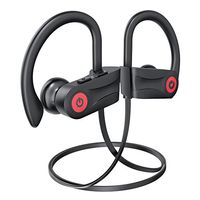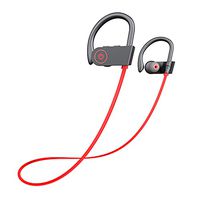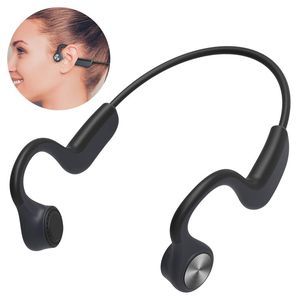
Description
Product description:
Color: Grayish black
USER INSTRUCTIONS:
1. Charge
Charge the headphones with the included micro-USB cable. Red LED light means it's charging. And the light will turn from red to blue when charging is complete.
Note:
①Since the battery may lose power during storage,it is recommended to charge the headset before using it for the first time.
②The headset cannot be used during charging.
③The headset will automatically shut down if it is not connected to the device for more than 5 minutes
2.Turn on/off
Press and hold the right button for 3 seconds,the blue light will be on, and the headset prompt music with a voice "Power up".Press again for 4 seconds, the headphone will turn off, voice prompt - "Power off".
3.Pairing and connection
Enable your BT in your device and find the device named "G101"and click it to connect the bone conduction phone. After confirming the connection, the headset voice prompt "Connected".
4.Basic operations
Single click the left or right button to pause songs and click again to re-play songs.
Single click the left or right button to answer a phone call when there is a coming call. Click again to end the call.
Long press (2 sec) the right button to reject the call.
Double-click the right/Left button to volume up/volume down.
Long press (2 sec) the right/Left button to skip forward/backward songs.
SPECIFICATIONS:
Charging time: 2 hrs
Music & Talking time: 6 hrs
Standby time: 240 hrs
Battery capacity: 200 mAh
Transmission range: 33 ft
Package:
1 x Bone Conduction Earphones
1 x Noise-Proofing Earplugs
1 x Charging Cable
1 x User's Manual
Color: Grayish black
USER INSTRUCTIONS:
1. Charge
Charge the headphones with the included micro-USB cable. Red LED light means it's charging. And the light will turn from red to blue when charging is complete.
Note:
①Since the battery may lose power during storage,it is recommended to charge the headset before using it for the first time.
②The headset cannot be used during charging.
③The headset will automatically shut down if it is not connected to the device for more than 5 minutes
2.Turn on/off
Press and hold the right button for 3 seconds,the blue light will be on, and the headset prompt music with a voice "Power up".Press again for 4 seconds, the headphone will turn off, voice prompt - "Power off".
3.Pairing and connection
Enable your BT in your device and find the device named "G101"and click it to connect the bone conduction phone. After confirming the connection, the headset voice prompt "Connected".
4.Basic operations
Single click the left or right button to pause songs and click again to re-play songs.
Single click the left or right button to answer a phone call when there is a coming call. Click again to end the call.
Long press (2 sec) the right button to reject the call.
Double-click the right/Left button to volume up/volume down.
Long press (2 sec) the right/Left button to skip forward/backward songs.
SPECIFICATIONS:
Charging time: 2 hrs
Music & Talking time: 6 hrs
Standby time: 240 hrs
Battery capacity: 200 mAh
Transmission range: 33 ft
Package:
1 x Bone Conduction Earphones
1 x Noise-Proofing Earplugs
1 x Charging Cable
1 x User's Manual
AKASO Aero Bone Conduction Headphones Open Ear with Microphone Wireless Bluetooth 5.0 Sports Headsets for Jogging Running Sports and Fitness G101
Current Price
$59.99
Average
$54.78
Min Price
$19.99
Max Price
$60.99
Price dynamics
9%
Description
Product description:
Color: Grayish black
USER INSTRUCTIONS:
1. Charge
Charge the headphones with the included micro-USB cable. Red LED light means it's charging. And the light will turn from red to blue when charging is complete.
Note:
①Since the battery may lose power during storage,it is recommended to charge the headset before using it for the first time.
②The headset cannot be used during charging.
③The headset will automatically shut down if it is not connected to the device for more than 5 minutes
2.Turn on/off
Press and hold the right button for 3 seconds,the blue light will be on, and the headset prompt music with a voice "Power up".Press again for 4 seconds, the headphone will turn off, voice prompt - "Power off".
3.Pairing and connection
Enable your BT in your device and find the device named "G101"and click it to connect the bone conduction phone. After confirming the connection, the headset voice prompt "Connected".
4.Basic operations
Single click the left or right button to pause songs and click again to re-play songs.
Single click the left or right button to answer a phone call when there is a coming call. Click again to end the call.
Long press (2 sec) the right button to reject the call.
Double-click the right/Left button to volume up/volume down.
Long press (2 sec) the right/Left button to skip forward/backward songs.
SPECIFICATIONS:
Charging time: 2 hrs
Music & Talking time: 6 hrs
Standby time: 240 hrs
Battery capacity: 200 mAh
Transmission range: 33 ft
Package:
1 x Bone Conduction Earphones
1 x Noise-Proofing Earplugs
1 x Charging Cable
1 x User's Manual
Color: Grayish black
USER INSTRUCTIONS:
1. Charge
Charge the headphones with the included micro-USB cable. Red LED light means it's charging. And the light will turn from red to blue when charging is complete.
Note:
①Since the battery may lose power during storage,it is recommended to charge the headset before using it for the first time.
②The headset cannot be used during charging.
③The headset will automatically shut down if it is not connected to the device for more than 5 minutes
2.Turn on/off
Press and hold the right button for 3 seconds,the blue light will be on, and the headset prompt music with a voice "Power up".Press again for 4 seconds, the headphone will turn off, voice prompt - "Power off".
3.Pairing and connection
Enable your BT in your device and find the device named "G101"and click it to connect the bone conduction phone. After confirming the connection, the headset voice prompt "Connected".
4.Basic operations
Single click the left or right button to pause songs and click again to re-play songs.
Single click the left or right button to answer a phone call when there is a coming call. Click again to end the call.
Long press (2 sec) the right button to reject the call.
Double-click the right/Left button to volume up/volume down.
Long press (2 sec) the right/Left button to skip forward/backward songs.
SPECIFICATIONS:
Charging time: 2 hrs
Music & Talking time: 6 hrs
Standby time: 240 hrs
Battery capacity: 200 mAh
Transmission range: 33 ft
Package:
1 x Bone Conduction Earphones
1 x Noise-Proofing Earplugs
1 x Charging Cable
1 x User's Manual
Price will be lower
in next 2 weeks
in next 2 weeks
According to the data, price will be lower in next two weeks, so not waste your money and track better price!
Product review & video
I talked about this in the past I've looked at these guys products in the past I talked about this product down on the loo later show there's been this movement towards these more advanced noise cancelling headphones that free you up to hear your surroundings because people you can't be cut off we have headphones on more frequently in public places this is kind of the original version of that now it's not a typical traditional headphone this uses bone conduction and this company aftershocks they've been doing it for a while now they decided to use jack on the front cover here also very athletic himself the skin to clothing ratio of this image like how did they get this what is this a shoulder you can email what is it jacket unbox therapy comm for these types of engagements those are the arrow pecs that's what they're calling their latest version from what I have heard these are supposed


Similar products