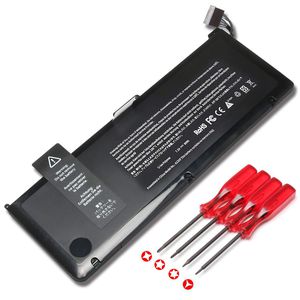
Description
Suggestion
1.For use a new battery, you'd better try a few cycles of discharging to 5%, then charging up to 95%.
2.Do not always run out of a battery to 0%, this would make it damage or usage life shortened.
3.Do not put away a battery for a long time (more than 2 months), this would cause cells inside of a battery losing balance.
The battery will not be charged up again or its lasting time shortens, so do charge a battery at least one time within two months.
4.Do not disassemble, crush or puncture; Do not dispose of in fire or water.
5.Choose correct laptop adapter, if a replacement battery is not charged, perhaps your adapter can not be compatible with it.
Please Note: This model is a MacBook Pro 5,2 2009 Version and MacBook Pro 6,1 2010 Version A1297 battery, Not a MacBook Pro 8,3 2011 Version A1297 battery.
If you are not sure about the compatibility of this item or need help finding out the part number you need, feel free to email us through Amazon before placing your order.
Compatible Part Number:
MacBook Pro 17 inch A1309 020-6313-C 661-5037-A
Compatible with Laptop Models:
MacBook Pro 17" A1297 Series(only for 2009 2010 Version)
MacBook Pro 17" Early 2009/Mid-2009/Mid-2010 Series
MacBook Pro 17" Precision Aluminum Unibody A1297
MacBook Pro 17" MC226*/A, MC226CH/A, MC226J/A
MacBook Pro 17" MC226LL/A, MC226TA/A, MC226ZP/A
Buy with confidence!
12-Month Warranty
Ship next business day
24 x 7 Email Support
Ankon A1309 Laptop Battery for Apple MacBook Pro 17" A1297 (only for Early-2009 Mid-2009 Mid-2010 Version),Fit MC226/A, MC226CH/A, MC226J/A MC226LL/A, MC226TA/A, MC226ZP/A [95Wh 7.3V]
Current Price
$46.99
Average
$44.91
Min Price
$36.99
Max Price
$47.99
Price dynamics
4%
Description
Suggestion
1.For use a new battery, you'd better try a few cycles of discharging to 5%, then charging up to 95%.
2.Do not always run out of a battery to 0%, this would make it damage or usage life shortened.
3.Do not put away a battery for a long time (more than 2 months), this would cause cells inside of a battery losing balance.
The battery will not be charged up again or its lasting time shortens, so do charge a battery at least one time within two months.
4.Do not disassemble, crush or puncture; Do not dispose of in fire or water.
5.Choose correct laptop adapter, if a replacement battery is not charged, perhaps your adapter can not be compatible with it.
Please Note: This model is a MacBook Pro 5,2 2009 Version and MacBook Pro 6,1 2010 Version A1297 battery, Not a MacBook Pro 8,3 2011 Version A1297 battery.
If you are not sure about the compatibility of this item or need help finding out the part number you need, feel free to email us through Amazon before placing your order.
Compatible Part Number:
MacBook Pro 17 inch A1309 020-6313-C 661-5037-A
Compatible with Laptop Models:
MacBook Pro 17" A1297 Series(only for 2009 2010 Version)
MacBook Pro 17" Early 2009/Mid-2009/Mid-2010 Series
MacBook Pro 17" Precision Aluminum Unibody A1297
MacBook Pro 17" MC226*/A, MC226CH/A, MC226J/A
MacBook Pro 17" MC226LL/A, MC226TA/A, MC226ZP/A
Buy with confidence!
12-Month Warranty
Ship next business day
24 x 7 Email Support
Price will be lower
in next 2 weeks
in next 2 weeks
According to the data, price will be lower in next two weeks, so not waste your money and track better price!
Product review & video
hello and welcome to our instructional series of videos in this installment we're going to show you how to replace the battery in early 2009 through mid 2010 17-inch MacBook Pro models when replacing the battery in these machines it's important that you calibrate the power management system in order to get the full use of your battery we include these instructions as well so be sure to watch all the way to the end of the video we've already gathered our materials shut down the MacBook Pro and are working on a soft static free work surface we're now ready to begin the first step is to close the MacBook Pro and flip it over on the bottom our 10 Phillips screws which will need to be removed these three screws are longer than the others so we'll remove those first then remove the remaining seven screws which are all the same size you can now remove the bottom cover and set it aside detach t



Similar products






































