Description
Product Information:
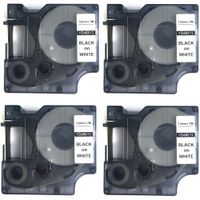
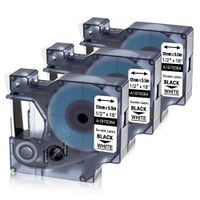
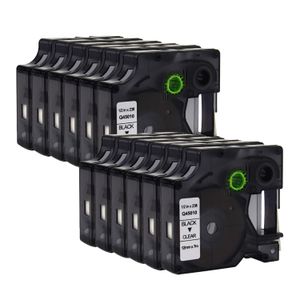
Model: Dymo 45010
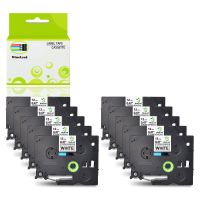
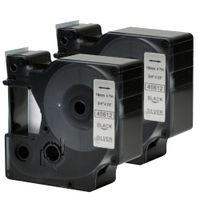
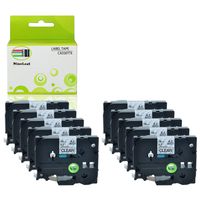
Color: Black Print on Clear Tape
Size: 12mm*7m
Package Includes: 12 Packs
Compatible for: 100% compatible for Dymo 45010 P-touch label maker.
Can be used with the Following Brother Printer:
Dymo LabelManager 100, Dymo LabelManager 120P, Dymo LabelManager 150, Dymo LabelManager 160, Dymo LabelManager 200, Dymo LabelManager 210D, Dymo LabelManager 220P
Dymo LabelManager 260P, Dymo LabelManager 280, Dymo LabelManager 300, Dymo LabelManager 350, Dymo LabelManager 350D, Dymo LabelManager 360D
Dymo LabelManager 400, Dymo LabelManager 420P, Dymo LabelManager 450, Dymo LabelManager 450D, Dymo LabelManager 500TS
Dymo LabelManager PC, Dymo LabelManager PC2, Dymo LabelManager PnP, Dymo LabelManager Wireless PnP
*Not all printers models listed here, please check with us.
Tips:
1) The ribbon may be loose during shipping, so before installing the D1 label tape into the label printers, please turn the gear in the direction of arrow on the tape for about 1-2 circles (Counterclockwise Turning) to tighten the ribbon and avoid any to tighten the ribbon and avoid any jam.
2) Before printing completely ended, please do not pull the D1 label in advance to avoid any damage.
3)Before the end of printing, please do not touch the cutter of label maker to avoid any error.
Model: Dymo 45010
Color: Black Print on Clear Tape
Size: 12mm*7m
Package Includes: 12 Packs
Compatible for: 100% compatible for Dymo 45010 P-touch label maker.
Can be used with the Following Brother Printer:
Dymo LabelManager 100, Dymo LabelManager 120P, Dymo LabelManager 150, Dymo LabelManager 160, Dymo LabelManager 200, Dymo LabelManager 210D, Dymo LabelManager 220P
Dymo LabelManager 260P, Dymo LabelManager 280, Dymo LabelManager 300, Dymo LabelManager 350, Dymo LabelManager 350D, Dymo LabelManager 360D
Dymo LabelManager 400, Dymo LabelManager 420P, Dymo LabelManager 450, Dymo LabelManager 450D, Dymo LabelManager 500TS
Dymo LabelManager PC, Dymo LabelManager PC2, Dymo LabelManager PnP, Dymo LabelManager Wireless PnP
*Not all printers models listed here, please check with us.
Tips:
1) The ribbon may be loose during shipping, so before installing the D1 label tape into the label printers, please turn the gear in the direction of arrow on the tape for about 1-2 circles (Counterclockwise Turning) to tighten the ribbon and avoid any to tighten the ribbon and avoid any jam.
2) Before printing completely ended, please do not pull the D1 label in advance to avoid any damage.
3)Before the end of printing, please do not touch the cutter of label maker to avoid any error.
ANMO 12 Pack LM Tapes 45010 Compatible DYMO D1 45010 S0720500 Black on Clear 1/2 Inch x 23 Ft Label Tape Replaces for DYMO LabelManager 160, 210D, Wireless PnP, 500TS, 450
Current Price
$56.99
Average
$33.5
Min Price
$21.99
Max Price
$56.99
Price dynamics
41%
Description
Product Information:
Model: Dymo 45010
Color: Black Print on Clear Tape
Size: 12mm*7m
Package Includes: 12 Packs
Compatible for: 100% compatible for Dymo 45010 P-touch label maker.
Can be used with the Following Brother Printer:
Dymo LabelManager 100, Dymo LabelManager 120P, Dymo LabelManager 150, Dymo LabelManager 160, Dymo LabelManager 200, Dymo LabelManager 210D, Dymo LabelManager 220P
Dymo LabelManager 260P, Dymo LabelManager 280, Dymo LabelManager 300, Dymo LabelManager 350, Dymo LabelManager 350D, Dymo LabelManager 360D
Dymo LabelManager 400, Dymo LabelManager 420P, Dymo LabelManager 450, Dymo LabelManager 450D, Dymo LabelManager 500TS
Dymo LabelManager PC, Dymo LabelManager PC2, Dymo LabelManager PnP, Dymo LabelManager Wireless PnP
*Not all printers models listed here, please check with us.
Tips:
1) The ribbon may be loose during shipping, so before installing the D1 label tape into the label printers, please turn the gear in the direction of arrow on the tape for about 1-2 circles (Counterclockwise Turning) to tighten the ribbon and avoid any to tighten the ribbon and avoid any jam.
2) Before printing completely ended, please do not pull the D1 label in advance to avoid any damage.
3)Before the end of printing, please do not touch the cutter of label maker to avoid any error.
Model: Dymo 45010
Color: Black Print on Clear Tape
Size: 12mm*7m
Package Includes: 12 Packs
Compatible for: 100% compatible for Dymo 45010 P-touch label maker.
Can be used with the Following Brother Printer:
Dymo LabelManager 100, Dymo LabelManager 120P, Dymo LabelManager 150, Dymo LabelManager 160, Dymo LabelManager 200, Dymo LabelManager 210D, Dymo LabelManager 220P
Dymo LabelManager 260P, Dymo LabelManager 280, Dymo LabelManager 300, Dymo LabelManager 350, Dymo LabelManager 350D, Dymo LabelManager 360D
Dymo LabelManager 400, Dymo LabelManager 420P, Dymo LabelManager 450, Dymo LabelManager 450D, Dymo LabelManager 500TS
Dymo LabelManager PC, Dymo LabelManager PC2, Dymo LabelManager PnP, Dymo LabelManager Wireless PnP
*Not all printers models listed here, please check with us.
Tips:
1) The ribbon may be loose during shipping, so before installing the D1 label tape into the label printers, please turn the gear in the direction of arrow on the tape for about 1-2 circles (Counterclockwise Turning) to tighten the ribbon and avoid any to tighten the ribbon and avoid any jam.
2) Before printing completely ended, please do not pull the D1 label in advance to avoid any damage.
3)Before the end of printing, please do not touch the cutter of label maker to avoid any error.
Price will be lower
in next 2 weeks
in next 2 weeks
According to the data, price will be lower in next two weeks, so not waste your money and track better price!
Product review & video
you today we're looking at the diamond label manager 160 label maker this is Deimos entry-level label maker in the consumer market the label manager 160 is about 8 inches long and fits comfortably in the hand it's a little on the chunkier side but it's still very much something you can carry around and use the LCD display on top of the unit is pretty clear and readable a backlight would have been a helpful addition but at this price point it's hard to complain the power and print buttons are colored light blue and have some formatting buttons for bold italics underline and vertical printing in between them right under those are the menu button the navigation keys and the back button the buttons on the keyboard are very clearly laid out and have a nice soft touch rubbery feel to them the most impressive thing about the layout is how intuitive this labeler feels there's almost no need for