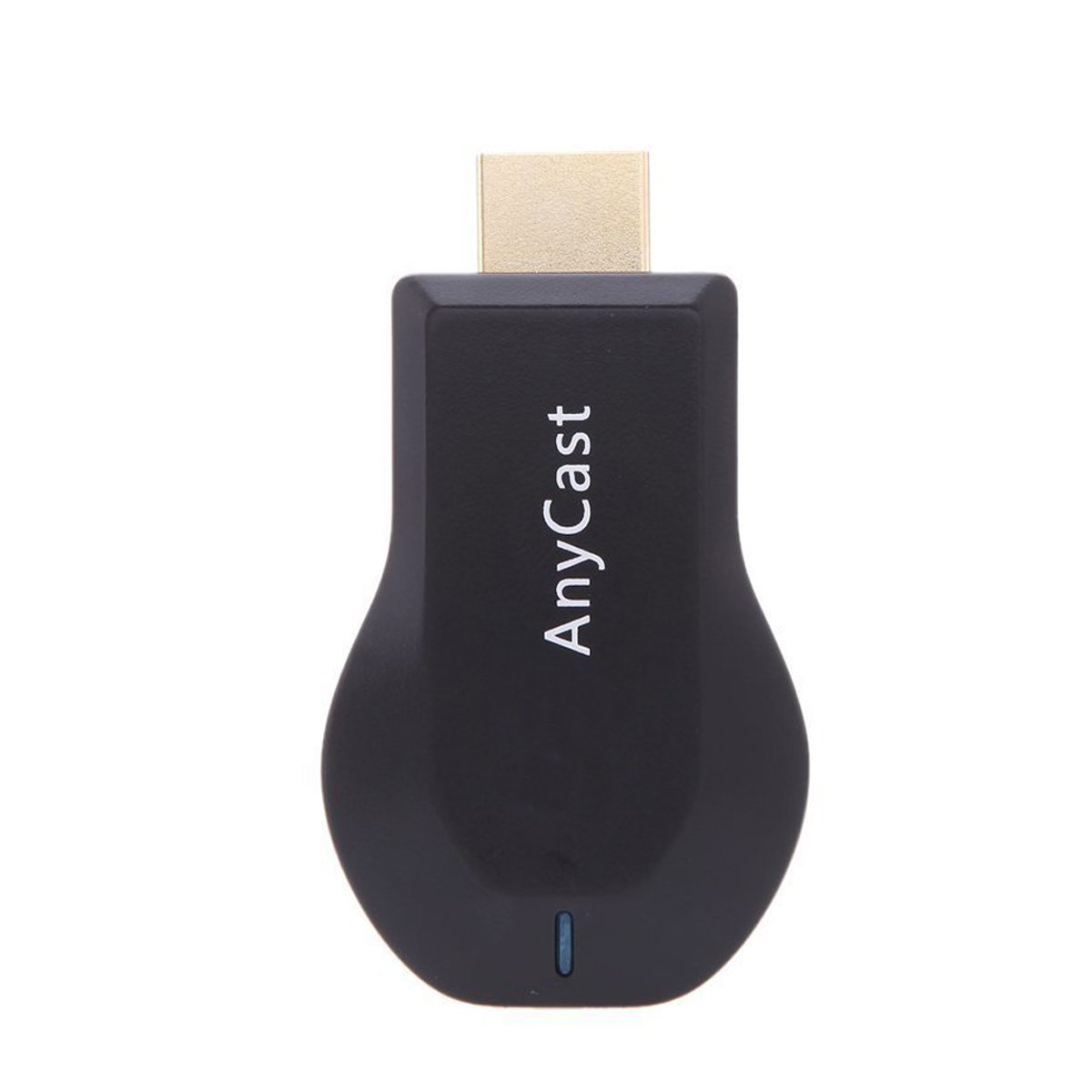
Description
Features:
Support WPS function, can fast connect with Router and AP compurgation
Support Online & local (content wireless) display: Video/Audio/Photo/Office file/Website
Office Software (Display Presentation): PDF/MS Word/MS Excel/MS Powerpoint/Keynotes
Online streaming: Youtube, Netflix, Hulu Plus, IDMB, Quickflix, Family On TV etc.
Support Video Format: AVI/DIVX/MKV/TS/DAT/MPG/MPEG1,2,4/MP4/RM/RMVB/WMV
Support Audio Format: MP1/MP2/MP3/WMA/OGG/ADPCM-WAV/PCM-WAV/AAC
Support Photo Format: JPEG/BMP
Compatibility:
AnyCast for iOS (iOS 7.0 or above)
Support iPhone 5 5S 5C SE, iPhone 6, 6 Plus, iPhone 7, 7 Plus
Support iPad mini, mini2, mini3, mini4, iPad 4, iPad Air, Air 2, iPad Pro
Resolution: iPhone 480*320 to 1136*640; iPad 1024*768 to 2048*1536
AnyCast for Android (Android 4.2 or above with 1GB RAM)
Resolution: WVGA to 1080p
Storage: At least 40MB free space needed
Specification:
CPU: Single Core ARM Cortex A9 Rockchip RK2928 1.2GHz
GPU: 3D GPU 1 x Mali 400
OS: Linux 3.0.8
DDR3: 256MB
Nand Flash: No
Support Airmirror, DLNA, Airplay, Miracast
WiFi: 802.11b/g/n 150Mbps 2.4GHz
Support projector with HDMI ports
System supported: ANDROID,IOS,MAC,WINDOWS
Working Distance: up to 10 meters
Dimension: 2.68 x 1.5 x 0.39(in)
Weight: 20g
Package Included:
1 x AnyCast M2 Plus Wi-Fi Display Dongle Receiver
1 x USB with WiFi Cable
1 x User Manual
Support WPS function, can fast connect with Router and AP compurgation
Support Online & local (content wireless) display: Video/Audio/Photo/Office file/Website
Office Software (Display Presentation): PDF/MS Word/MS Excel/MS Powerpoint/Keynotes
Online streaming: Youtube, Netflix, Hulu Plus, IDMB, Quickflix, Family On TV etc.
Support Video Format: AVI/DIVX/MKV/TS/DAT/MPG/MPEG1,2,4/MP4/RM/RMVB/WMV
Support Audio Format: MP1/MP2/MP3/WMA/OGG/ADPCM-WAV/PCM-WAV/AAC
Support Photo Format: JPEG/BMP
Compatibility:
AnyCast for iOS (iOS 7.0 or above)
Support iPhone 5 5S 5C SE, iPhone 6, 6 Plus, iPhone 7, 7 Plus
Support iPad mini, mini2, mini3, mini4, iPad 4, iPad Air, Air 2, iPad Pro
Resolution: iPhone 480*320 to 1136*640; iPad 1024*768 to 2048*1536
AnyCast for Android (Android 4.2 or above with 1GB RAM)
Resolution: WVGA to 1080p
Storage: At least 40MB free space needed
Specification:
CPU: Single Core ARM Cortex A9 Rockchip RK2928 1.2GHz
GPU: 3D GPU 1 x Mali 400
OS: Linux 3.0.8
DDR3: 256MB
Nand Flash: No
Support Airmirror, DLNA, Airplay, Miracast
WiFi: 802.11b/g/n 150Mbps 2.4GHz
Support projector with HDMI ports
System supported: ANDROID,IOS,MAC,WINDOWS
Working Distance: up to 10 meters
Dimension: 2.68 x 1.5 x 0.39(in)
Weight: 20g
Package Included:
1 x AnyCast M2 Plus Wi-Fi Display Dongle Receiver
1 x USB with WiFi Cable
1 x User Manual
AnyCast M2 Plus DLNA Airplay Miracast WiFi Display Dongle Receiver, HDMI 1080P TV Stick for Streaming Video, Web Surfing, Photo Viewer, Live Camera Sharing
Current Price
$17.99
Average
$16.74
Min Price
$11.81
Max Price
$17.99
Price dynamics
7%
Description
Features:
Support WPS function, can fast connect with Router and AP compurgation
Support Online & local (content wireless) display: Video/Audio/Photo/Office file/Website
Office Software (Display Presentation): PDF/MS Word/MS Excel/MS Powerpoint/Keynotes
Online streaming: Youtube, Netflix, Hulu Plus, IDMB, Quickflix, Family On TV etc.
Support Video Format: AVI/DIVX/MKV/TS/DAT/MPG/MPEG1,2,4/MP4/RM/RMVB/WMV
Support Audio Format: MP1/MP2/MP3/WMA/OGG/ADPCM-WAV/PCM-WAV/AAC
Support Photo Format: JPEG/BMP
Compatibility:
AnyCast for iOS (iOS 7.0 or above)
Support iPhone 5 5S 5C SE, iPhone 6, 6 Plus, iPhone 7, 7 Plus
Support iPad mini, mini2, mini3, mini4, iPad 4, iPad Air, Air 2, iPad Pro
Resolution: iPhone 480*320 to 1136*640; iPad 1024*768 to 2048*1536
AnyCast for Android (Android 4.2 or above with 1GB RAM)
Resolution: WVGA to 1080p
Storage: At least 40MB free space needed
Specification:
CPU: Single Core ARM Cortex A9 Rockchip RK2928 1.2GHz
GPU: 3D GPU 1 x Mali 400
OS: Linux 3.0.8
DDR3: 256MB
Nand Flash: No
Support Airmirror, DLNA, Airplay, Miracast
WiFi: 802.11b/g/n 150Mbps 2.4GHz
Support projector with HDMI ports
System supported: ANDROID,IOS,MAC,WINDOWS
Working Distance: up to 10 meters
Dimension: 2.68 x 1.5 x 0.39(in)
Weight: 20g
Package Included:
1 x AnyCast M2 Plus Wi-Fi Display Dongle Receiver
1 x USB with WiFi Cable
1 x User Manual
Support WPS function, can fast connect with Router and AP compurgation
Support Online & local (content wireless) display: Video/Audio/Photo/Office file/Website
Office Software (Display Presentation): PDF/MS Word/MS Excel/MS Powerpoint/Keynotes
Online streaming: Youtube, Netflix, Hulu Plus, IDMB, Quickflix, Family On TV etc.
Support Video Format: AVI/DIVX/MKV/TS/DAT/MPG/MPEG1,2,4/MP4/RM/RMVB/WMV
Support Audio Format: MP1/MP2/MP3/WMA/OGG/ADPCM-WAV/PCM-WAV/AAC
Support Photo Format: JPEG/BMP
Compatibility:
AnyCast for iOS (iOS 7.0 or above)
Support iPhone 5 5S 5C SE, iPhone 6, 6 Plus, iPhone 7, 7 Plus
Support iPad mini, mini2, mini3, mini4, iPad 4, iPad Air, Air 2, iPad Pro
Resolution: iPhone 480*320 to 1136*640; iPad 1024*768 to 2048*1536
AnyCast for Android (Android 4.2 or above with 1GB RAM)
Resolution: WVGA to 1080p
Storage: At least 40MB free space needed
Specification:
CPU: Single Core ARM Cortex A9 Rockchip RK2928 1.2GHz
GPU: 3D GPU 1 x Mali 400
OS: Linux 3.0.8
DDR3: 256MB
Nand Flash: No
Support Airmirror, DLNA, Airplay, Miracast
WiFi: 802.11b/g/n 150Mbps 2.4GHz
Support projector with HDMI ports
System supported: ANDROID,IOS,MAC,WINDOWS
Working Distance: up to 10 meters
Dimension: 2.68 x 1.5 x 0.39(in)
Weight: 20g
Package Included:
1 x AnyCast M2 Plus Wi-Fi Display Dongle Receiver
1 x USB with WiFi Cable
1 x User Manual
Price will be lower
in next 2 weeks
in next 2 weeks
According to the data, price will be lower in next two weeks, so not waste your money and track better price!
Product review & video
[Music] pshaw I am ICC and today I have something different this is an HDMI wireless adapter this is good if you want to capture Android game footage or even iPhone game footage this was sent to me and I will do a tutorial right now so the first thing we want to do with our anycast is take the supplied cable plug that in and then head over to the source that we want to use it at next we come over to our hdmi port and we plug in the anycast next we take the USB I'm gonna plug it into my TV that way it's powered every time I turn the TV on but you don't have to use the USB on your TV any powered USB you could use your phone charger if you want but I'm just gonna keep it nice and simple and do that next you want to put the antenna somewhere where it's at least accessible not blocked then let's turn on the TV okay now that the TV's powered up you can see at the top there is an SSID and a pa



Similar products