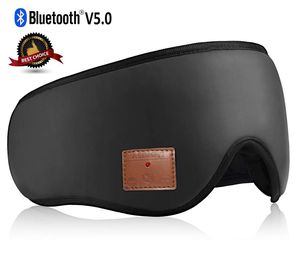
Description
How to pair the Sleeping Headphones on your device?
- Step 1: Confirm that your device's Bluetooth has been turned off, at the same time, the sleep mask is also turned off. Make sure its charged before trying to connect.
- Step 2: Hold down the Play/Pause button 3-5 seconds, until the red and blue light flashes, first it will say"power on", and KEEP holding it and it will finally say "pairing". Then release your finger.
- Step 3: Turn on Bluetooth on your device, then a name(Bluetooth Eye Mask ) will show up under your Bluetooth devices. Click the name, Start pairing. When the product indicator light turn blue and
you can hear the sound of "Du Du Du" from the module, the connection is successful! You can use the eye mask for sleeping to listen to music, make phone calls and etc.
Specifications:
- Bluetooth Version: 5.0
- Transmission Distance: 44 ft (15 m)
- Battery: LiPO(Lithium-Polymer Battery) 3.7 V 130 mAh
- Play Time: Up to 10 hours
- Standby Time: Up to 100 hours
- Charging Time: 1.5 hours
- Product Weight: 7 oz
- Crown Size: 9 in. ± 0.6 in.
- Height: 9 in. ± 0.6 in.
Package Contents:
- 1 x Bluetooth Sleep Mask
- 1 x Micro USB Charging Cable
- 1 x User Manual
Note:
- 1.Please use Micro USB charging cable to charge the sleep headphones before you using it.
- 2.Please note that you MUST remove the control panel & speaker before washing the Bluetooth Sleep Eye Mask.
ASIILOVI Sleep Headphones, Bluetooth Sleep Mask Eye Mask for Sleeping, Built-in Ultra-Thin HD Speakers and Mic Perfect for Insomnia, Nap, Snoring, Air Travel, Meditation & Relaxation (Black-Leather)
Price is below average
Current Price
$25.97
Average
$30.09
Min Price
$18.99
Max Price
$35.97
Price dynamics
14%
Description
How to pair the Sleeping Headphones on your device?
- Step 1: Confirm that your device's Bluetooth has been turned off, at the same time, the sleep mask is also turned off. Make sure its charged before trying to connect.
- Step 2: Hold down the Play/Pause button 3-5 seconds, until the red and blue light flashes, first it will say"power on", and KEEP holding it and it will finally say "pairing". Then release your finger.
- Step 3: Turn on Bluetooth on your device, then a name(Bluetooth Eye Mask ) will show up under your Bluetooth devices. Click the name, Start pairing. When the product indicator light turn blue and
you can hear the sound of "Du Du Du" from the module, the connection is successful! You can use the eye mask for sleeping to listen to music, make phone calls and etc.
Specifications:
- Bluetooth Version: 5.0
- Transmission Distance: 44 ft (15 m)
- Battery: LiPO(Lithium-Polymer Battery) 3.7 V 130 mAh
- Play Time: Up to 10 hours
- Standby Time: Up to 100 hours
- Charging Time: 1.5 hours
- Product Weight: 7 oz
- Crown Size: 9 in. ± 0.6 in.
- Height: 9 in. ± 0.6 in.
Package Contents:
- 1 x Bluetooth Sleep Mask
- 1 x Micro USB Charging Cable
- 1 x User Manual
Note:
- 1.Please use Micro USB charging cable to charge the sleep headphones before you using it.
- 2.Please note that you MUST remove the control panel & speaker before washing the Bluetooth Sleep Eye Mask.
Price will be lower
in next 2 weeks
in next 2 weeks
According to the data, price will be lower in next two weeks, so not waste your money and track better price!
Similar products