Description
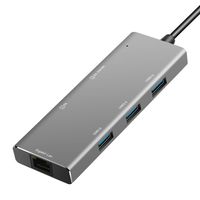
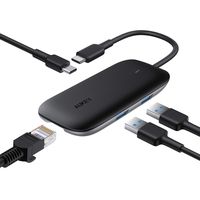
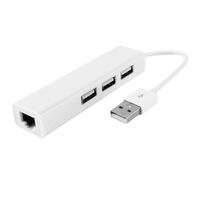
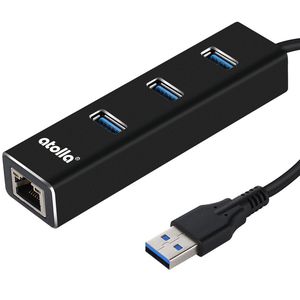
atolla 3-PORT USB 3.0 Hub AND USB to Ethernet Adapter (CH-301) is a 3-Ports SuperSpeed USB 3.0 HUB integrated with 1 Gigabit Ethernet Network Adapter. With a compact, unibody design, this hub is highly travel-friendly. It is compatible with most major OS and plug & play, easy to use, ideal for home and office use.
Why You NEED this?
Are you facing a limited USB 3.0 accessibility for your slim laptop or tablet?
So you want to replace/upgrade Gigabit network for HD Media streaming or gaming?
You want to connect your tablet (such as Surface, Chromebook) to a wired network via USB?
Just want to save the backache and add desktop access of USB/Ethernet from your PC case?
atolla CH-301 is here for you.
Installation:
1. Connect the USB 3.0 Input Port to the USB port on your tablet, Laptop or computer. Upon connection, the Blue LED Indicator on the unit will illuminate to show the unit is connected and receiving power.
2. Connect a network RJ-45 plug to the Ethernet Port .Once connection set up successfully, the Amber Indicator blinks while the Green Indicator stays on.
3. Connect USB devices to the available USB 3.0 Output Ports on the front panel.
Compatibility:
The NIC driver has been integrated in the product, when the atolla Hub is connected to computer, the driver will be installed automatically.
For Windows 8 or above, the OS may enumerate the Hub as "USB Storage Device" and prompted to install a driver, please select "Run RTK_NIC_DRIVER_INSTALLER.sfx.exe " manually.
If it warns about compatibility, please click cancel.
* For Mac OS X (10.5-10.8), download and install the driver from our official website or contact with us)
Why You NEED this?
Are you facing a limited USB 3.0 accessibility for your slim laptop or tablet?
So you want to replace/upgrade Gigabit network for HD Media streaming or gaming?
You want to connect your tablet (such as Surface, Chromebook) to a wired network via USB?
Just want to save the backache and add desktop access of USB/Ethernet from your PC case?
atolla CH-301 is here for you.
Installation:
1. Connect the USB 3.0 Input Port to the USB port on your tablet, Laptop or computer. Upon connection, the Blue LED Indicator on the unit will illuminate to show the unit is connected and receiving power.
2. Connect a network RJ-45 plug to the Ethernet Port .Once connection set up successfully, the Amber Indicator blinks while the Green Indicator stays on.
3. Connect USB devices to the available USB 3.0 Output Ports on the front panel.
Compatibility:
The NIC driver has been integrated in the product, when the atolla Hub is connected to computer, the driver will be installed automatically.
For Windows 8 or above, the OS may enumerate the Hub as "USB Storage Device" and prompted to install a driver, please select "Run RTK_NIC_DRIVER_INSTALLER.sfx.exe " manually.
If it warns about compatibility, please click cancel.
* For Mac OS X (10.5-10.8), download and install the driver from our official website or contact with us)
atolla 3 Port USB 3.0 Hub with RJ45 Gigabit Ethernet USB to Ethernet Adapter for MacBook Air/Pro/Surface/PC/Laptop(Black)
Current Price
$16.99
Average
$16.79
Min Price
$13.99
Max Price
$22.88
Price dynamics
1%
Description
atolla 3-PORT USB 3.0 Hub AND USB to Ethernet Adapter (CH-301) is a 3-Ports SuperSpeed USB 3.0 HUB integrated with 1 Gigabit Ethernet Network Adapter. With a compact, unibody design, this hub is highly travel-friendly. It is compatible with most major OS and plug & play, easy to use, ideal for home and office use.
Why You NEED this?
Are you facing a limited USB 3.0 accessibility for your slim laptop or tablet?
So you want to replace/upgrade Gigabit network for HD Media streaming or gaming?
You want to connect your tablet (such as Surface, Chromebook) to a wired network via USB?
Just want to save the backache and add desktop access of USB/Ethernet from your PC case?
atolla CH-301 is here for you.
Installation:
1. Connect the USB 3.0 Input Port to the USB port on your tablet, Laptop or computer. Upon connection, the Blue LED Indicator on the unit will illuminate to show the unit is connected and receiving power.
2. Connect a network RJ-45 plug to the Ethernet Port .Once connection set up successfully, the Amber Indicator blinks while the Green Indicator stays on.
3. Connect USB devices to the available USB 3.0 Output Ports on the front panel.
Compatibility:
The NIC driver has been integrated in the product, when the atolla Hub is connected to computer, the driver will be installed automatically.
For Windows 8 or above, the OS may enumerate the Hub as "USB Storage Device" and prompted to install a driver, please select "Run RTK_NIC_DRIVER_INSTALLER.sfx.exe " manually.
If it warns about compatibility, please click cancel.
* For Mac OS X (10.5-10.8), download and install the driver from our official website or contact with us)
Why You NEED this?
Are you facing a limited USB 3.0 accessibility for your slim laptop or tablet?
So you want to replace/upgrade Gigabit network for HD Media streaming or gaming?
You want to connect your tablet (such as Surface, Chromebook) to a wired network via USB?
Just want to save the backache and add desktop access of USB/Ethernet from your PC case?
atolla CH-301 is here for you.
Installation:
1. Connect the USB 3.0 Input Port to the USB port on your tablet, Laptop or computer. Upon connection, the Blue LED Indicator on the unit will illuminate to show the unit is connected and receiving power.
2. Connect a network RJ-45 plug to the Ethernet Port .Once connection set up successfully, the Amber Indicator blinks while the Green Indicator stays on.
3. Connect USB devices to the available USB 3.0 Output Ports on the front panel.
Compatibility:
The NIC driver has been integrated in the product, when the atolla Hub is connected to computer, the driver will be installed automatically.
For Windows 8 or above, the OS may enumerate the Hub as "USB Storage Device" and prompted to install a driver, please select "Run RTK_NIC_DRIVER_INSTALLER.sfx.exe " manually.
If it warns about compatibility, please click cancel.
* For Mac OS X (10.5-10.8), download and install the driver from our official website or contact with us)
Price will be lower
in next 2 weeks
in next 2 weeks
According to the data, price will be lower in next two weeks, so not waste your money and track better price!
Product review & video
Hello! Welcome back to my channel! If your
laptop does not have an Ethernet port like mine, then, consider watching this video. I will show
you how to install a USB Ethernet adapter so you can enjoy a wired network connection. If
you find this video helpful, please give it a thumbs up and subscribe to my channel. Thank
you for watching! Now, let's get to the video. For this exercise, I will be installing
the USB 2.5 gigabit USB Ethernet adapter on my MacBook Pro. I will leave a link
in the description below, if interested. And... No. This video is not sponsored.
Okay, inside the box we have a card with a number to call in case you come across
any problems and also a quick start guide for you to follow although this should be a plug
and play unit, so you shouldn't have any problems. The cool thing about this unit is that
it has dual USB connection: USB type-A


Similar products