Description
Compatible Devices
PCs: MacBook Pro, MacBook, iMac 2017, Google Chromebook, Google Pixelbook, Lenovo Yoga 900 & 910
Phone: Samsung Galaxy S8
(Specifically designed for full compatibility with the above models. Compatibility for other models may vary and can't be warranted)
Note
1. The USB-C port on your computer should support video output and Power Delivery for the HDMI and Power Delivery ports to function.
2. Use your laptop's original power adapter to charge your laptop via the USB-C Power Delivery port on this hub.
3. When connecting an external hard drive or multiple devices to this hub, connect your laptop's power adapter to the USB-C Power Delivery port.
4. The hub supports a maximum of 2 hard drives (one hard drive on either side of the hub), but for best performance, the power demand of connected devices shouldn't exceed the total USB output of 5V 0.9A. Devices with high power demand such as Apple USB SuperDrive shouldn't be connected to the hub.
5. For use with the 15-inch MacBook Pro's 87W power adapter, please download the 'CB-C55 & CB-C58 & CB-C59 & CB-C60 Firmware Update for Power Delivery for 15-inch MacBook Pro' from the AUKEY website. A Windows computer with USB-C port is needed to install the firmware, but then the hub will provide full power to the 15-inch MacBook Pro.
Specifications
Model: CB-C60
Material: Aluminum alloy, ABS, PC
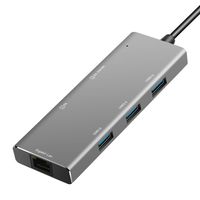
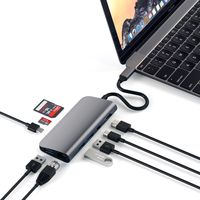
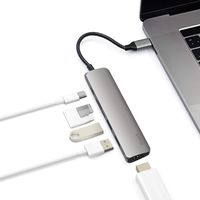
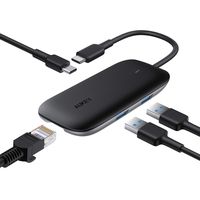
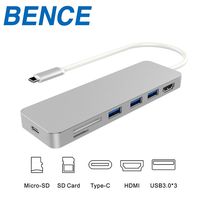
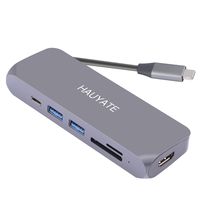
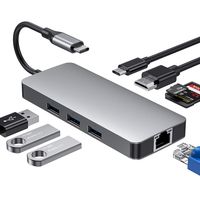
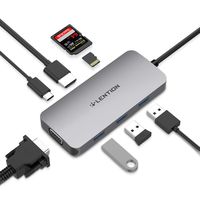
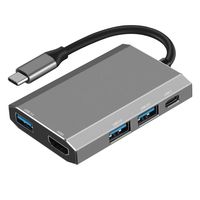
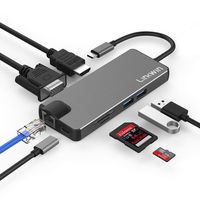
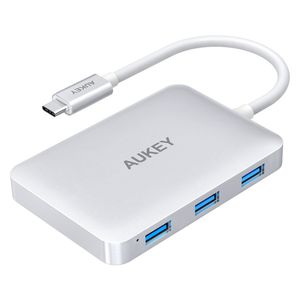
Interfaces: Four USB 3.1 Gen 1 (USB 3.0) ports, HDMI port, and USB-C Power Delivery port
Connector: USB-C
Input: DC 5-20V 3A (Support a max power of 60W to your laptop)
USB Output: DC 5V 900mA (total)
HDMI Maximum Display Resolution: 4K@30Hz
Compatible Systems: Windows XP / 7 / 8 / 10, Mac OS, Chrome OS (Not compatible with Linux)
Cable Length: 150mm / 5.91"
Dimensions: 89 x 61 x 14mm / 3.5" x 2.4" x 0.55"
Weight: 72g / 2.54oz
PCs: MacBook Pro, MacBook, iMac 2017, Google Chromebook, Google Pixelbook, Lenovo Yoga 900 & 910
Phone: Samsung Galaxy S8
(Specifically designed for full compatibility with the above models. Compatibility for other models may vary and can't be warranted)
Note
1. The USB-C port on your computer should support video output and Power Delivery for the HDMI and Power Delivery ports to function.
2. Use your laptop's original power adapter to charge your laptop via the USB-C Power Delivery port on this hub.
3. When connecting an external hard drive or multiple devices to this hub, connect your laptop's power adapter to the USB-C Power Delivery port.
4. The hub supports a maximum of 2 hard drives (one hard drive on either side of the hub), but for best performance, the power demand of connected devices shouldn't exceed the total USB output of 5V 0.9A. Devices with high power demand such as Apple USB SuperDrive shouldn't be connected to the hub.
5. For use with the 15-inch MacBook Pro's 87W power adapter, please download the 'CB-C55 & CB-C58 & CB-C59 & CB-C60 Firmware Update for Power Delivery for 15-inch MacBook Pro' from the AUKEY website. A Windows computer with USB-C port is needed to install the firmware, but then the hub will provide full power to the 15-inch MacBook Pro.
Specifications
Model: CB-C60
Material: Aluminum alloy, ABS, PC
Interfaces: Four USB 3.1 Gen 1 (USB 3.0) ports, HDMI port, and USB-C Power Delivery port
Connector: USB-C
Input: DC 5-20V 3A (Support a max power of 60W to your laptop)
USB Output: DC 5V 900mA (total)
HDMI Maximum Display Resolution: 4K@30Hz
Compatible Systems: Windows XP / 7 / 8 / 10, Mac OS, Chrome OS (Not compatible with Linux)
Cable Length: 150mm / 5.91"
Dimensions: 89 x 61 x 14mm / 3.5" x 2.4" x 0.55"
Weight: 72g / 2.54oz
AUKEY USB C Hub HDMI 4K, 4 USB 3.0 Ports, 60W Type C PD Charging Port, 6 in 1 Multiport Adapter for MacBook Pro 2017 iMac, Google Chromebook Pixelbook - Aluminum, Silver
Price is below average
Current Price
$29.99
Average
$38.69
Min Price
$29.99
Max Price
$49.99
Price dynamics
22%
Description
Compatible Devices
PCs: MacBook Pro, MacBook, iMac 2017, Google Chromebook, Google Pixelbook, Lenovo Yoga 900 & 910
Phone: Samsung Galaxy S8
(Specifically designed for full compatibility with the above models. Compatibility for other models may vary and can't be warranted)
Note
1. The USB-C port on your computer should support video output and Power Delivery for the HDMI and Power Delivery ports to function.
2. Use your laptop's original power adapter to charge your laptop via the USB-C Power Delivery port on this hub.
3. When connecting an external hard drive or multiple devices to this hub, connect your laptop's power adapter to the USB-C Power Delivery port.
4. The hub supports a maximum of 2 hard drives (one hard drive on either side of the hub), but for best performance, the power demand of connected devices shouldn't exceed the total USB output of 5V 0.9A. Devices with high power demand such as Apple USB SuperDrive shouldn't be connected to the hub.
5. For use with the 15-inch MacBook Pro's 87W power adapter, please download the 'CB-C55 & CB-C58 & CB-C59 & CB-C60 Firmware Update for Power Delivery for 15-inch MacBook Pro' from the AUKEY website. A Windows computer with USB-C port is needed to install the firmware, but then the hub will provide full power to the 15-inch MacBook Pro.
Specifications
Model: CB-C60
Material: Aluminum alloy, ABS, PC
Interfaces: Four USB 3.1 Gen 1 (USB 3.0) ports, HDMI port, and USB-C Power Delivery port
Connector: USB-C
Input: DC 5-20V 3A (Support a max power of 60W to your laptop)
USB Output: DC 5V 900mA (total)
HDMI Maximum Display Resolution: 4K@30Hz
Compatible Systems: Windows XP / 7 / 8 / 10, Mac OS, Chrome OS (Not compatible with Linux)
Cable Length: 150mm / 5.91"
Dimensions: 89 x 61 x 14mm / 3.5" x 2.4" x 0.55"
Weight: 72g / 2.54oz
PCs: MacBook Pro, MacBook, iMac 2017, Google Chromebook, Google Pixelbook, Lenovo Yoga 900 & 910
Phone: Samsung Galaxy S8
(Specifically designed for full compatibility with the above models. Compatibility for other models may vary and can't be warranted)
Note
1. The USB-C port on your computer should support video output and Power Delivery for the HDMI and Power Delivery ports to function.
2. Use your laptop's original power adapter to charge your laptop via the USB-C Power Delivery port on this hub.
3. When connecting an external hard drive or multiple devices to this hub, connect your laptop's power adapter to the USB-C Power Delivery port.
4. The hub supports a maximum of 2 hard drives (one hard drive on either side of the hub), but for best performance, the power demand of connected devices shouldn't exceed the total USB output of 5V 0.9A. Devices with high power demand such as Apple USB SuperDrive shouldn't be connected to the hub.
5. For use with the 15-inch MacBook Pro's 87W power adapter, please download the 'CB-C55 & CB-C58 & CB-C59 & CB-C60 Firmware Update for Power Delivery for 15-inch MacBook Pro' from the AUKEY website. A Windows computer with USB-C port is needed to install the firmware, but then the hub will provide full power to the 15-inch MacBook Pro.
Specifications
Model: CB-C60
Material: Aluminum alloy, ABS, PC
Interfaces: Four USB 3.1 Gen 1 (USB 3.0) ports, HDMI port, and USB-C Power Delivery port
Connector: USB-C
Input: DC 5-20V 3A (Support a max power of 60W to your laptop)
USB Output: DC 5V 900mA (total)
HDMI Maximum Display Resolution: 4K@30Hz
Compatible Systems: Windows XP / 7 / 8 / 10, Mac OS, Chrome OS (Not compatible with Linux)
Cable Length: 150mm / 5.91"
Dimensions: 89 x 61 x 14mm / 3.5" x 2.4" x 0.55"
Weight: 72g / 2.54oz
Price will be lower
in next 2 weeks
in next 2 weeks
According to the data, price will be lower in next two weeks, so not waste your money and track better price!
Product review & video
- Let's be honest, USB-C
is kind of a nightmare. Sure, one day we might
get to the point where every cable, every gadget, every screen uses the same next generation connector, but we're nowhere near that point today. Which means, if you've
got a new USB-C laptop, like a MacBook Pro, or
Dell's latest XPS 13, and you wanna use those old
ports from your old computer, stuff like regular USB, HDMI, ethernet, display port, SD, micro SD. All those old connectors that
you used to use every day. You're gonna need a USB-C hub. (slow funky music) To be clear, for the
sake of this comparison, we're only looking at a
small subset of USB-C hubs. That means that we're
only talking about ones that offer some sort
of pass through powers, that you can keep charging your computer while you're using other stuff, and ones that don't need their
own integrated power supply. That means unfortunately,
all those

Similar products