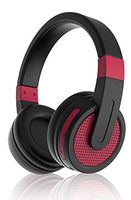
Description
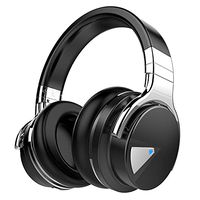
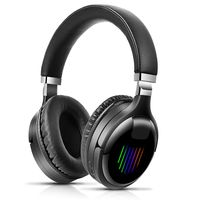
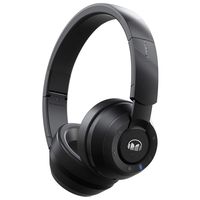
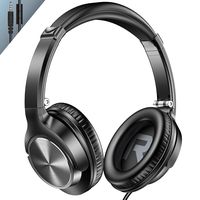
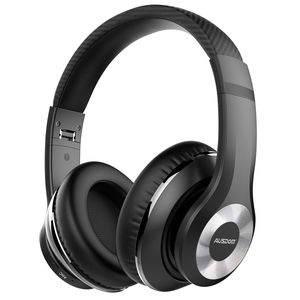
AUSDOM Active Noise Cancelling Wireless Foldable Headphones with Mic
Package Contents:
1 x Wireless Headphone;
1 x Micro USB Charging Cable;
1 x 3.5mm Audio Cable;
1 x User Manual
Troubleshooting:
Q: The headphone cannot be turned on/off.
A: Please check the followings.
1. The battery may be flat. Please recharge the battery and try again.
2. Try to reset the headphones, please connect it to your mobile or computer with the AUX cable, play music and test whether it works well.
Q: Why doesn't the headphone pair with the mobile phone?
A: Please check the followings.
1. Check that the headphone is on a full charge.
2. Make sure that the mobile phone's Wireless function is on.You can clear all connection history on your phone.
3. Make sure other paired device's wireless function is turned off.
4. Make sure the two devices are in the effective pairing range. (33 feet/10 meters).
5. Make sure that there is no obstacle between the headphone and the mobile phone, such as electronic equipment and a wall.
6. Furthermore, make sure that the headphone is in pairing mode, and pair it with phone again.
Q: There is some noise.
A: Wireless is a radio technology, so it is sensitive to obstacles between the headphone and the pairing device. Please make sure that there is no obstacle between the two devices and is within33 feet/10 meters.
Q: I can't hear sound.
A: Please check the followings.
1. Try increase the volume.
2. Make sure that the Wireless function is on and whether the two devices are connected and within 33 feet/10 meters.
Package Contents:
1 x Wireless Headphone;
1 x Micro USB Charging Cable;
1 x 3.5mm Audio Cable;
1 x User Manual
Troubleshooting:
Q: The headphone cannot be turned on/off.
A: Please check the followings.
1. The battery may be flat. Please recharge the battery and try again.
2. Try to reset the headphones, please connect it to your mobile or computer with the AUX cable, play music and test whether it works well.
Q: Why doesn't the headphone pair with the mobile phone?
A: Please check the followings.
1. Check that the headphone is on a full charge.
2. Make sure that the mobile phone's Wireless function is on.You can clear all connection history on your phone.
3. Make sure other paired device's wireless function is turned off.
4. Make sure the two devices are in the effective pairing range. (33 feet/10 meters).
5. Make sure that there is no obstacle between the headphone and the mobile phone, such as electronic equipment and a wall.
6. Furthermore, make sure that the headphone is in pairing mode, and pair it with phone again.
Q: There is some noise.
A: Wireless is a radio technology, so it is sensitive to obstacles between the headphone and the pairing device. Please make sure that there is no obstacle between the two devices and is within33 feet/10 meters.
Q: I can't hear sound.
A: Please check the followings.
1. Try increase the volume.
2. Make sure that the Wireless function is on and whether the two devices are connected and within 33 feet/10 meters.
AUSDOM ANC10 Wireless Active Noise Cancelling Headphones, Bluetooth 5.0 Over Ear Headphones with Mic, Soft Foldable Earpads, Hi-Fi Deep Bass Headset for Travel Work TV PC Mobile Airplane-Black
Current Price
$49.99
Average
$41.77
Min Price
$31.99
Max Price
$49.99
Price dynamics
16%
Description
AUSDOM Active Noise Cancelling Wireless Foldable Headphones with Mic
Package Contents:
1 x Wireless Headphone;
1 x Micro USB Charging Cable;
1 x 3.5mm Audio Cable;
1 x User Manual
Troubleshooting:
Q: The headphone cannot be turned on/off.
A: Please check the followings.
1. The battery may be flat. Please recharge the battery and try again.
2. Try to reset the headphones, please connect it to your mobile or computer with the AUX cable, play music and test whether it works well.
Q: Why doesn't the headphone pair with the mobile phone?
A: Please check the followings.
1. Check that the headphone is on a full charge.
2. Make sure that the mobile phone's Wireless function is on.You can clear all connection history on your phone.
3. Make sure other paired device's wireless function is turned off.
4. Make sure the two devices are in the effective pairing range. (33 feet/10 meters).
5. Make sure that there is no obstacle between the headphone and the mobile phone, such as electronic equipment and a wall.
6. Furthermore, make sure that the headphone is in pairing mode, and pair it with phone again.
Q: There is some noise.
A: Wireless is a radio technology, so it is sensitive to obstacles between the headphone and the pairing device. Please make sure that there is no obstacle between the two devices and is within33 feet/10 meters.
Q: I can't hear sound.
A: Please check the followings.
1. Try increase the volume.
2. Make sure that the Wireless function is on and whether the two devices are connected and within 33 feet/10 meters.
Package Contents:
1 x Wireless Headphone;
1 x Micro USB Charging Cable;
1 x 3.5mm Audio Cable;
1 x User Manual
Troubleshooting:
Q: The headphone cannot be turned on/off.
A: Please check the followings.
1. The battery may be flat. Please recharge the battery and try again.
2. Try to reset the headphones, please connect it to your mobile or computer with the AUX cable, play music and test whether it works well.
Q: Why doesn't the headphone pair with the mobile phone?
A: Please check the followings.
1. Check that the headphone is on a full charge.
2. Make sure that the mobile phone's Wireless function is on.You can clear all connection history on your phone.
3. Make sure other paired device's wireless function is turned off.
4. Make sure the two devices are in the effective pairing range. (33 feet/10 meters).
5. Make sure that there is no obstacle between the headphone and the mobile phone, such as electronic equipment and a wall.
6. Furthermore, make sure that the headphone is in pairing mode, and pair it with phone again.
Q: There is some noise.
A: Wireless is a radio technology, so it is sensitive to obstacles between the headphone and the pairing device. Please make sure that there is no obstacle between the two devices and is within33 feet/10 meters.
Q: I can't hear sound.
A: Please check the followings.
1. Try increase the volume.
2. Make sure that the Wireless function is on and whether the two devices are connected and within 33 feet/10 meters.
Price will be lower
in next 2 weeks
in next 2 weeks
According to the data, price will be lower in next two weeks, so not waste your money and track better price!
Product review & video
the Austin ANC tends their practical affordable Bluetooth headphones they are indeed active noise-cancelling or so they say so but with the budget price of 37 pounds that's around 46 in US dollars are they actually any good well let's go ahead and let's find out hello guys welcome back so outside the box it's all very nice looking it's quite simplistic but to the side he states that these headphones after 20 hours playback time they have bluetooth 5.0 built-in and they have a wired and wireless connection oh yes and the Aventine foldable inside the pocket of the anc turns to the top let's just move them to the side for now but underneath we have a micro USB charge cable this is a simple wired 3.5 millimeter cable which has no inline mic included there is a multi-language user manual and 12 bucks for the headphones and you know what it don't have to be bad to be honest I do like this shi


Similar products