- HomeElectronicsComputers & AccessoriesComputer Accessories & PeripheralsKeyboards, Mice & AccessoriesKeyboards
Description
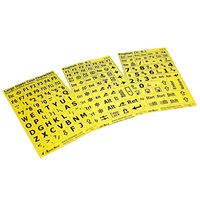
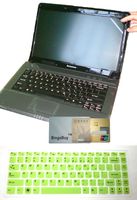
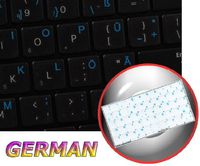
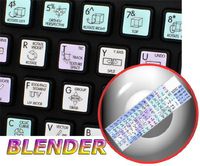
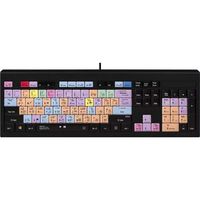
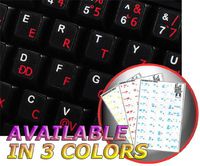
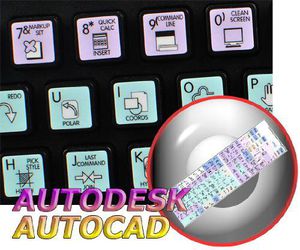
The Autodesk AutoCAD stickers can easily transform your standard keyboard into a customized one within minutes, depending on your specific need and preferences.Unsurpassed quality.
The Galaxy series presents 12x12 mm (15/32"x15/32") reverse printing technology which guarantees life-time durability of these stickers.
The characters/letters are printed underneath protective coat, on a high quality film. This method is used to prevent the ink from smearing or coming off as a keyboard is being used.
Autodesk AutoCAD's keyboard stickers are ideal for all users, beginners and professionals.
Autodesk AutoCAD stickers designed for a standard size keyboard, and therefore, perfectly suitable for majority of keyboard or laptops. The Autodesk AutoCAD keyboard stickers are compatible with all default shortcuts for all versions of Autodesk AutoCAD. Therefore, by applying them on your keyboard you immediately start editing with Autodesk AutoCAD.
The Galaxy series stickers are made of matte vinyl - guarantees complete absence of glare under different angels of lighting.
Autodesk AutoCAD keyboard stickers are designed to improve your productivity and to enjoy your work all the way through.
By using Autodesk AutoCAD stickers your productivity will ultimately be increased by 15 - 40 percent, saving your time and ultimately Your money!
Discover the World of perfection and simplicity with our product.
OUR MOTTO IS - QUALITY!
The product listed above is copyrighted, has been manufactured and distributed by Royal Galaxy Ltd. Usage of the images posted, distribution or resale has NOT been authorized by Royal Galaxy Ltd, and is in direct violation of its written terms. Federal law provides severe civil and criminal penalties for the unauthorized usage, distribution or resale of copyrighted product, its listings with all imaged posted. For all requests regarding usage of images of this product, its distribution and resale, please contact us by email.
AUTODESK AUTOCAD Galaxy Series New Keyboard Stickers Shortcuts 12X12 Size
Current Price
$12.86
Average
$12.86
Min Price
$12.86
Max Price
$12.86
Description
The Autodesk AutoCAD stickers can easily transform your standard keyboard into a customized one within minutes, depending on your specific need and preferences.Unsurpassed quality.
The Galaxy series presents 12x12 mm (15/32"x15/32") reverse printing technology which guarantees life-time durability of these stickers.
The characters/letters are printed underneath protective coat, on a high quality film. This method is used to prevent the ink from smearing or coming off as a keyboard is being used.
Autodesk AutoCAD's keyboard stickers are ideal for all users, beginners and professionals.
Autodesk AutoCAD stickers designed for a standard size keyboard, and therefore, perfectly suitable for majority of keyboard or laptops. The Autodesk AutoCAD keyboard stickers are compatible with all default shortcuts for all versions of Autodesk AutoCAD. Therefore, by applying them on your keyboard you immediately start editing with Autodesk AutoCAD.
The Galaxy series stickers are made of matte vinyl - guarantees complete absence of glare under different angels of lighting.
Autodesk AutoCAD keyboard stickers are designed to improve your productivity and to enjoy your work all the way through.
By using Autodesk AutoCAD stickers your productivity will ultimately be increased by 15 - 40 percent, saving your time and ultimately Your money!
Discover the World of perfection and simplicity with our product.
OUR MOTTO IS - QUALITY!
The product listed above is copyrighted, has been manufactured and distributed by Royal Galaxy Ltd. Usage of the images posted, distribution or resale has NOT been authorized by Royal Galaxy Ltd, and is in direct violation of its written terms. Federal law provides severe civil and criminal penalties for the unauthorized usage, distribution or resale of copyrighted product, its listings with all imaged posted. For all requests regarding usage of images of this product, its distribution and resale, please contact us by email.
Price will be lower
in next 2 weeks
in next 2 weeks
According to the data, price will be lower in next two weeks, so not waste your money and track better price!
Product review & video
welcome to this very short video about making keyboard shortcuts in thermal desktop this actually works with any AutoCAD command but I'm going to use a TD command as an example I'm using AutoCAD 2016 but I know this also works in 2014 the first thing to do is find out what the command is using the pulldown menu I can click on the case set manager as an example the command line shows what the actual command is RC case set for this example though I want to use our thermal edit checking the command for that I see this RC edit any now select tools custom interface the first thing in here is to create the command I'll just call it thermal edit and in the macro window I will type RC edit any you can use the button to the right if you want to make some more complex commands now it's created but not assigned on the top left panel I want to expand keyboard shortcuts and then shortcut keys then I


Similar products