Description
★Display current sensor data, including:
1.Engine RPM
2.Calculated Load Value
3.Coolant Temperature
4.Fuel System Status
5.Vehicle Speed
6.Short Term Fuel Trim
7.Long Term Fuel Trim
8.Intake Manifold Pressure
9.Timing Advance
10.Intake Air Temperature
11.Air Flow Rate
12.Absolute Throttle Position
13.Oxygen sensor voltages/associated short term fuel trims
14.Fuel System status
15.Fuel Pressure
★USE Instructions
1.Install OBDII on car
2.Install Android Software Torque
a)Copy software to phone from CD
b)Install Software
3.Connection OBDII
a)Search OBDII Bluetooth
b)Enter the password "1234"
c)Connection Success
4.Run Software Click Menu button setting Bluetooth connection
a)Choose Commotion type is Bluethooth
b)Choose Bluethooth Device is OBDII
c)Exit Torque , and re-run the software.
Successful connection
Manual download link:116.6.104.5:801/yks/s/255e9076
★Specifications:
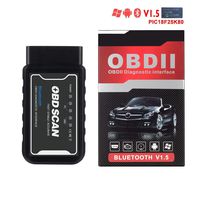
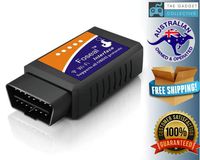
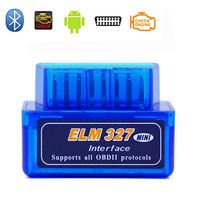
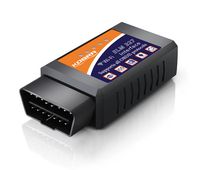
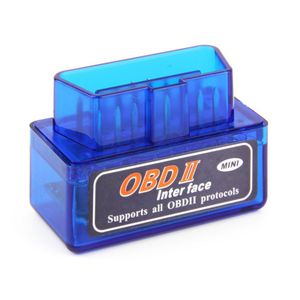
Model name: ELM327 OBD2, OBD-II bluetooth
Type: code readers & scan tools
Output protocol: bluetooth
Item size: 4.8 * 2.5 * 3.4cm / 1.89 * 0.98 * 1.33in
Net weight:25 g
Weight:35 g
Compatibility:Works with Android Torque (Suggested)Works with OBD-II Complaint Vehicles for Android system phones
★NOTE TO CUSTOMERS: This scanner can not work for Apple system
1.Engine RPM
2.Calculated Load Value
3.Coolant Temperature
4.Fuel System Status
5.Vehicle Speed
6.Short Term Fuel Trim
7.Long Term Fuel Trim
8.Intake Manifold Pressure
9.Timing Advance
10.Intake Air Temperature
11.Air Flow Rate
12.Absolute Throttle Position
13.Oxygen sensor voltages/associated short term fuel trims
14.Fuel System status
15.Fuel Pressure
★USE Instructions
1.Install OBDII on car
2.Install Android Software Torque
a)Copy software to phone from CD
b)Install Software
3.Connection OBDII
a)Search OBDII Bluetooth
b)Enter the password "1234"
c)Connection Success
4.Run Software Click Menu button setting Bluetooth connection
a)Choose Commotion type is Bluethooth
b)Choose Bluethooth Device is OBDII
c)Exit Torque , and re-run the software.
Successful connection
Manual download link:116.6.104.5:801/yks/s/255e9076
★Specifications:
Model name: ELM327 OBD2, OBD-II bluetooth
Type: code readers & scan tools
Output protocol: bluetooth
Item size: 4.8 * 2.5 * 3.4cm / 1.89 * 0.98 * 1.33in
Net weight:25 g
Weight:35 g
Compatibility:Works with Android Torque (Suggested)Works with OBD-II Complaint Vehicles for Android system phones
★NOTE TO CUSTOMERS: This scanner can not work for Apple system
Autosion Bluetooth OBD II Car Scan Super Mini Portable ELM327 OBD2 II Bluetooth Car Auto Diagnostic Interface Scanner Tool Blue for Android Smartphones
Price is below average
Current Price
$18.88
Average
$19.41
Min Price
$18.88
Max Price
$19.99
Price dynamics
3%
Description
★Display current sensor data, including:
1.Engine RPM
2.Calculated Load Value
3.Coolant Temperature
4.Fuel System Status
5.Vehicle Speed
6.Short Term Fuel Trim
7.Long Term Fuel Trim
8.Intake Manifold Pressure
9.Timing Advance
10.Intake Air Temperature
11.Air Flow Rate
12.Absolute Throttle Position
13.Oxygen sensor voltages/associated short term fuel trims
14.Fuel System status
15.Fuel Pressure
★USE Instructions
1.Install OBDII on car
2.Install Android Software Torque
a)Copy software to phone from CD
b)Install Software
3.Connection OBDII
a)Search OBDII Bluetooth
b)Enter the password "1234"
c)Connection Success
4.Run Software Click Menu button setting Bluetooth connection
a)Choose Commotion type is Bluethooth
b)Choose Bluethooth Device is OBDII
c)Exit Torque , and re-run the software.
Successful connection
Manual download link:116.6.104.5:801/yks/s/255e9076
★Specifications:
Model name: ELM327 OBD2, OBD-II bluetooth
Type: code readers & scan tools
Output protocol: bluetooth
Item size: 4.8 * 2.5 * 3.4cm / 1.89 * 0.98 * 1.33in
Net weight:25 g
Weight:35 g
Compatibility:Works with Android Torque (Suggested)Works with OBD-II Complaint Vehicles for Android system phones
★NOTE TO CUSTOMERS: This scanner can not work for Apple system
1.Engine RPM
2.Calculated Load Value
3.Coolant Temperature
4.Fuel System Status
5.Vehicle Speed
6.Short Term Fuel Trim
7.Long Term Fuel Trim
8.Intake Manifold Pressure
9.Timing Advance
10.Intake Air Temperature
11.Air Flow Rate
12.Absolute Throttle Position
13.Oxygen sensor voltages/associated short term fuel trims
14.Fuel System status
15.Fuel Pressure
★USE Instructions
1.Install OBDII on car
2.Install Android Software Torque
a)Copy software to phone from CD
b)Install Software
3.Connection OBDII
a)Search OBDII Bluetooth
b)Enter the password "1234"
c)Connection Success
4.Run Software Click Menu button setting Bluetooth connection
a)Choose Commotion type is Bluethooth
b)Choose Bluethooth Device is OBDII
c)Exit Torque , and re-run the software.
Successful connection
Manual download link:116.6.104.5:801/yks/s/255e9076
★Specifications:
Model name: ELM327 OBD2, OBD-II bluetooth
Type: code readers & scan tools
Output protocol: bluetooth
Item size: 4.8 * 2.5 * 3.4cm / 1.89 * 0.98 * 1.33in
Net weight:25 g
Weight:35 g
Compatibility:Works with Android Torque (Suggested)Works with OBD-II Complaint Vehicles for Android system phones
★NOTE TO CUSTOMERS: This scanner can not work for Apple system
Price will be lower
in next 2 weeks
in next 2 weeks
According to the data, price will be lower in next two weeks, so not waste your money and track better price!

Similar products