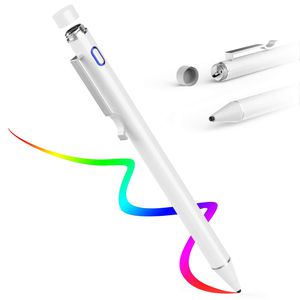
Description
Compatible models:
Most capacitive touch panels, such as smartphones and tablets, iPhone, iPad, and Andriod.
Unsupported models:
Windows devices, such as HUA WEI MediaPad series, Fire HD, ArrowTab, tablet computers and other smartphones.
※Note: All touch screen electronic terminals cannot guarantee operation.
Product specifications:
Pen length: about 13.5 cm
Pen weight: about 12.5 grams
Available time: about 12 hours(fully charged)
Charging time: <2 hours
Charger requirement: 5V 2A
How to charge: Rotate the cover to the right and remove it, connect the USB charging cable (included) to the micro USB port, then connect it to the adapter or other USB port.
Package Contents:
1, capacitive pen * 1
2,1 micro USB cable* 1
3, USB port protection cover * 1
4, instruction manual * 1
Indicator Description:
Indicator Description: Press the power button to turn the power on/off.
Power on: The power is turned on when the light turns blue.
Charging: The indicator light is red. (Requires shutdown when charging)
Charging complete: The indicator light is green.
Power Off: When the power is off, the light will flash blue and then turn off automatically.
Automatic power-off function: Do not use for 5 minutes. If not selected (still state), the power will automatically turn off. Turn the power on again when using.
Precautions:
1. Do not subject this product to strong vibration or shock or excessive force.
2, do not store in high temperature and high humidity.
3. If not used for a long time, please fully charge and store in a box.
4. Do not disassemble, repair or modify this product.
5. The protective film may affect the responsiveness of this product.
Most capacitive touch panels, such as smartphones and tablets, iPhone, iPad, and Andriod.
Unsupported models:
Windows devices, such as HUA WEI MediaPad series, Fire HD, ArrowTab, tablet computers and other smartphones.
※Note: All touch screen electronic terminals cannot guarantee operation.
Product specifications:
Pen length: about 13.5 cm
Pen weight: about 12.5 grams
Available time: about 12 hours(fully charged)
Charging time: <2 hours
Charger requirement: 5V 2A
How to charge: Rotate the cover to the right and remove it, connect the USB charging cable (included) to the micro USB port, then connect it to the adapter or other USB port.
Package Contents:
1, capacitive pen * 1
2,1 micro USB cable* 1
3, USB port protection cover * 1
4, instruction manual * 1
Indicator Description:
Indicator Description: Press the power button to turn the power on/off.
Power on: The power is turned on when the light turns blue.
Charging: The indicator light is red. (Requires shutdown when charging)
Charging complete: The indicator light is green.
Power Off: When the power is off, the light will flash blue and then turn off automatically.
Automatic power-off function: Do not use for 5 minutes. If not selected (still state), the power will automatically turn off. Turn the power on again when using.
Precautions:
1. Do not subject this product to strong vibration or shock or excessive force.
2, do not store in high temperature and high humidity.
3. If not used for a long time, please fully charge and store in a box.
4. Do not disassemble, repair or modify this product.
5. The protective film may affect the responsiveness of this product.
AWAVO Capacitive Stylus Pen for Apple Pencil Touch Screens, Rechargeable Styli with 1.6mm Fine Plastic Nib, Compatible with Apple iPad Pro/iPad 2018/iPhone/Samsung iOS & Android Tablet
Price is below average
Current Price
$23.99
Average
$29.99
Min Price
$23.99
Max Price
$39.99
Price dynamics
20%
Description
Compatible models:
Most capacitive touch panels, such as smartphones and tablets, iPhone, iPad, and Andriod.
Unsupported models:
Windows devices, such as HUA WEI MediaPad series, Fire HD, ArrowTab, tablet computers and other smartphones.
※Note: All touch screen electronic terminals cannot guarantee operation.
Product specifications:
Pen length: about 13.5 cm
Pen weight: about 12.5 grams
Available time: about 12 hours(fully charged)
Charging time: <2 hours
Charger requirement: 5V 2A
How to charge: Rotate the cover to the right and remove it, connect the USB charging cable (included) to the micro USB port, then connect it to the adapter or other USB port.
Package Contents:
1, capacitive pen * 1
2,1 micro USB cable* 1
3, USB port protection cover * 1
4, instruction manual * 1
Indicator Description:
Indicator Description: Press the power button to turn the power on/off.
Power on: The power is turned on when the light turns blue.
Charging: The indicator light is red. (Requires shutdown when charging)
Charging complete: The indicator light is green.
Power Off: When the power is off, the light will flash blue and then turn off automatically.
Automatic power-off function: Do not use for 5 minutes. If not selected (still state), the power will automatically turn off. Turn the power on again when using.
Precautions:
1. Do not subject this product to strong vibration or shock or excessive force.
2, do not store in high temperature and high humidity.
3. If not used for a long time, please fully charge and store in a box.
4. Do not disassemble, repair or modify this product.
5. The protective film may affect the responsiveness of this product.
Most capacitive touch panels, such as smartphones and tablets, iPhone, iPad, and Andriod.
Unsupported models:
Windows devices, such as HUA WEI MediaPad series, Fire HD, ArrowTab, tablet computers and other smartphones.
※Note: All touch screen electronic terminals cannot guarantee operation.
Product specifications:
Pen length: about 13.5 cm
Pen weight: about 12.5 grams
Available time: about 12 hours(fully charged)
Charging time: <2 hours
Charger requirement: 5V 2A
How to charge: Rotate the cover to the right and remove it, connect the USB charging cable (included) to the micro USB port, then connect it to the adapter or other USB port.
Package Contents:
1, capacitive pen * 1
2,1 micro USB cable* 1
3, USB port protection cover * 1
4, instruction manual * 1
Indicator Description:
Indicator Description: Press the power button to turn the power on/off.
Power on: The power is turned on when the light turns blue.
Charging: The indicator light is red. (Requires shutdown when charging)
Charging complete: The indicator light is green.
Power Off: When the power is off, the light will flash blue and then turn off automatically.
Automatic power-off function: Do not use for 5 minutes. If not selected (still state), the power will automatically turn off. Turn the power on again when using.
Precautions:
1. Do not subject this product to strong vibration or shock or excessive force.
2, do not store in high temperature and high humidity.
3. If not used for a long time, please fully charge and store in a box.
4. Do not disassemble, repair or modify this product.
5. The protective film may affect the responsiveness of this product.
Price will be lower
in next 2 weeks
in next 2 weeks
According to the data, price will be lower in next two weeks, so not waste your money and track better price!

Similar products


































