- HomeElectronicsAccessories & SuppliesAudio & Video AccessoriesCables & InterconnectsVideo CablesHDMI Cables
Description
♥♥ Item Features ♥♥:
♥Ultra-Compact and Lightweight. It is very convenient allows you to carry in your bag and compatible with Phone, Pad or Pod anywhere.
♥Plug and Play. No need personal hotspot/Airplay, no need any setting/App on your devices, only click the "Trust" button while connecting it.
♥Full 1080P Definition. Good choice for sharing entertainment, doing presentation, playing games and more in big screen.
♥Resolution: 1080P, 720P, 480P.
Wide compatibility:
※Compatible with i Phone XR/XS max/X, i Phone 8/8 Plus, i Phone 7/7 Plus, i Phone 6/6S, i Phone 6 Plus/6S Plus;
※Compatible with Retina Display, i Pad mini, mini 2, mini 3, mini 4, Air, Air 2, i Pad Pro(9.7-Inch) and i Pad Pro (12.9-Inch);
※Compatible with i Pod Touch 5th Gen(32gb and 64GB), i Pod Touch 5th Gen 16gb, i Pod touch 6th Generation.
How to use:
① Please first connect a HDMI cable to your adapter, then connect the other end of your HDMI cable to your secondary display(TV, monitor, or projector).
② Connect a 5V/1A Charg-er to supply power to your adapter.
③ Switch the TV/projector's output to corresponding HDMI.
④ For i-O-S system, the Phones' screen will pop out a "Trust" option, just click it then wait it to connect automatically.
↓↓↓ Note ↓↓↓:
■This adapter Must be connected to power source before you use it, or it will not work well (Strongly recommended 5V/1A).
■Due to HDCP copyright protection measures, the adapter doesn't work with some paid contents, including Netflix, Amazon video, DIRECTV, HULU and other App which need to be paid fee.
■Service: If you have any problems or concerns, please feel free to contact us first, we promise to give you a satisfactory solution.
Package Included:
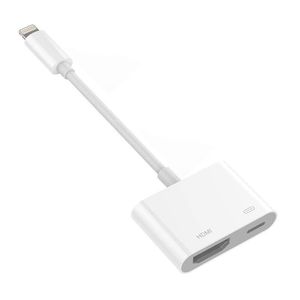
✔ 1 x iPh to HDMI Adapter
♥Ultra-Compact and Lightweight. It is very convenient allows you to carry in your bag and compatible with Phone, Pad or Pod anywhere.
♥Plug and Play. No need personal hotspot/Airplay, no need any setting/App on your devices, only click the "Trust" button while connecting it.
♥Full 1080P Definition. Good choice for sharing entertainment, doing presentation, playing games and more in big screen.
♥Resolution: 1080P, 720P, 480P.
Wide compatibility:
※Compatible with i Phone XR/XS max/X, i Phone 8/8 Plus, i Phone 7/7 Plus, i Phone 6/6S, i Phone 6 Plus/6S Plus;
※Compatible with Retina Display, i Pad mini, mini 2, mini 3, mini 4, Air, Air 2, i Pad Pro(9.7-Inch) and i Pad Pro (12.9-Inch);
※Compatible with i Pod Touch 5th Gen(32gb and 64GB), i Pod Touch 5th Gen 16gb, i Pod touch 6th Generation.
How to use:
① Please first connect a HDMI cable to your adapter, then connect the other end of your HDMI cable to your secondary display(TV, monitor, or projector).
② Connect a 5V/1A Charg-er to supply power to your adapter.
③ Switch the TV/projector's output to corresponding HDMI.
④ For i-O-S system, the Phones' screen will pop out a "Trust" option, just click it then wait it to connect automatically.
↓↓↓ Note ↓↓↓:
■This adapter Must be connected to power source before you use it, or it will not work well (Strongly recommended 5V/1A).
■Due to HDCP copyright protection measures, the adapter doesn't work with some paid contents, including Netflix, Amazon video, DIRECTV, HULU and other App which need to be paid fee.
■Service: If you have any problems or concerns, please feel free to contact us first, we promise to give you a satisfactory solution.
Package Included:
✔ 1 x iPh to HDMI Adapter
BestDR Compatible with Phone Pad to HDMI Cable, HDMI Adapter for iPh, Compatible with Phone XS/XSmax/XR/X/8/7/6/Plus/Pad/Pod to TV Projector, HDMI Coupler 1080P Digital AV Adapter (white)
Current Price
$14.66
Average
$12.51
Min Price
$0.11
Max Price
$20.99
Price dynamics
15%
Description
♥♥ Item Features ♥♥:
♥Ultra-Compact and Lightweight. It is very convenient allows you to carry in your bag and compatible with Phone, Pad or Pod anywhere.
♥Plug and Play. No need personal hotspot/Airplay, no need any setting/App on your devices, only click the "Trust" button while connecting it.
♥Full 1080P Definition. Good choice for sharing entertainment, doing presentation, playing games and more in big screen.
♥Resolution: 1080P, 720P, 480P.
Wide compatibility:
※Compatible with i Phone XR/XS max/X, i Phone 8/8 Plus, i Phone 7/7 Plus, i Phone 6/6S, i Phone 6 Plus/6S Plus;
※Compatible with Retina Display, i Pad mini, mini 2, mini 3, mini 4, Air, Air 2, i Pad Pro(9.7-Inch) and i Pad Pro (12.9-Inch);
※Compatible with i Pod Touch 5th Gen(32gb and 64GB), i Pod Touch 5th Gen 16gb, i Pod touch 6th Generation.
How to use:
① Please first connect a HDMI cable to your adapter, then connect the other end of your HDMI cable to your secondary display(TV, monitor, or projector).
② Connect a 5V/1A Charg-er to supply power to your adapter.
③ Switch the TV/projector's output to corresponding HDMI.
④ For i-O-S system, the Phones' screen will pop out a "Trust" option, just click it then wait it to connect automatically.
↓↓↓ Note ↓↓↓:
■This adapter Must be connected to power source before you use it, or it will not work well (Strongly recommended 5V/1A).
■Due to HDCP copyright protection measures, the adapter doesn't work with some paid contents, including Netflix, Amazon video, DIRECTV, HULU and other App which need to be paid fee.
■Service: If you have any problems or concerns, please feel free to contact us first, we promise to give you a satisfactory solution.
Package Included:
✔ 1 x iPh to HDMI Adapter
♥Ultra-Compact and Lightweight. It is very convenient allows you to carry in your bag and compatible with Phone, Pad or Pod anywhere.
♥Plug and Play. No need personal hotspot/Airplay, no need any setting/App on your devices, only click the "Trust" button while connecting it.
♥Full 1080P Definition. Good choice for sharing entertainment, doing presentation, playing games and more in big screen.
♥Resolution: 1080P, 720P, 480P.
Wide compatibility:
※Compatible with i Phone XR/XS max/X, i Phone 8/8 Plus, i Phone 7/7 Plus, i Phone 6/6S, i Phone 6 Plus/6S Plus;
※Compatible with Retina Display, i Pad mini, mini 2, mini 3, mini 4, Air, Air 2, i Pad Pro(9.7-Inch) and i Pad Pro (12.9-Inch);
※Compatible with i Pod Touch 5th Gen(32gb and 64GB), i Pod Touch 5th Gen 16gb, i Pod touch 6th Generation.
How to use:
① Please first connect a HDMI cable to your adapter, then connect the other end of your HDMI cable to your secondary display(TV, monitor, or projector).
② Connect a 5V/1A Charg-er to supply power to your adapter.
③ Switch the TV/projector's output to corresponding HDMI.
④ For i-O-S system, the Phones' screen will pop out a "Trust" option, just click it then wait it to connect automatically.
↓↓↓ Note ↓↓↓:
■This adapter Must be connected to power source before you use it, or it will not work well (Strongly recommended 5V/1A).
■Due to HDCP copyright protection measures, the adapter doesn't work with some paid contents, including Netflix, Amazon video, DIRECTV, HULU and other App which need to be paid fee.
■Service: If you have any problems or concerns, please feel free to contact us first, we promise to give you a satisfactory solution.
Package Included:
✔ 1 x iPh to HDMI Adapter
Price will be lower
in next 2 weeks
in next 2 weeks
According to the data, price will be lower in next two weeks, so not waste your money and track better price!

Similar products






































