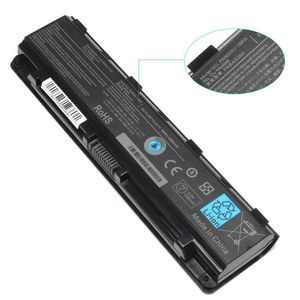
Description
NOTE: Please check your battery part number and Laptop Models to ensure you are getting the correct battery for your laptop!
Compatible Part Numbers:
Toshiba: PA5023U-1BRS, PA5024U-1BRS, PA5025U-1BRS, PA5026U-1BRS, PA5027U-1BRS,
PA5109U-1BRS, PABAS259, PABAS260, PABAS261, PABAS262, PABAS26
Compatible Models
Toshiba Satellite Pro C800, C805, C840, C845, C850, C855, C870, C875,
L800, L805, L830, L835, L840, L845, L850, L855, L870, L875,
M800, M801, M805, M840, M845, S800, S840, S845, S850, S855, S870, S875 Series
Toshiba Satellite Pro P800 Pro P800D Pro P840 Pro P840D Pro P845 Pro P845D Pro P850 Pro P850D
Pro P855 Pro P855D Pro P870 Pro P870D Pro P875 Pro P875D.
Toshiba Satellite C55-A5249 C55-A5300 C55-A5302 C55-A5308 C55-A5309 C55-A5311 C55-A5330 C55-A5332
C55D-A5150 C55t-A5222 C55T-A5314 C855D-S5900 C855D-S5950 C855D-SP5265FM C855-S5107 C855-S5108
C855-S5111 C855-S5115 C855-S5118 L45T-A423 L875D-S7230 L875D-S733
Dynabook Qosmio B352 T552 T572 T642 T652 T752 T772 T852
There are some troubleshooting methods for won't hold a charge:
> 1.Turn off the laptop.
> 2.Unplug AC power.
> 3.Remove the battery.
> 4.Replace AC power.
> 5.Turn on laptop,allow OS to boot.
> 6.Once logged in to the machine,perform a normal shut down.
> 7.Unplug AC power.
> 8.Replace battery
> 9.Turn on laptop,allow OS to boot.
If this still does not work properly, all of our products has 12 months warranty, please contact us for exchange!
Buy with confidence!
12-Month Warranty
24 x 7 Email Support
30 days money return guarantee
Ankon PA5109U-1BRS PA5024U-1BRS Battery for Toshiba PA5023U-1BRS PA5024U-1BRS PA5025U-1BRS S70DT C55-A5302 C55-A5308 C55-A5309 C55D-A5150-12 Months Warranty
Current Price
$27.99
Average
$27.85
Min Price
$24.99
Max Price
$29.99
Price dynamics
1%
Description
NOTE: Please check your battery part number and Laptop Models to ensure you are getting the correct battery for your laptop!
Compatible Part Numbers:
Toshiba: PA5023U-1BRS, PA5024U-1BRS, PA5025U-1BRS, PA5026U-1BRS, PA5027U-1BRS,
PA5109U-1BRS, PABAS259, PABAS260, PABAS261, PABAS262, PABAS26
Compatible Models
Toshiba Satellite Pro C800, C805, C840, C845, C850, C855, C870, C875,
L800, L805, L830, L835, L840, L845, L850, L855, L870, L875,
M800, M801, M805, M840, M845, S800, S840, S845, S850, S855, S870, S875 Series
Toshiba Satellite Pro P800 Pro P800D Pro P840 Pro P840D Pro P845 Pro P845D Pro P850 Pro P850D
Pro P855 Pro P855D Pro P870 Pro P870D Pro P875 Pro P875D.
Toshiba Satellite C55-A5249 C55-A5300 C55-A5302 C55-A5308 C55-A5309 C55-A5311 C55-A5330 C55-A5332
C55D-A5150 C55t-A5222 C55T-A5314 C855D-S5900 C855D-S5950 C855D-SP5265FM C855-S5107 C855-S5108
C855-S5111 C855-S5115 C855-S5118 L45T-A423 L875D-S7230 L875D-S733
Dynabook Qosmio B352 T552 T572 T642 T652 T752 T772 T852
There are some troubleshooting methods for won't hold a charge:
> 1.Turn off the laptop.
> 2.Unplug AC power.
> 3.Remove the battery.
> 4.Replace AC power.
> 5.Turn on laptop,allow OS to boot.
> 6.Once logged in to the machine,perform a normal shut down.
> 7.Unplug AC power.
> 8.Replace battery
> 9.Turn on laptop,allow OS to boot.
If this still does not work properly, all of our products has 12 months warranty, please contact us for exchange!
Buy with confidence!
12-Month Warranty
24 x 7 Email Support
30 days money return guarantee
Price will be lower
in next 2 weeks
in next 2 weeks
According to the data, price will be lower in next two weeks, so not waste your money and track better price!
Product review & video
hey guys bringing you it do it yourself computer repair video today I have a Toshiba laptop here and I'm going to be showing you how to deal with the issue if you're getting a battery error battery won't charge err 0% available plugged in not charging battery not detected any sort of errors like that I'll show you what to do with that if you have any questions or comments through this process if something's not going like you thought it would check the frequently asked questions below in the description see if it can save you some time getting answers and if you need to leave me a comment I do try to get back to you at least a couple times a day so first thing you want to do while we have your computer on is run your updates about 10 percent of the time this is the cause so so not a lot but it's very easy to do go down in your search bar down here type in updates check for updates I'll


Similar products






































